
Slovenia prefill VAT return
Starting July 2025, taxpayers in Slovenia must submit VAT ledgers.
When you submit these VAT ledgers through the authority’s portal, the tax authority will generate a prefilled VAT return for you. This prefilled return mirrors the traditional VAT return layout, but it automatically populates using the information you provide in the new VAT ledgers.
Within ONESOURCE Indirect Compliance (OIC), you can now access this prefilled VAT return. OIC populates every box using the same logic as the tax authority and highlights any discrepancies compared to the traditional VAT return. This feature helps you quickly spot and correct any differences before you submit your final VAT return.
Follow these steps to use the prefilled VAT return in OIC:
- Upload your relevant Accounts Payable (AP) and Accounts Receivable (AR) data into OIC for the period. OIC uses this data to populate both the traditional VAT return and the VAT ledgers.
- To create your first prefilled VAT return, selectInsert sheets > Prefill VAT return – Draft.
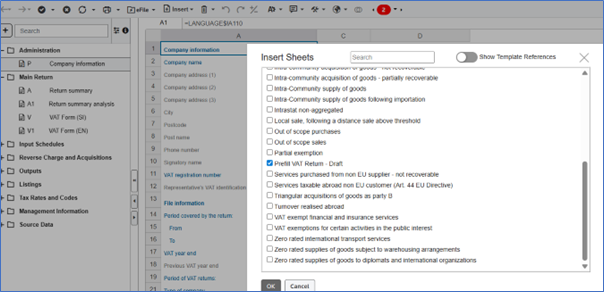
- Once you insert the prefilled VAT return, OIC automatically fills in the following columns for each box:
- Prefill– Displays amounts calculated from the VAT ledgers. This should match the values in the tax authority’s prefilled VAT return.
- OIC VAT Return– Shows figures from the traditional VAT return in OIC (A sheet).
- Difference– Highlights any discrepancies between the 2 previous columns.
- Review difference– Lets the users tick checkboxes to clear errors.
- Review comment– Lets users leave comments after reviewing discrepancies.
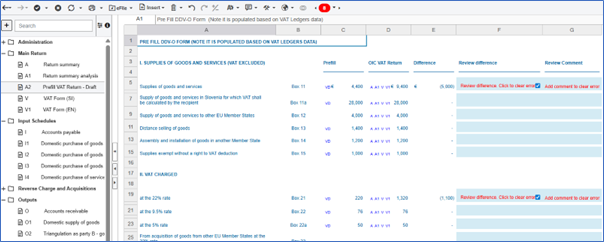
This release marks the introduction of prefilled returns in ONESOURCE. As other country authorities roll out similar requirements—such as Romania later this year—we’ll continue to release new features. We'll enhance the experience based on your feedback and by automating data integration from additional non-ERP sources where relevant.