
R2025.10 | October 2025
Key release highlights
This table gives a gist of the key highlights coming with this release, which solve pertinent business challenges of our customers and ensures an improved customer experience on ONESOURCE Indirect Tax Compliance (OIC) platform.
Business challenge | How OIC can help | Product updates in this release |
|---|---|---|
Tax teams need agile workflows to file their returns and to also ensure the returns are error free for successful filing not to incur any penalties. | Simplify the process involved in filing a return and thereafter verifying the status to ensure valid filing within OIC. | Automated Display of Latest E-Filing Status for NL ESL |
Businesses need tax solutions that are accurate and up-to-date with changing tax regulations across jurisdictions and that are also adept in adopting new legislative changes within the platform. | By staying current with changing legislative requirements and implementing them within the ONESOURCE Indirect Compliance platform. | New version of the Germany VAT return E-Filing |
Legislative updates:
Thomson Reuter's content team are constantly monitoring changes in indirect tax legislation to ensure the latest requirements from the jurisdictions covered are supported in our content.
Romania
: - Following a legislative update the PDF version of the VAT return has been updated to reflect the latest version of D300 VAT form with the newly introduced 21% and 11% rates.
- As part of the legislative updates box 11 was updated to grant manual entry. However, during development, the original formulas in Box 11 were not removed – this has been corrected and the formulas have been deleted.
VAT returns/listings
Czechia ESL
– The 'suma_pln' attribute in the XML output was incorrectly generated as a non-decimal value. This has been corrected to ensure the Amount Totals calculated in the ESL sheets are displayed with a proper decimal formatting in line with the requirements.France
– manual entry will be enabled for box I1 in the return summary to grant adding manual adjustments directly in the return.Italy
– a new tax code has been added to turn on reporting of transactions related to Intra-community acquisitions falling under a 5% tax rate.Malaysia SST
– the tax code metadata has been updated to ensure correct performance of analytics reports using tax codes mappings.Netherlands
– the descriptions of the following tax codes have been updated to remove the reference to 0% since they refer to transactions with any rate other than standard, reduced or zero therefore the inclusion of 0% in the description is not correct. The mapping in the return remains unchanged:- Domestic supply of goodsAR_DOMSPLYGDS_L
- Domestic supply of servicesAR_DOMSPLYSRV_L
Philippines
:- In the new quarterly 2550Q form, a new box has been introduced for transactions: “Box 49A VAT-Exempt Importations.” These transactions should continue to be reported under Box 18M in the monthly 2550M form. Therefore, a mapping for the tax code Import of goods – Exempt has been added to Box 18M of 2550M monthly return.
- Box 38B ('Input Tax Carried Over from Previous Quarter') in the 2550Q VAT return is currently not editable because the amount is automatically carried over from the previous quarter’s database. The field format has been updated to grant data entry, enabling customers to enter data for returns without an automatic roll-forward manually.
Spain VAT return pdf
– updates have been made to ensure the information related to refunds, IBAN, and refund amounts populated in the Return Summary are also reflected in the PDF version of the return under V sheets.E-filing and coverage expansion
Germany VAT return EFiling
- new version of the EFiling schema ERIC 42.3.2.0 has been implemented instead of current version 41.6.2.0.Returns:
Auto adjustment of the column's width on the 'Returns' screen: An enhancement has been implemented in the 'Returns' screen to automatically adjust column widths when data is exported using the 'Export Grid' button. This ensures that exported files maintain optimal readability and formatting consistency.
API updates:
Extending Report's Run Id Storage to Database for Tracking
: The system now persists report run identifiers in the database to facilitate tracking and auditing for the reports, which is generated using the APIs. This change supports enhanced traceability of report executions and aligns with reporting requirements for external stakeholders.API changes in upcoming releases
To improve agility and reliability, we are making enhancements to API processing in future releases of the ONESOURCE Indirect Compliance platform.
Prevention of Import Deletion During Processing
: An upcoming update will introduce a safeguard to prevent deletion of imports that are actively undergoing processing. This enhancement is designed to maintain system stability and avoid conflicts caused by parallel operations.- Planned Behaviour: Deletion attempts via the API will be blocked for imports in any of the following statuses: Importing, File Processed, Validating, Promoting, Promote Successful, Uploading, Deleting.
- Expected API Response:
- When deletion is attempted during these statuses, the API will return:
- HTTP Status Code: 409 Conflict
- Error Code: OIC-API-1014
- Error Message: Import can't be deleted at the moment as it is still in progress.
- Action Required: If your current API automation or processes include deleting imports, you will need to update them to account for this new behaviour. Please ensure that your workflows check the import status and only attempt a deletion when the import is in a completed or final state (for example, successful or failed).
- Availability for Testing: These changes are now available in the UAT environment. Teams interested in testing or experiencing the updated behaviour can contact the support team for assistance
For any further questions or clarifications, please do to reach out to the TR support team.
Failure Handling for Report Batch Jobs via APIGEE Endpoint
: An upcoming enhancement will improve error handling for report batch job creation through APIGEE endpoints. This update ensures that customers receive accurate feedback when the system is unable to queue a report batch job due to backend issues.- Planned Behaviour: When the batch system is isn't available or unable to create a job, the API will return a failure response instead of a misleading runId. This helps prevent false assumptions about job status and ensures transparency in processing.
- Expected API Response: When job creation fails, the API will return:
- HTTP Status Code: 500 Internal Server Error
- runId: "00000000-0000-0000-0000-000000000000"
- Status: Failed
- Reason: "Error queueing request. Try again after sometime"
- Action Required: If current API workflows rely on the presence of a runId to verify job creation, they’ll need to be updated. It is recommended to implement logic that checks for a valid runId and handles failure responses appropriately, including retry mechanisms.
- Availability for Testing: These changes are now available in the UAT environment. Teams interested in testing or experiencing the updated behaviour can contact the support team for assistance.
For any further questions or clarifications, please do to reach out to the TR support team.
Prevention of Report Download During Processing
: An upcoming update will introduce a validation check to prevent downloading reports that are still being generated. This enhancement ensures that only fully processed reports are available for download, improving reliability and reducing errors in automated workflows.- Planned Behaviour: Download attempts via API will be blocked if the report is in any status other than "Ready".
- Expected API Response: When a download is attempted while the report is still processing, the API will return:
- HTTP Status Code: 409 Conflict
- Error Code: OIC-API-4009
- Error Message: Report can't be downloaded as it is currently being generated. Please wait for the report to reach 'Ready' status before downloading it.
- Action Required:If current API automation or workflows include downloading reports based on fixed timeouts, they need to be updated to check the report status before initiating a download. Implement retry logic to handle the 409 Conflict response and ensure downloads are only attempted when the report status is "Ready".
- Availability for Testing: These changes are now available in the UAT environment. Teams interested in testing or experiencing the updated behaviour can contact the support team for assistance.
For any further questions or clarifications, please do to reach out to the TR support team.
Imports:
Advanced Import
- Advanced import lets customers import non-transactional data directly to the revenues, expenses, and other adjustments sheets for Australia GAT and GST templates respectively. This functionality has been enhanced further to simplify the import process by adding a ‘Date format’ field. This field is now mandatory in Advanced Import flow. The selected format from the dropdown is saved in the import specification for future imports to prevent locale-related date failures.note
If you encounter issues with an existing import specification, edit the specification and add a date format for the Reporting Date column.
Other updates:
Introduction of 'DistributionType' Field for Transaction Categorization
A new transactional field, DistributionType, has been introduced to enhance transaction classification within the OIC platform. This update supports categorization of transactions as B2B, B2C, or B2G, aligning with regulatory compliance and business reporting requirements.
Key Enhancements
:- New Field Added:
- DistributionTypeis now available under theTransactions import type.
- Acceptable values: B2B, B2C, B2G.
- Default Logic:
- If no value is imported, DistributionType defaults to B2B.
- If a valid value (B2B, B2C or B2G) is imported, it will override the default and be prioritized accordingly.
- Field Visibility Update:
- Legacy fields B2B, B2C, and B2G have been deprecated and are no longer visible on the Transactional Fields page.
Automated Display of Latest E-Filing Status for NL ESL
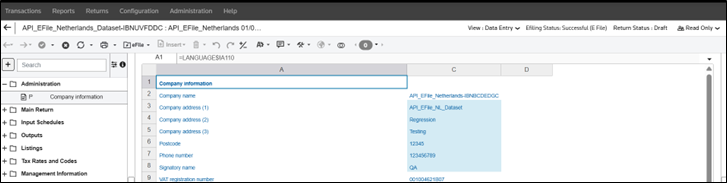
: Previously, in the Netherlands e-filing workflow, customers were required to relaunch the wizard and manually select the “Check Status” option to view updated submission statuses. This additional step impacted the overall customer experience. With the recent enhancement, the ESL e-filing wizard now automatically presents the latest submission status immediately following the filing action, removing the need for manual intervention. However, for customers who would want to verify the status again at a later point in time, the ‘check status’ option will still be available. This improvement streamlines the process, reduces manual effort, and provides customers with direct, real-time access to status updates, significantly enhancing efficiency and usability.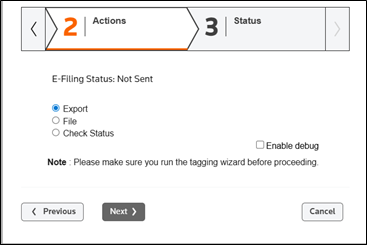
Enhanced SII Notification
: ONESOURCE Notifications, introduced in earlier releases, provide email alerts for errors in Spanish SII submissions. When an automated submission fails, customers receive an email to their registered email address prompting them to sign in and resolve the issue. The feature has now been enhanced to include a direct hyperlink in the email, which takes customers to the appropriate environment's sign in page and, after authentication, redirects them to the SII Errors page for immediate review and resolution.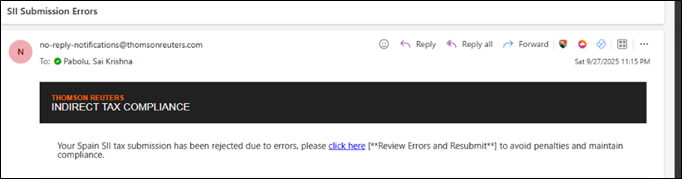
Increased character limit for Supply Type Code in Configuration
: The character limit for the "Supply Type Code" field under Configuration → Mappings → Supply Type Map has been increased to support values up to 150 characters. This update enables compatibility with external systems that require longer supply type identifiers.Resolved Inconsistency in Entity Access Permissions in the Application
: An issue was identified where entities configured with write permissions in Administrator were appearing with read-only access within the ONESOURCE Indirect Tax application. This discrepancy was caused by misalignment in the synchronization logic between the Administrator and the application's access control framework. The implementation has been corrected to ensure that permission mappings from Administrator are accurately reflected in the application interface.Update to Malaysia SST ACC templates
: The Malaysia SST ACC templates namely – Malaysia VAT single and Malaysia VAT group templates will be made isn't available to access or add license for new onboarded ONESOURCE Indirect Compliance customers as new Malaysia standard templates have been released in September namely(Malaysia SST Single and Malaysia SST Group). The new Malaysia SST templates should be used by new customers to add licenses and create returns. However, current customers who are actively using the Malaysia ACC templates can continue using old templates or add licenses for new SST templates. Further, during auto roll-forward: If the original return was created using an old VAT template, the new return is automatically created using the same old template.
Known issues
Inconsistencies observed in ‘Reset Permissions’ functionality:
There is a known issue with the Reset
button on the User Access Permission
screen. When used, it doesn’t allow direct reassignment of the permissions as expected. Following are the recommended workarounds(interim) to ensure the correct permissions are applied. However, this issue is currently being worked upon and will be addressed in an upcoming release. 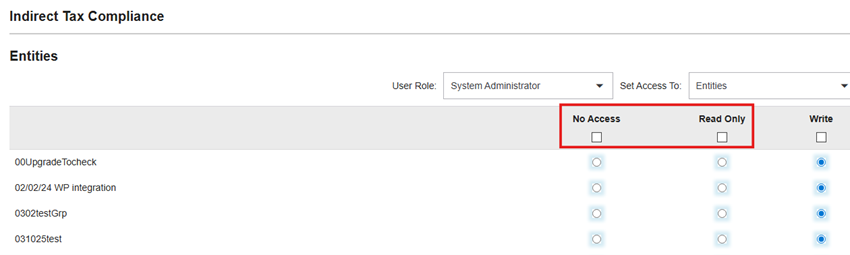
Workaround
: To grant the required permission, please select the appropriate checkbox at the header level
. If you encounter issues with direct selection at the header level, follow these steps:To grant read only permission to all entities:
- SelectNo AccessorWritefrom theheader-level permissions.
- Save the permissions.
- Go back to the same screen.
- SelectRead Only.
Use similar steps to grant either
No Access
or Write
permissions.Content template versions
VAT3CZ16_8_422_TPL.XML
VAT3CZGRP16_8_261_TPL.XML
VAT3ES15_11_541_TPL.xml
VAT3ESGRP15_11_371_TPL.xml
VAT3FR15_10_269_TPL.xml
VAT3IT16_8_235_tpl.xml
VAT3ITGRP16_8_159_tpl.xml
VAT3MY2501_1_9_TPL.XML
VAT3MYGRP2501_1_9_TPL.XML
VAT3PH11_4_50_TPL.XML
VAT3RO16_7_532_TPL.XML
VAT3ROGRP16_7_322_TPL.XML