
R2026.09 | September 3, 2026
Release information
Release:
R2026.09Release date:
3 September 2026Release highlights
Issue | Solution | Benefit |
|---|---|---|
When preparing Italian VAT returns across monthly, quarterly and annual periods, data was pulled backwards from the annual return into the quarter 4 return because both shared the same end date. This introduced an unwanted column on the "Monthly return summary" sheet in the quarter 4 return and unwanted transfer of transactional adjustments from the annual return to quarter 4 return. | Consolidation now follows a one-way upward hierarchy: monthly data consolidates into quarterly and annual returns, and quarterly data consolidates into annual returns, with no backward flow from annual to quarter 4. This protects data integrity and supports accurate, automated processing of Italian VAT returns. | Accurate multi-period consolidation for Italy VAT returns, enforcing the correct consolidation direction and preventing double-counted adjustments. |
Tax teams working on SAF-T validation need succinct errors referencing source of discrepancy to correct the information at the source. | Validation messages have been redesigned to use plain business language, pinpoint the affected section and field, and guide users directly to the right place in the system to make the correction, reducing the time and effort needed to resolve issues. | Clearer, action-oriented SAF-T validation messages applied across all SAF-T validation scenarios. |
Users configuring special method calculations in the UAE Partial Exemption worksheets had limited control over how the required special method output was presented. | Users can now select the format required for the special method option when Special Method is chosen as the Type of Attribution, giving greater flexibility directly within the affected worksheets. | Format selection for the special method option across the UAE Partial Exemption, Annual Adjustment for Year Ended, and Partial Exemption – Consolidation worksheets. |
VAT returns and listings
Poland VAT Import Details and Tax Code Configuration
: An enhancement has been introduced to support e‑invoicing scope attributes associated with VAT tax codes within the Poland VAT configuration. These attributes are now available during data import and are automatically populated based on the tax code setup. 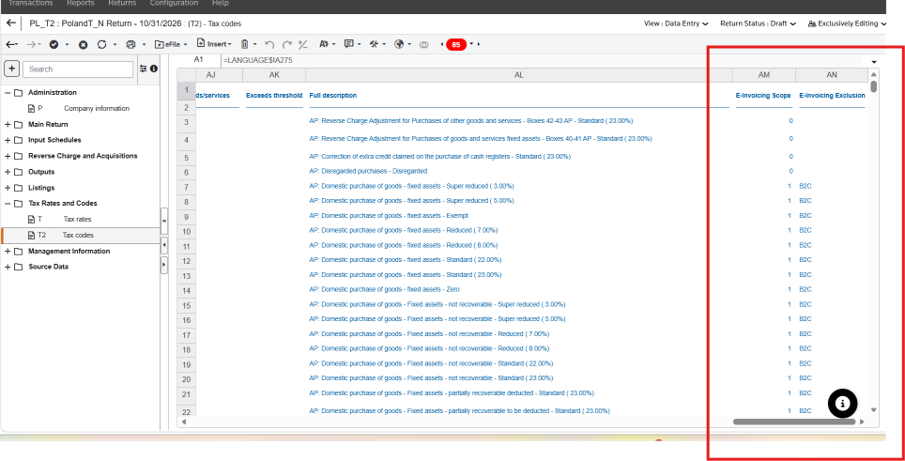
Portugal VAT Return:
Box 7, which relates to "Transmissões intracomunitárias de bens e prestações de serviços mencionadas nas declarações recapitulativas", is now automatically rounded to a whole-euro value prior to XML generation. This update ensures that the generated filing output fully complies with the Portuguese Tax Authority validation rule Z46. As a result, clients are no longer required to manually adjust Box 7 values containing decimal places before submission, providing a more accurate and streamlined filing process.Turkey VAT Return:
Boxes covering "510.Transaction type - Re-invoicing of Expenses Not Incurred by the Taxpayer" have been added to 1015A Return sheets. They are manual entry boxes 2.3.10.1-2.3.10.4. They are in Block C: Other Transactions section. Formulae in boxes 2.3.0.3 and 2.3.0.2 have been updated to accommodate the new boxes.Additionally, the formula in box 3.3.0.4 has been corrected.
Turkey Other Adjustments (S3) sheet:
Other Adjustments (S3) sheet included to support the VAT return. This sheet supports manual adjustment boxes and manual return boxes on the Return Summary Analysis sheet. This allows users to import and report on multiple adjustments for each of these boxes on the return.United Arab Emirates:
An enhancement has been introduced to the Partial Exemption, Annual Adjustment for Year Ended, and Partial Exemption – Consolidation worksheets. Users can now select the Format required for special method option when Special Method is chosen as the Type of Attribution in the relevant worksheets. This update provides greater flexibility when configuring special method calculations and improves the user experience by enabling the selection of the appropriate reporting format directly within the affected worksheets.SAF-T
JPK_CIT_ST_KR & JPK_CIT_KR_PD — Reason for Submission Displayed in Report Output
An issue that caused the Reason for Submission (CelZlozenia) to be missing or displayed incorrectly in the
JPK_CIT_ST_KR
and JPK_CIT_KR_PD
report outputs has been resolved. The output now accurately reflects the value entered in the report parameters.SAF-T Validation Messages — Clearer, Action-Oriented Error Guidance
SAF-T validation messages have been redesigned to make it easier for users to understand what needs attention and how to resolve it. Previously, errors appeared as raw technical output referencing schema line numbers, namespaces and data type constraints, leaving users to interpret what went wrong and where to act. Messages now speak in plain business terms, pinpoint the affected section and field, and guide users directly to the right place in the system to make the correction, reducing the time and effort needed to work through validation outcomes and keep reporting on track.
This improvement applies across SAF-T validation scenarios as part of our ongoing commitment to making the reporting experience as intuitive and efficient as possible.
ONESOURCE Touchless Compliance AI
ONESOURCE Indirect Compliance powered by CoCounsel is now available, which streamlines tax compliance through AI-driven exception resolution, e-invoicing reconciliation, and strong human-in-the-loop controls. ONESOURCE Indirect Compliance powered by CoCounsel extends the approach launched for US and Canada with the ONESOURCE Sales and Use CoCounsel tool to global indirect tax reporting, by automating the preparation of VAT returns and VAT listings across multiple countries and regimes. It brings together ONESOURCE Indirect Compliance, ONESOURCE Pagero E-invoicing, and ONESOURCE Reconciliations into a single coordinated workflow, to help customers generate ready to review returns and filings for indirect tax compliance. OIC CoCounsel is now live in production.
For enablement or more information, please contact the Thomson Reuters support team or your account manager.
UX Enhancements:
AI Workflow Tracking Dashboard
- access an overview of your compliance operations and complete AI workflows with the new OIC CoCounsel landing page.CoCounsel Task Review Dashboard
- have complete oversight of all actions completed by OIC CoCounsel Agents and utilize Human in The Loop workflows to approve or override any AI decisions.Compliance Control Panel
- manage your AI workflows for each jurisdiction and configure the AI activity to match your process needs.Embedded E-invoicing Reconciliations
– leverage the ONESOURCE reconciliation tool to automatically cross-validate your data imported to ONESOURCE Indirect Compliance against Pagero e-invoices, with advanced customization and compatibility with 3rd party e-invoicing tools and other sources scheduled for H2 2026. Initial Scope for AI workflows and scenarios:
Capabilities in scope for all supported jurisdictions:
- Data quality
- Unmapped tax code
- Tax Rate Discrepancy
- GL reconciliation
- Exception reports (duplicate invoice, gross amount, invoice-date mismatch, tax-only, zero-value tax)
- Automated box number report
- Return error summarisation
- E-file and exports (within CoCounsel)
Capabilities with jurisdiction-specific scope:
- E-invoice reconciliation — In scope for Italy and Spain. Runs with country-specific logic for Poland and Romania. Not applicable for the UK or Australia.
- Tax ID — VAT/GST ID format check — In scope across EU jurisdictions.
- Tax ID — VIES validation (EU) — In scope across EU jurisdictions.
- Tax ID — ABN validation — Applies to Australia only.
- RO VAT prefill — Applies to Romania only.
Returns
Accurate Multi-Period Consolidation for Italy VAT Returns:
This affects clients that create monthly, quarterly and annual returns in OIC.
Italy VAT return consolidation now follows a one-way upward hierarchy: monthly data consolidates into quarterly and annual returns, and quarterly data consolidates into annual returns.
Data no longer flows backwards from the annual return into shorter periods. Previously, because quarter 4 and annual returns shared the same end date, data from the annual return was pulled into the quarter 4 return. This introduced an unwanted column on the “Monthly return summary” sheet in the quarter 4 return. It also meant that transactional adjustments on the “Manual upload data” and “Adjustments Summary” sheet in the annual return transferred to the “Manual upload data” sheet in the quarter 4 return.
After the update the unwanted column will not appear on “Monthly return summary” sheet in the quarter 4 return and transactional adjustments will not flow from the annual return to the quarter 4 return. This update enforces the correct consolidation direction, protects data integrity, prevents double-counting of manual adjustments, and supports accurate, automated processing of Italian VAT returns.
Other updates
Enhanced Net Tax Position Over Time Report
: The report now includes additional columns, providing a broader, consolidated view of tax outcomes across entities and reporting periods:- Entity name
- Period
- Currency
- VAT position
View Transactions: Column arrangement retained per user across imports of the same type
Column arrangement settings are now saved at the user level, ensuring a consistent and personalised experience across all imports of the same type. Once a user configures a column order for an import type, the same arrangement is automatically applied whenever they access any other import within that type — including across sessions after logging out and back in. Settings are stored individually per user, meaning each user maintains their own column configuration without affecting the view of others. Any saved arrangement can be reset to default at any time using the reset view settings option.
Content template versions
VAT3AE17_6_172_TPL.xml
VAT3AEGRP17_6_126_TPL.xml
VAT3PL16_12_313_TPL.xml
VAT3PLGRP16_9_176_TPL.xml
VAT3PT15_10_338_TPL.XML
VAT3PTGRP15_10_230_TPL.XML
VAT3TR11_11_275_TPL.xml
VAT3TRGRP11_11_201_TPL.xml