
Partial exemption
Depending on the nature of your business, you may have limitations on the deduction of input VAT. ONESOURCE provides partial exemption schedules to help you calculate the amount of input VAT that you can recover.
The partial exemption schedules can be inserted from the
Insert
menu on the Input schedules page. Inserting the partial exemption schedule (C) automatically inserts the annual partial exemption schedule (C1) and partial exemption summary schedule (C2). The annual partial exemption schedule allows for automatic recalculation of input VAT and recoverability at the end of the VAT year for the company, based on the information entered for each quarter/month. The partial exemption summary schedule is a summary of input tax by supply types and calculates the irrecoverable VAT by tax codes.Partial exemption calculations (C)
At the top of the C schedule are several settings:
Setting | Description |
|---|---|
Is this a member of a group or sector? | This is set to Yes automatically if the file is linked to a group file. |
Sector Head (Calculate the attribution Percentage) | If you want to calculate the attribution per cent for the group sector in the current entity, select Yes . Otherwise, select No . |
Type of attribution | Select the attribution type. The available attribution types are Standard (recoverability based on taxable supplies/total supplies) or Special . The special methods included are:
|
Rounding | You can select the rounding method for attribution percentage for jurisdiction, which allows users to have different rounding options. |
Once set, these settings remain for the next period, but can always be changed if circumstances change.
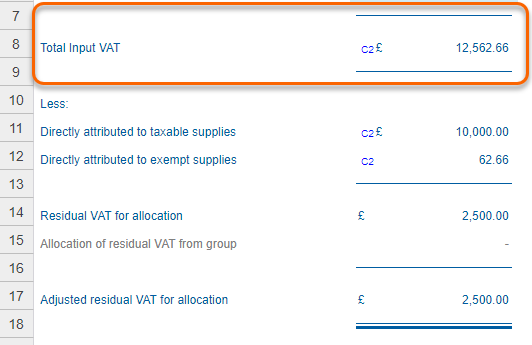
Residual VAT for Allocation
When you insert the partial exemption schedule,
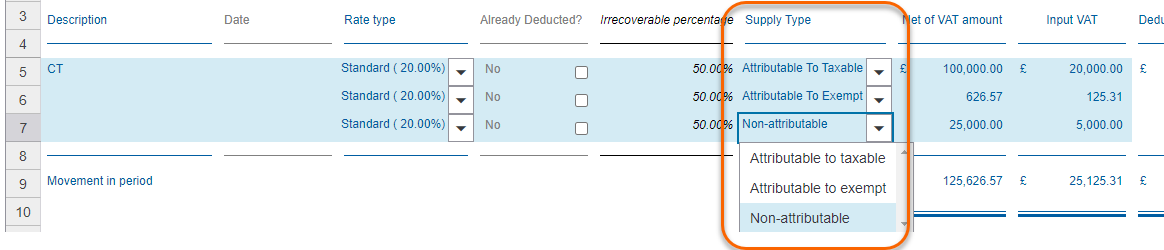
Supply Type
selectors appear on all input schedules. Using the Supply Type
selectors, you can select whether a transaction is:- Attributable to taxable
- Attributable to exempt
- Non-attributable
Input VAT is then automatically aggregated on the C and C2 schedule based on attribution.
Attribution Percentage
The attribution percentage can be calculated by using either standard or special method.
- The standard method is used to calculate how much of residual input tax is attributable to taxable supplies, and therefore recoverable. If you selected theStandard Methodsetting at the top of the page, the attribution percentage will be automatically calculated based on the amount of taxable supplies and exempt supplies. It will automatically deduct disregarded supplies and outside-of-scope supplies from total supplies.
- A special method is any calculation, other than the standard method, that enables the calculation of how much input tax may be recovered. It only allow you to recover the input tax on purchases to the extent that you use these purchases to make taxable rather than exempt supplies. Some examples are floor area, staff numbers, and costs allocations.
De minimis rules apply when the total value of input tax related to exempt supply is not more than a certain amount on average/tax period. In this case the total input tax is attributable as taxable input tax. If de minimus rules apply (for relevant jurisdictions), select
Yes
from the dropdown from the selector De minimus rules apply
and the calculation will be adjusted.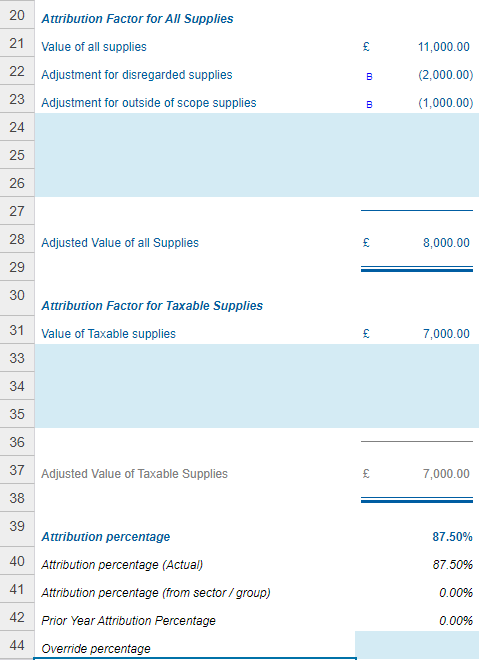
You can enter an override percentage (if, for example you have agreed a percentage with the tax authorities). This will then override the automatic calculation. You can select to carry forward the override percentage in the 'P' schedule.
Total recoverable VAT
Based on the calculation of non-attributable VAT and attribution percentage, ONESOURCE Indirect Tax Compliance will thereafter allocate non-attributable VAT to recoverable and irrecoverable VAT.
The partial exemption adjustments will be automatically posted to the A1 schedule.
Annual partial exemption adjustments (C1)
At the end of the year, the attribution percentage is recalculated using the figures for the whole year. Any difference between the amount of recoverable input tax as a result of the annual period calculation and the total amount that is provisionally claimed per submitted returns is adjusted in the return. You can select to report annual adjustment in final period of the year or the first period of next year if applicable.
Prior year attribution percentage can be carried forward if
Carry forward partial exemption annual adjustment percentage?
in the 'P' schedule is selected. This percentage can be overridden manually by using the memo at the bottom of the 'C' sheet.Partial exemption summary (C2)
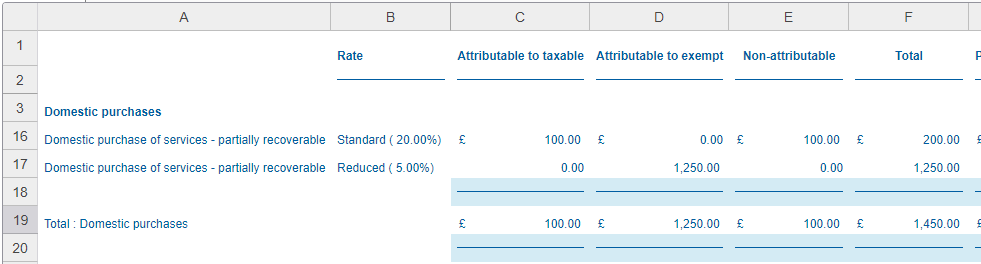
The partial exemption summary calculates irrecoverable VAT on a tax code basis. The annual adjustment by tax codes is also available on this schedule. The amounts in C2 are distributed between the columns based on the ‘supply type’ choice made for each transaction in I schedules. For countries with multiple return boxes for input tax, adjustments will be posted to relevant boxes.
Group partial exemption settings
If you have a group, partial exemption calculations from the single entities are automatically included on the group partial exemption – consolidation schedule 'C', depending on settings chosen on the partial exemption schedule in the single entity. You can insert this schedule in the group file.
Depending on settings chosen in the group file and each of the single entities, partial exemption adjustments can be calculated in the group based on total sales/attributability for the group as a whole.
- If you choose the optionSector Head (Calculate Attribution Percentage), the effective percentage in that calculation will be pushed down to and applied in theAttribution percentage (from sector / group)field of all child calculations.
- If, for a group of companies theSector Head (calculate Attribution Percentage)is not checked in any company, the percentage calculated on the top company will be pushed down to all companies below. Therefore, if you want the percentage to be calculated at the single entity, and for the single entities not to pull the percentage down from their parent entities, checkSector Head (calculate Attribution Percentage)in the single entities.
- If a calculation has aPrior Year Percentageand anAttribution percentage (from sector/group)pulled from its parent entity calculation, theAttribution percentage (from sector/group)takes priority.
The annual partial exemption schedule is also present in group and will be automatically calculated in the same way as for single entities.