
Adjustments - Credit Notes and Invoices
The
Adjustment
flag in the return analysis sheets is used to adjust from invoices to credit notes and vice versa.The adjustment will be automatically checked if the functionality to adjust invoices or credit notes is set at the tax code level in the tax code mappings, with expected behaviour as follows:
- Adjust Invoices: Transactions with a negative sign will be treated as credit note adjustments in the workbook and are aggregated on theCredit Noteline in the summary.
- Adjust Credit Notes: Transactions with a positive sign will be treated as invoice adjustments in the workbook and are aggregated on theInvoiceline in the summary.
Adjustments Based on Invoice Type Presentation in a Return
Invoice type (Invoice & Credit Note) lines appear in two different rows in the return for each invoice type. When the
Adjustment
box to the right of a row is checked, the value is treated as an adjustment.Amounts are aggregated in the summary section according to their invoice type.
In this example the
Adjustment
box is checked for AP_CN_adj
and AP_INV_adj
.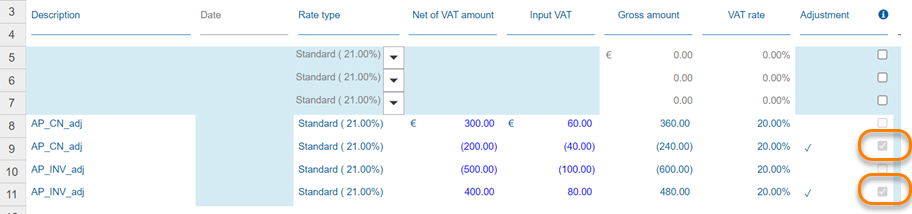
- LineAP_CN_adjwith theAdjustmentbox checked is absorbed with invoices in the summary.
- LineAP_INV_adjwith theAdjustmentbox checked is absorbed with credit notes in the summary.
note
In some jurisdictions the invoice type adjustment influences how the values are reflected in the return, depending on country-specific requirements. Transactions can be reported differently in the Return Summary, depending on whether a transaction is considered as an invoice or credit note in the workbook regardless of its sign or the invoice type assigned during import.
Invoice Type Adjustment using Invoice Type Override
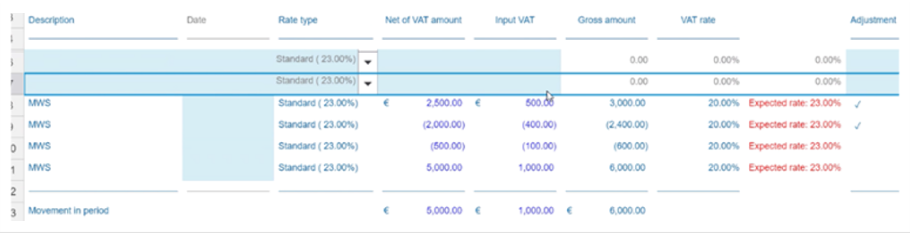
The same outcome in the return occurs when invoice type overrides are used in the import specification to treat negative amounts as INV and positive amounts as CNs instead of being set for each tax code individually. The data is aggregated into up to four rows per tax code, as defined below:
- Positive value, INV
- Negative value, INV (Adj flag ticked)
- Negative value, CN
- Positive value, CN (Adj flag ticked)
In the following example, CN and INV with adjusted invoices configured for this code are displayed in separate rows.
Related Content
-
Adjustments
Format: Article,
1 min read
Article,
1 min read