
Determination setup for SAP
Tax Code Qualifier Configuration
SAP Tax Code Setup
Before we get into the configuration details there are prerequisite steps that must be completed prior to this process. They include:
- Analysis and documentation of your tax policy needs for a given country configuration.
- Identify the list of needed tax code and account keys required. This is often an exercise in reverse engineering as we recommend that you look first at what will be required for your compliance reporting needs and where specific tax code and tax type breakouts may be needed to get the data summarized into the correct “buckets” for the specific country’s reporting. This may also need to take into consideration your company structure, sales and purchasing models, tax exempt situations, shipping methods, tax laws, etc.
- Decide on other needed tax codes for items such as separate tax codes to be used for override transactions, fallback tax codes, and driver tax code.
- Create the needed tax codes and account keys in SAP.
- Create your G/L accounts that you want to use for the tax code account assignments. Consider that this step may also be a reverse engineering exercise to identify required accounts for better reconciliation needs and prerequisites to easier compliance reporting.
Tax Code Concepts
One of the key designs of Integration for SAP is the assignment of a Results Tax Code in SAP based on the Determination tax calculation. Instead of using SAP’s standard process of a tax code having a fixed rate, we will instead setup SAP tax codes without a rate maintained on them. This will eliminate the need for creating new tax codes in SAP each time a tax rate changes, greatly simplifying system maintenance and user training. Once Determination returns the tax results, including the rate, we will use that results structure to update SAP with the proper tax code, account key, and other tax details.

The ERP Tax Code is repopulated as the final SAP Tax Code and Account Assignment key through our standard mapping table and code. SAP then uses this information to establish the correct general ledger account to be used for the GL accounting document. For an overview of the process see the User Guide -> New logic for the assignment of General Ledger Accounts.
Driver Tax Codes
We recommend that you setup tax code O1 as the driver tax code for output tax on sales orders, I1 as the driver tax code on input tax on purchases, and if you are configuring for US tax, the U1 tax code for self-accrued consumer use tax. These three tax codes are not used in the account assignment table T030K. They are used during the initial document creation process and can either be assigned using condition records, info records, or manually. The sole purpose of this set of tax codes is to initiate the tax call to Determination. These tax codes don’t have to be mapped in T030K to a General Ledger account.
Results Tax Codes
These are tax codes which are maintained in SAP for posting to General Ledger accounts and downstream processes like reporting and compliance. These tax codes are setup without a tax rate in SAP. At time of the tax calculation Determination will assign an ERP_TAX_CODE based on the results of the Tax Code Qualifier evaluation back to SAP. Integration then takes the ERP_TAX_CODE value and assigns it to the SAP transaction by overriding the driver tax code with the results tax code and account key.
Fallback Tax Codes
The process of driving a tax calculation to the final tax code and account key assignment involves the standard setup in SAP of tax codes, account assignment keys, general ledger accounts, and the account assignment table as well as the Tax Code Qualifier process in Determination. If any side of the needed configuration is missing, you will likely get an error message and an incomplete document that will not post correctly to accounting halting your business process. To avoid a possible error due to a missing or incorrect setup we recommend the use of a fallback tax code. A fallback TCQ would be at the bottom of the sort order as an assignment of last resort if none of the other TCQ assignments apply. It would allow the entry to post to a temporary account assignment rather than block the transaction. This logic is purely optional and one that you may or may not choose to use in your configuration.
If a fallback account is created and assigned to the fallback TCQ then procedures should be established to ensure that you are monitoring this account to correct entries that may fall to this default setting. To set this up for your system you will need to:
- Create a new tax liability account on the G/L for fall back posting to account assignment.
- Create both a fallback input tax code and a fallback output tax code.
- Add table entries to the T030K account assignment table based on the account key and tax code.
- Setup TCQ to drive the transaction to the new account.
Special Note on Assigning Tax Codes
For US and Canada TCQ and tax code assignments, users may encounter error number FF-753 in situations where multiple tax codes are assigned to a single line-item. This can occur when one authority is exempt (AO) and other are taxed (A1), or in Canada where we have GST (A1) and PST (A2). This is discussed in OSS note 495737. When error message FF-753 is set to error mixing of tax codes on the same line isn't possible. If you encounter this issue and elect to not change FF-753 per this OSS note then different TQC and tax code assignment logic is needed that allows for the tax code to be the same but instead creating additional account assignment codes for your tax authority assignments. Two optional templates are available via the ONESOURCE Indirect Tax and Compliance Support website for use in this situation for both US and Canada. Knowledge Base article “Setting up Tax Code Qualifiers in Determination for Global Next Integrations” provides details and samples on this.
Tax Code Qualifier Examples
Once you have completed above steps, you are now ready to tie it all together from end to end by configuring your Tax Code Qualifiers (TCQ) in Determination. Please consult the Determination Online Help to familiarize yourself with the TCQ feature and function.
The following information is an example of how you might want to configure the Tax Code Qualifiers for a Great Britain company code. This is provided as a possible tool for set up of your system for GB and other countries but your configuration may be different according to your needs.
Basic Setup
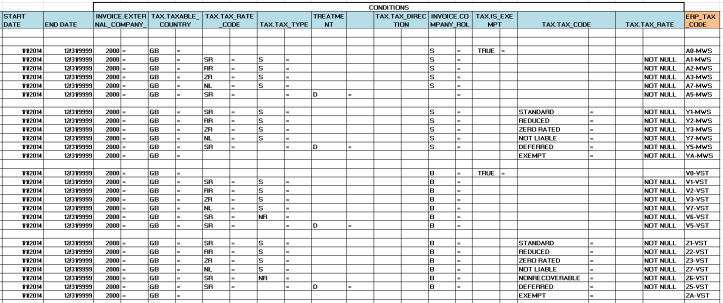
For the below sample the assumption has been made that the tax code should drive the rate and the tax treatment should be reflected in the account assignment key. Thereby a V1 is standard rate, V2 reduced rate etc. In this sample the “A” tax codes are output tax, the “Y” tax codes are used as override output tax codes. The “V” tax codes are input tax and the “Z” tax codes are used as override input tax codes. These are the single direction tax code assignments as opposed to those that require both an ‘I’ and ‘O’ direction like reverse charge, acquisition etc.
Multiple Tax Directions
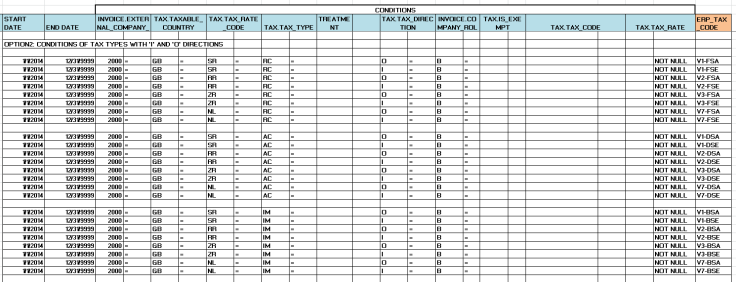
For situations where both an Input (I) and Output (O) direction are needed:
Option 1:
This option assumes that the tax code is designating the tax treatment and not the tax rate.

Option 2:
This option assumes that the tax code is designating the tax rate and not the tax treatment.
Default Tax Code Sample
The set below is used for fallback scenario and are recommended to always include at the very bottom of the sort order as a catch. The tax code can be mapped in SAP to a fallback account to be reviewed regularly by the tax administrator for analysis and correction.

Download Samples
You can download samples of exported Tax Code Qualifiers provide by Thomson Reuters from the ONESOURCE Support Network, Knowledge Base Setting up Tax Code Qualifiers in Determination for Global Next Integrations.
Cash Discount at the Time of Payment: Additional Tax Code Qualifiers Needed
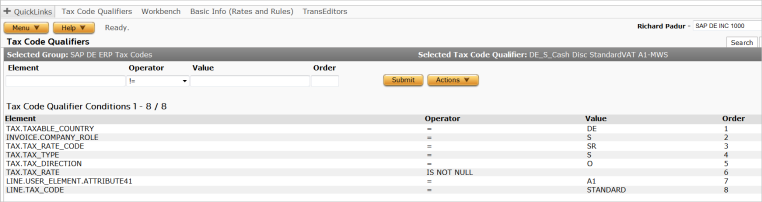
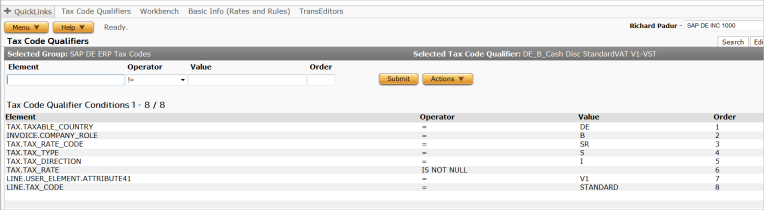
If you are using cash discounts at time of payment on any of your country configuration in SAP then you will need to address this step. Tax code qualifiers will need to be replicated in the TCQ table so that a “standard” Determination tax code condition with attribute 46 condition at the line level of “A1” would drive to an ERP Tax Code of A1-MWS. Likewise, the Attribute 46 of Y1 would drive to ERP tax code of Y1-MWS. You would need to set up an additional TCQ for each entry in the cash discount adjustment table. Each TCQ would be a mirror or your original but would have the additional conditions of tax_line_attribute41 = XX where XX would be the original tax code. It would also have a condition for the Determination tax code as it is used in the override tax code instructions. An example is shown below.
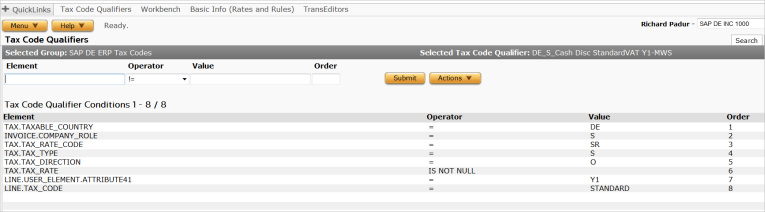
Special note: The sort order of the TCQ list is important to correct assignment. Cash discount adjustment TCQ’s should be higher in the list than their non-cash discount counterparts. Likewise, the override version needs to be listed before the non-override. An example of the correct order is shown below:
Position 1: Cash Discount Override Y1 TCQ
Position 2: Cash Discount A1 TCQ
Position 3: Override Y1 TCQ
Position 4: A1 TCQ
Maintaining Zone Aliases
You may need region codes for countries that tax at levels below country level. ONESOURCE Indirect Tax has enhanced its international tax data to include additional codes (2-digit, 3-digit, ISO) where appropriate.
In many cases, our codes do not match the codes maintained in SAP. For example, Indian state codes are numeric in SAP (for example, 22 = Tamil Nadu) whereas in ONESOURCE Indirect Tax the same one has a code of TN. Therefore, when SAP sends state code 22 to Integration for address determination, it does not match the zone maintained in Determination.
ONESOURCE Indirect Tax enables you to map codes maintained by the ERP system to those maintained in the Determination using the Zone Alias feature.
Zones for Mismatched Determination and SAP Codes
Identify zones for which Determination codes do not match SAP codes. The region codes for India, Argentina, and several other countries do not match the state/province codes in Determination.
Identify Region Codes in SAP
- To display region codes for countries in SAP, navigate to:
- Transaction:SPROnavigate toSAP NetWeaver > General Settings >Insert Regions.
- The images show a portion of the region codes for the countries India and Argentina.
- Locate the region codes you need to map to Determination and write them down.
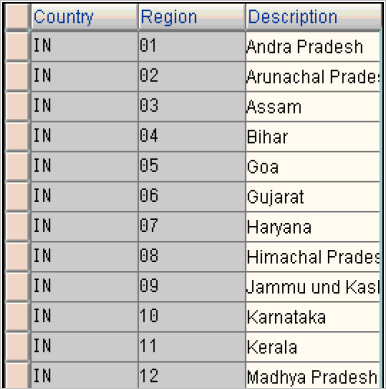
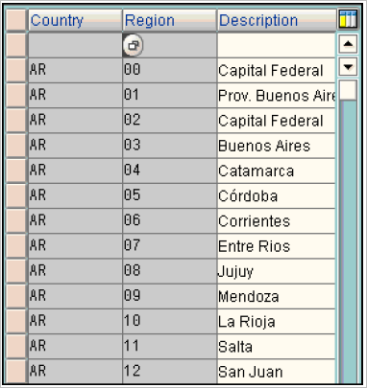
In this example, India Region Codes are shown on the left and Argentina Region Codes on the right.
Set Address Validation Configuration Parameters
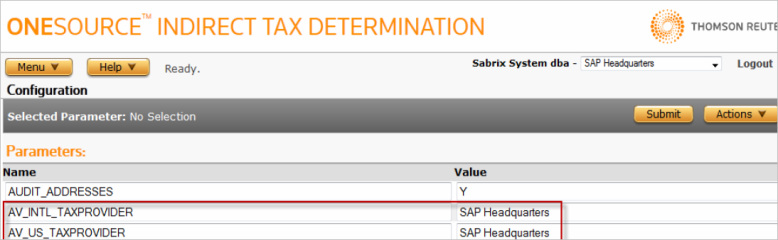
- Log into the Determination and navigate toSystem > CONFIGURATION.
- Change companies to the parent company in your Determination hierarchy. Select the company from the drop-down list in the upper right-hand corner of the page. In the example below, the example parent company is SAP Headquarters.
- Set the parameters AV_INTL_TAXPROVIDER and AV_US_TAXPROVIDER parameters to the selected company and selectSubmit.
Create Zone Aliases
1. Navigate to
Tax Data > Zones
.2. Search for and select a country to create an alias (for example, Argentina).
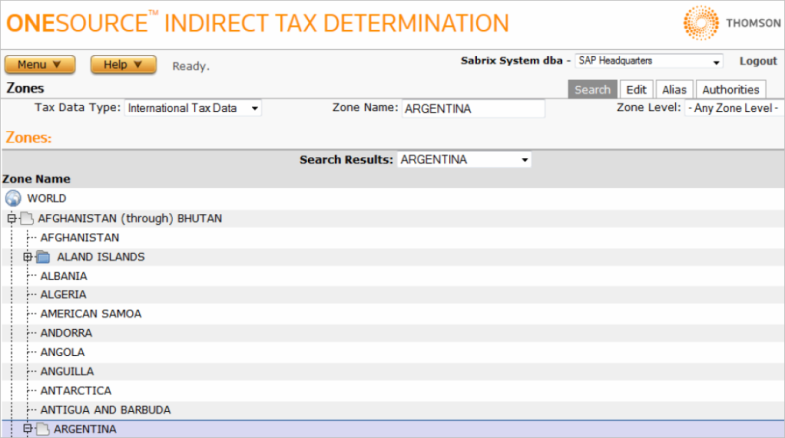
3. Once the desired country is selected, select the Alias tab.
4. Enter the desired aliases and select
Submit
. For example, you might create the following aliases in Argentina:
Alias represents the code maintained in SAP. Value represents the name maintained in the Determination Zone Tree. In the example above, the selected Zone is Argentina. Always configure aliases at the Country level and apply each alias at the Province level.