
New notification queue screen
The
New Notifications Queue
screen gives administrators a central place to track background processes in ONESOURCE Administration.The
New Notifications Queue
screen improves visibility into long-running operations by displaying their progress, results, and any associated errors in 1 place. 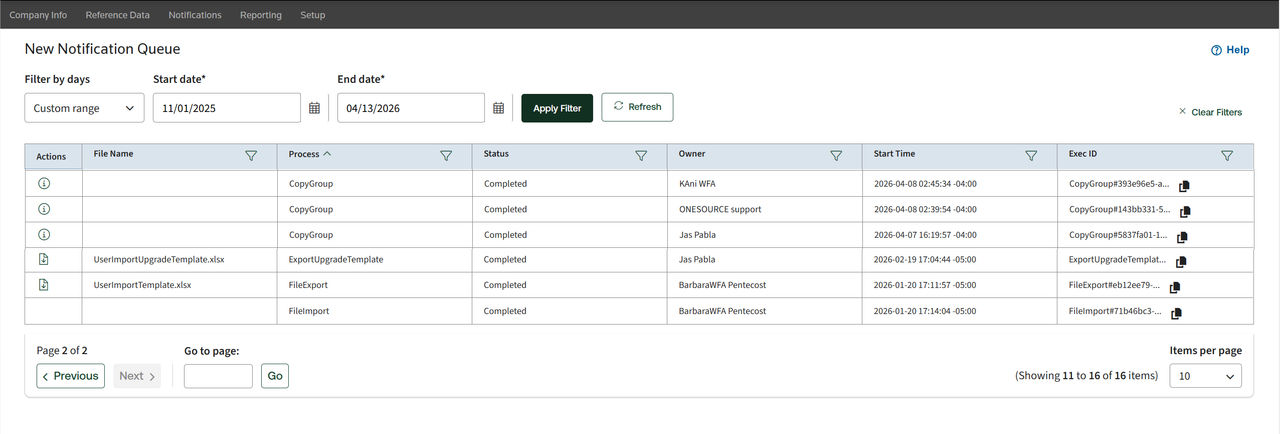
Common activities that the
New Notifications Queue
tracks include: - User imports and exports
- Copy Group operations
- Report exports
Column descriptions
Column name | Description |
|---|---|
Actions | Lists the available actions for the record, such as viewing additional details or downloading output files. |
File Name | Displays the name of the file associated with the process (for example, an import or export file). This field may be blank for processes that don’t involve a file, such as Copy Group . |
Process | Identifies the type of operation being performed, such as CopyGroup , FileExport , or User Import . |
Status | Current or final state of the process: Pending , In Progress , Completed , or Failed . |
Owner | User or system account that initiated the process. |
Start Time | Shows when the process began, using the tenant's local time zone. |
Exec ID | Provides a unique identifier for the process execution. Support teams can use this ID for troubleshooting. |