
How single sign-on works
Instead of browsing directly to a Thomson Reuters application, you go to a URL on your own network. Your servers host this URL, configured specifically for the single sign-on connection from your network to ours.
You directly access this custom URL (for example, through a Favorites link) or via a link in your internal web portal. Your network security authenticates your sign-in because the URL is running on your servers. Your browser then automatically redirects to the Thomson Reuters PingFederate single sign-on server, where the protocol transaction happens.
Finally, the system redirects your browser into the specific Thomson Reuters application (such as Checkpoint or the ONESOURCE Platform). This happens quickly as each server hands the browser off to the next server in the process.
The following diagram visually illustrates the process:
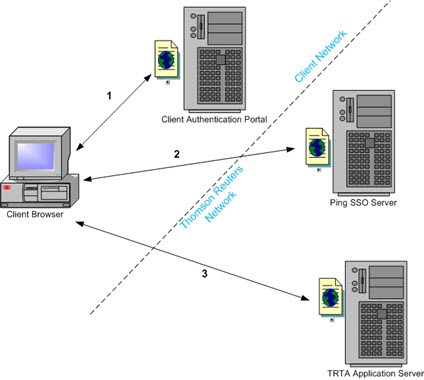
Step 1:
Go to a URL on your corporate network that authenticates using whatever technology your network supports.Step 2:
After authenticating, the authentication portal posts a SAML assertion back to the Thomson Reuters PingFederate single sign-on server where it validates the assertion.Step 3:
After validating the SAML assertion, our PingFederate single sign-on server redirects the browser to the specific Thomson Reuters application.Thomson Reuters servers don’t directly communicate with yours; instead the system directs the web browser to each server in the chain by the preceding server. Supporting single sign-on means no changes to the firewall.
Infrastructure requirements
Federated single sign-on requires infrastructure on your corporate network, which supports the SAML 2.0 federation protocol.
note
Thomson Reuters doesn’t give code or end-user support for third-party identity management solutions. Your IT department must manage your own single sign-on server deployments and work with the vendor of your library or server product for end-user support.