
How to use the ONESOURCE Platform
The Homepage features a global menu bar, application tiles, or menus to open your ONESOURCE applications. The application menu is always accessible, so you can switch between different ONESOURCE applications. The global menu bar displays a uniform look and connects you to all applications.
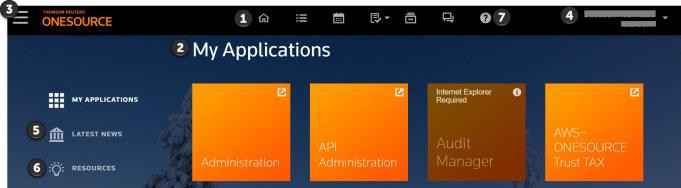
- UseHometo return to the ONESOURCE homepage. Use the tool bar to do more tasks:
- ONESOURCE Workflow Manager or ONESOURCE Calendar (if licensed)
- My To-Do
- Community
- Alerts
- ONESOURCE Platform information
- My Applications: Select application tiles to open your ONESOURCE applications.
- Use the menu to open applications.
- Username,Account, andAccount ID: Select the down arrow to open the menu for:
- My Settings: select to change the password or language.
- Change Background: select to change the background.
- Sign Out: select to sign out of the platform.
- Latest News: Check ourLatest Newssection for tax updates. News feeds come directly from ONESOURCE Checkpoint News and Insight. Select article links to read more.
- Resources: Select the link in this section to access more product information resources.
- Use the Help and Support icon to open the window for more product resources.