
Release notes 26.02
Release highlights
ONESOURCE Trust Tax version 26.02 includes bug fixes and introduces the following features:
- 2021 tax year processing no longer available
- Information Return Diagnostics feature in Review menu revised display to focus on errors
- 990 Schedule A Section E regulatory changes
New features
2021 Tax Year Processing
Processing for tax year 2021 is no longer available.
Process
is now unavailable from the Account Action dropdown list in the account binder and in the Process
subtopic in registers when you are logged in to tax year 2021. The following graphic shows that Process is no longer available in the Account Action drop-down list when you are logged in to tax year 2021.

Download Archive Data
Action Required: Archive data for tax year 2020 will be permanently deleted after June 30, 2026. Download your data before this date.
To download Archive data or send Archive data to a SFTP site (requires licensing through your Client Success Manager), select the
Download Archive Data
subtopic on the Admin
topic from the HOME
menu.The user right
Can download Archive data
will need to be set for users performing this task.Options and Overrides
Beginning with this release the following changes were made to Options and Overrides:
- TheBypass state returns for IL, KS, MD, ME, MI, NC, NM, OH, RI and WI (WI beginning with 2018 tax year)drop down selection for optionProcessing of state returns on grantor accountsin theCompute - Statescategory was updated toBypass state returns for IL, KS, MD, ME, MI, NC, NM, OH, RI and WI).

- TheCounty (Only applicable if fiduciary state above is OK and processing OK returns) (Option applicable beginning with tax year 2025)field was added to theFiduciary Infocategory of Options & Overrides.
 noteCounty should be entered when the fiduciary address is in Oklahoma.
Review Menu - Information Reporting Diagnostics
Beginning with this release, the
Information Reporting Diagnostics
page under the Review
menu has been updated with the following changes for all tax years: - The page displays onlyInformationalandSeverediagnostics, allowing users to focus on actionable items
- TheNonebutton was removed
- This applies to all1099, 1098, and 5498 formsand both payer and recipient diagnostics
note
This change is for
display only
. All valid records continue to be included in processing and filing as expected. 
Account Information
Beginning with tax year 2025, the
52/53 Week Year
checkbox was added to the State Misc
group box within the State Misc and UPIA
collapsible section on the Account Information
subtopic.
A 52/53-week filer is a fiscal filer with a tax year that varies from 52 to 53 weeks because their tax year ends on the same day of the week instead of the last day of the month. Currently the states of Illinois and Oklahoma have this checkbox on their state returns.
When checked, it will roll to subsequent tax years.
990
Beginning in tax year 2025, the following changes were made to in the
Section E. type III Functionally-Integrated Supporting Organizations
in Part IV, Supporting Organizations
collapsible sectionSchedule A
subtopic of Tax Review-990
topic. Part IV
is accessible when Section 509(a)(3) - Supported Organizations
is selected in the dropdown listing for “The organization is not a private foundation because it is
” question. - The description of 3. was changed fromParent of Supported Organizations. Answer (a) and (b) below.toParent of Supported Organizations. Answer (a), (b), and (c) below.
- The description of b was changed fromDid the organization exercise a substantial degree of direction over the policies, programs, and activities of each of its supported organizations? If "Yes," describe in the Supplemental Section the role played by the organization in this regard.toDid the organization direct the policies, programs, and activities of each of its supported organizations? If "Yes," describe in Part VI the role played by the organization in this regard.
- c. Are the organization and its supported organization(s) part of an integrated system (for example, a hospital system)?was addedwith dropdown selections Required/Yes/No

Minnesota
Beginning in tax year 2025, the
Only Bonus Depreciation
field was added to Adjustments to federal taxable income
category under the following collapsible sections:- Schedule M2NC, Federal AdjustmentsunderIncome and Deductionscollapsible section
- Schedule M2SBNC, Federal AdjustmentsunderESBTcollapsible section


Nebraska
Beginning in tax year 2025, the were added to the
Certificate number from Form SR-3604
and the Nebraska Pregnancy Help Act Credit for contributors
fieldsCredit
category under Payments and Credits
grid in the Payments and Credits
collapsible section.
Oklahoma
Beginning in tax year 2025, the following changes were made:
- TheBonus Depreciation Adjustmentcategory containing theAddition - Duplicated federal depreciation (Fiduciary share)andSubtraction - Oklahoma bonus depreciation (Fiduciary share) fieldswas added to theAdditions and Subtractionsgrid in theIncome and Deductionscollapsible section.

The were added to the
Oklahoma bonus depreciation - Addition (Fiduciary Share)
and Oklahoma bonus depreciation - Subtraction (Fiduciary Share)
fields Deductions
group box in the Nonresident Returns
collapsible section.
Pennsylvania
Beginning in tax year 2025, the
Other Credits
grid was added to the Payments and Credits
collapsible section that includes these fields:- Credit Type – dropdown selections are shown in a subsequent graphic
- Award Source - dropdown selections are shown in a subsequent graphic
- Awardee ID type - dropdown selections are shown in a subsequent graphic
- Awardee Tax ID
- Award number
- Award date
- Award Claim Amount

Credit Type


Award Source
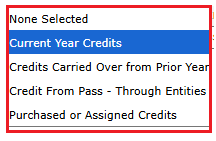
Awardee ID type

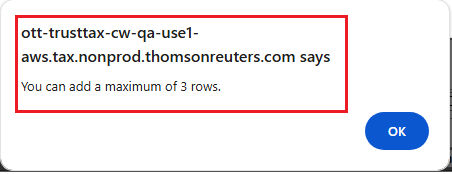
A maximum of 3 credits is allowed. An error will be displayed if more than 3 credits are added as shown in the following graphic.
Since the following three credits are included in this new grid, they have been removed from the Payments and Credits grid:
- Employment incentive payment credit
- Jobs creation tax credit
- Research and development tax credit
Fixes
For a list of ONESOURCE Trust Tax fixes (closed) issues, search Alerts and Notices.
Known issues
For a list of ONESOURCE Trust Tax known (open) issues, search Alerts and Notices.
Related Content
-
2026 releases
Format: Article