
Release notes 26.04
Release highlights
ONESOURCE Trust Tax version 26.04 includes bug fixes and introduces the following features:
- Form-based data-entry capability for 1099-DIV income.
- Tax year 2021 archive files are available for download or delivery to an SFTP site.
New features
Annual archival process for tax year 2021
Archive data for tax year 2021 is available for download until June 30, 2027. See the Archive Data guide, available in the PDF Library and Digital Library of OTT Help, for details about downloading archive data files.
Tax year 2021 source data will be deleted by September 30, 2026.
Tax year 2021 was removed as a selection from the
Tax Year
dropdown list on the Login page and in the main navigation area.1099 Income
Beginning with tax year 2025, the
1099 Income
subtopic is available under Tax Review - Income
. This feature simplifies the entry of 1099 information received from outside sources and incorporates that information into the account's tax reporting.Users can enter payer information and 1099 form data directly from source documents, eliminating the process of creating transactions and sales records.
note
This initial release of the feature is limited to Form 1099-DIV input for 1041 and 5227 returns. Support for additional 1099 form types and return types is planned for future releases.
The
1099 Income
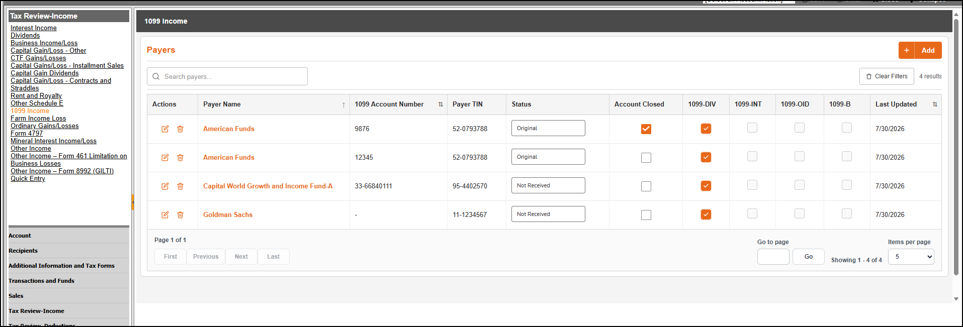
page includes a payer summary grid that displays payer information and identifies which 1099 forms have been entered for each payer. The grid includes the following information:- Payer name
- 1099 account number
- Payer ID
- Status
- Account closed indicator
- Indicators showing whether Form 1099-DIV, 1099-INT, 1099-OID, or 1099-B information has been entered for the payer.
Adding payers
To add a payer, click
Add
from the payer summary grid and complete the payer detail page. The following fields are available:- Payer Name: Required. Enter the payer's name.
- Payer Name 2: Enter an additional payer name, if applicable.
- 1099 Account Number: Enter the alphanumeric 1099 account number. Use this field to differentiate multiple 1099 statements received from the same payer.
- Payer TIN: Required. Enter the payer TIN or SSN in the required format.
- Status: Select the status of the 1099 information from the dropdown list.
- Account Closed: Select this checkbox when the account is closed. Information for a payer marked as closed does not roll to the next tax year.
- Payer Address: Enter the street address, city, state, ZIP code, country, and foreign address information, as applicable.
- Phone Number: Enter the payer contact number.
Additional details
- Payer NameandPayer TINare required to add a 1099 payer. All other fields are optional.
- TheActionscolumn in the payer summary grid provides icons for editing and deleting payer information. Deleted payers cannot be restored.
note
Payer records currently do not roll over to the next tax year as part of a tax return compute. This will be corrected in a subsequent release.
Adding Form 1099-DIV detail
Access Form 1099-DIV input by clicking the payer name hyperlink in the payer summary grid. The 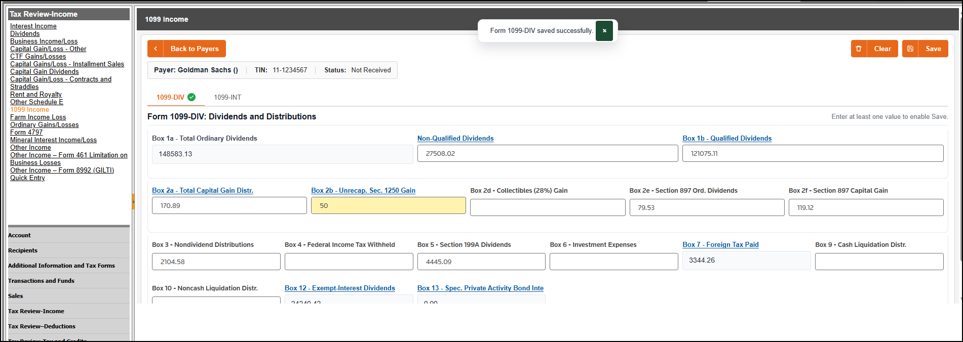
1099-DIV
tab provides form-based entry designed to mirror Form 1099-DIV and supporting details commonly received on 1099 statements. Data entered is automatically translated into transactions identified with the respective OTT tax codes for tax return and worksheet processing. This input does not affect account cash balances.
The following input boxes are available:
- Box 1a - Total Ordinary Dividends: Disabled amount field that displays the total ofBox Non-Qualified DividendsandBox 1b - Qualified Dividends.
- Box Non-Qualified Dividends: Amount field that displays the total of the related sub-line items. Access the sub-line items by clicking the hyperlink. This is an override field and changes to yellow when overridden.
- Nonqualified domestic dividends
- USGI reported as nonqualified dividends
- S-T cap gain dividends
- Sec 199A dividends
- Nonqualified foreign dividends
- Nonqualified S-T cap gain dividends
- Nonqualified foreign S-T cap gain dividends
- 80/20 company dividends
- 305C dividends
- Publicly traded partnership distributions - undetermined
- Sec 897 ordinary dividends
- Nonqualified partnership and fiduciary dividends
- US corporate nonqualified dividends from foreign source
- Box 1b - Qualified Dividends: Amount field that displays the total of the related sub-line items. Access the sub-line items by clicking the hyperlink. This is an override field and changes to yellow when overridden.
- Domestic dividends
- USGI reported as qualified dividends
- Qualified S-T cap gain dividends
- Foreign dividends
- Qualified foreign S-T cap gain dividends
- US corporate dividends from foreign source
- Partnership and fiduciary dividends
- Box 2a - Total Capital Gain Distributions: Amount field that displays the total of the related sub-line items. Access the sub-line items by clicking the hyperlink. This is an override field and changes to yellow when overridden.
- L-T cap gain dividend distributions
- L-T 28% cap gain dividends/distributions
- Sec 897 capital gain
- Unrecaptured Sec 1250 gains-CTF
- Cap gain distributions-unrecaptured Sec 1250
- Box 2b - Unrecaptured Section 1250 Gain: Amount field that displays the total of the related sub-line items. Access the sub-line items by clicking the hyperlink. This is an override field and changes to yellow when overridden.
- Cap gain distributions-unrecaptured Sec 1250
- Unrecaptured Sec 1250 gains-CTF
- Box 2d - Collectibles (28%) Gain: Amount field.
- Box 2e - Section 897 Ordinary Dividends: Amount field.
- Box 2f - Section 897 Capital Gain: Amount field.
- Box 3 - Nondividend Distributions: Amount field.
- Box 4 - Federal Income Tax Withheld: Amount field.
- Box 5 - Section 199A Dividends: Amount field.
- Box 6 - Investment Expenses: Amount field.
- Box 7 - Foreign Tax Paid: Disabled amount field that displays the total of the related sub-line items. Access the sub-line items by clicking the hyperlink.
- Foreign Taxes Paid
- Foreign Taxes on Nonqualified Foreign Dividends
- Foreign Taxes on Qualified Foreign Dividends
- Box 9 - Cash Liquidation Distribution: Amount field.
- Box 10 - Noncash Liquidation Distribution: Amount field.
- Box 12 - Exempt-Interest Dividends: Disabled amount field that displays the total of the related sub-line items. Access the sub-line items by clicking the hyperlink.
- Exempt dividends not subject to AMT-states
- Exempt dividends subject to AMT-states
- Exempt dividends not subject to AMT-territories
- Exempt dividends subject to AMT-territories
- Box 13 - Specified Private Activity Bond Interest Dividends: Disabled amount field that displays the total of the related sub-line items. Users can view or add sub-line items by clicking the hyperlink.
- Exempt dividends subject to AMT-states
- Exempt dividends subject to AMT-territories
Worksheet presentation
Entries made on the
1099-DIV
income page are listed in the Transaction Detail
section of the worksheet within the appropriate tax codes. The transaction description is 1099 INPUT FOR PAYER ID - payer ID | FORM 1099DIV
. The second line of the description displays the payer name. The transaction date is the account's tax year-end date.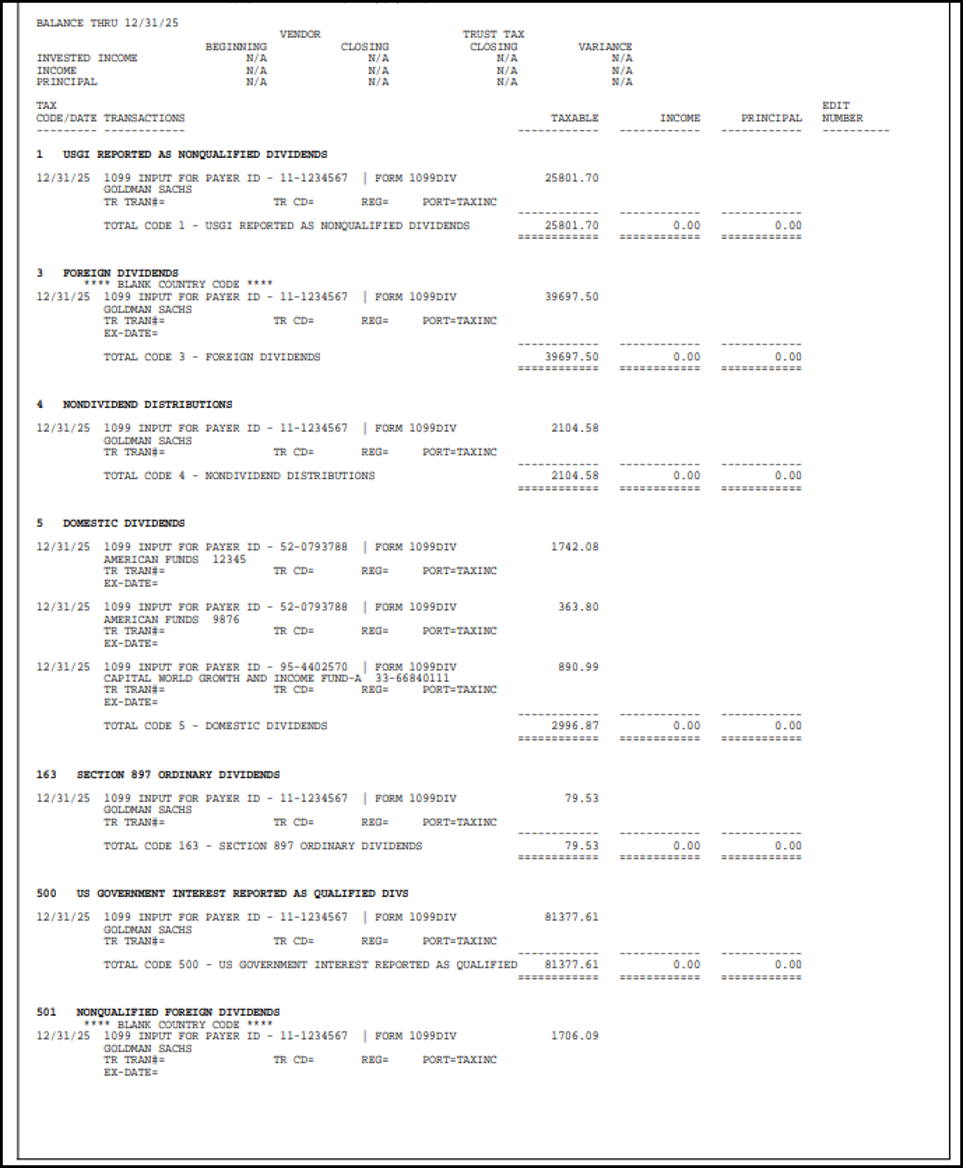
These amounts are not included in the trust accounting income calculation.
Options and Overrides
Beginning with this release, the ONESOURCE Trust Tax generic bridge layout includes new optional account-specific fields for direct deposit routing number and direct deposit account number. These fields are available for trust accounting systems to populate; however, use of the new fields is not required.
If you are interested in bridging this information to ONESOURCE Trust Tax, work with your trust accounting system provider to confirm whether its extract process has been updated to include the new layout positions.
The 
Direct deposit routing number
and Direct deposit account number
information loads to the individual account-level Options and Overrides
fields in the Fiduciary Info
category.Maryland
Beginning with tax year 2025, the 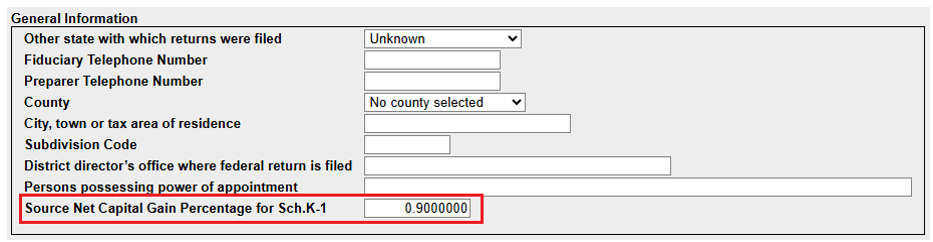
Source Net Capital Gain Percentage for Sch. K-1 percentage
field was added to the General information
group box within the General Information
collapsible section.Mississippi
Beginning with this release, transactions posted to tax code 190 (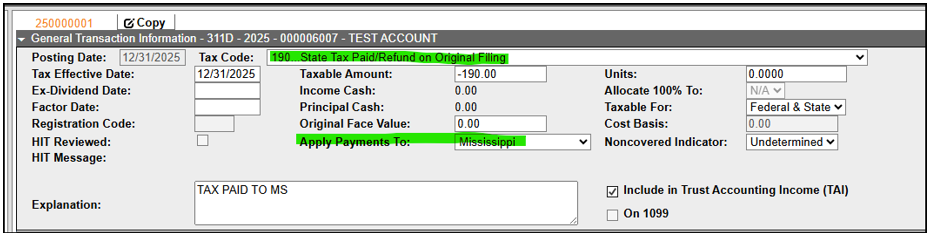
State Tax Paid/Refund on Original Filing
) with the Apply Payment To
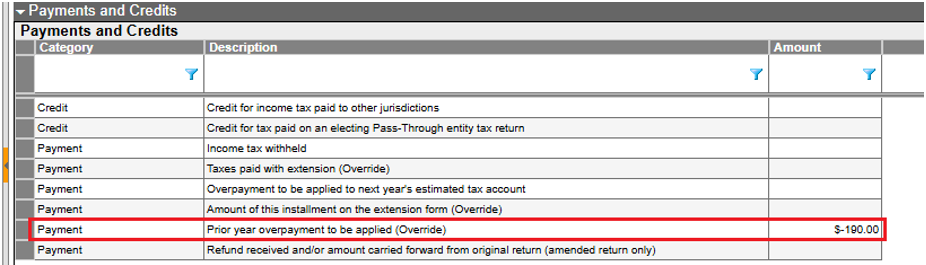
field set to Mississippi populate the Prior year overpayment to be applied (Override)
field instead of the Taxes paid with extension (Override)
field within the Mississippi Payments and Credits
collapsible section.Fixes
For a list of ONESOURCE Trust Tax fixes (closed) issues, search Alerts and Notices.
Known issues
For a list of ONESOURCE Trust Tax known (open) issues, search Alerts and Notices.
Related Content
-
2026 releases
Format: Article