
Release notes 26.00
Release notes for ONESOURCE Trust Tax version 26.00, including new features, fixes, and known issues.
Release Highlights
ONESOURCE Trust Tax version 26.00 includes bug fixes and introduces the following features:
- New and revised tax codes for 1099-R reporting
- New income codes and Chapter 3 status codes for 1042-S reporting
- 1099 register updates for extension filing of information returns
New Features
The following topics describe features added with this release.
Second Logo Capability on 1099 Output
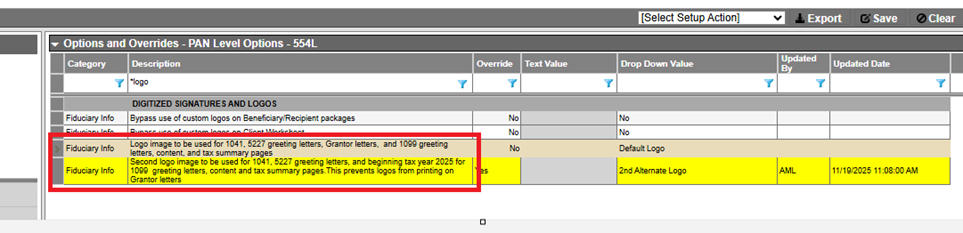
Beginning with tax year 2025, the option of using two logos on 1099 output is available. This feature has been available for 1041 & 5227 greeting letters. To accommodate this change, the following updates were made under
Fiduciary Info
category of Options and Overrides: - TheSecond logo to be used........Grantor letteroption description was revised toSecond logo image to be used for 1041, 5227 greeting letters, and beginning tax year 2025 for 1099 greeting letters, content and tax summary pages. This prevents logos from printing on Grantor letters.
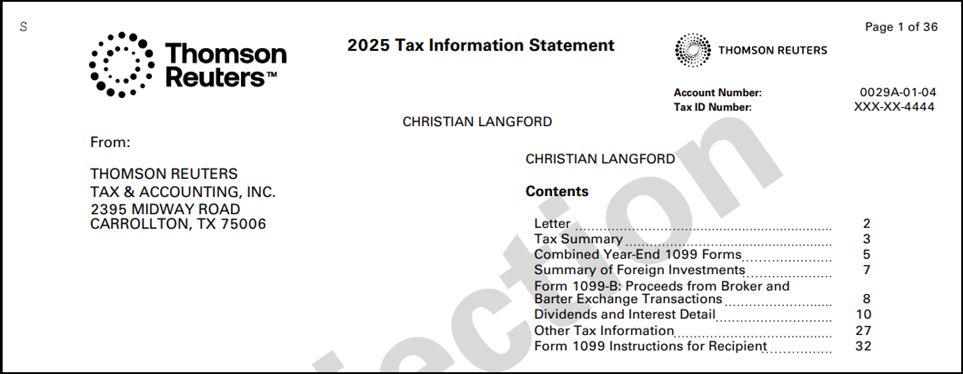
- When used, the second logo is positioned in the upper right side of the page directly above the "Account Number" field as illustrated on the Contents page example in the following graphic:
note
The default (1st) logo is positioned on the right side of 1041 & 5227 greeting letters and the left side of 1099 output. The 2nd logo is positioned on the left side of 1041 & 5227 greeting letters and the right side of 1099 output.
Digital Asset Indicator on Sale Records
Beginning with tax year 2025, the
Digital Asset
checkbox was added to sale records to accommodate the new reporting codes (G, H, and I) on Form 8949. The Digital
Asset
checkbox was added to the sales detail page as shown in the following graphic: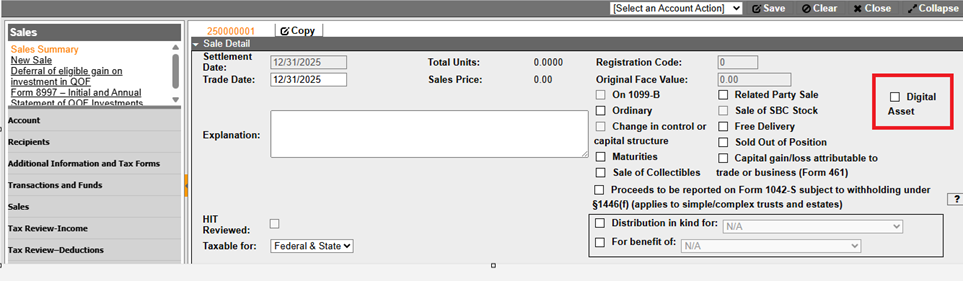
Additionally, the
Digital Asset
field can be included in custom sale registers. The field is accessible from the Sales General Information
category. 
note
Form 1099-DA is not supported in OTT for tax year 2025. Therefore sales flagged as digital assets (Digital Asset checkbox is selected) will not be reported on 1099 accounts. The flag should only be used for non-1099 reporting
Sale Fields Available in Custom Registers
The
Form 1042-S
and Form 461
sale flags are available to be added to custom sales registers. The checkboxes are available in the Sales Detail
page and are now accessible from Sales General Information
category in register properties.

Form 1099-R
The following changes for 1099-R reporting were made beginning with tax year 2025:
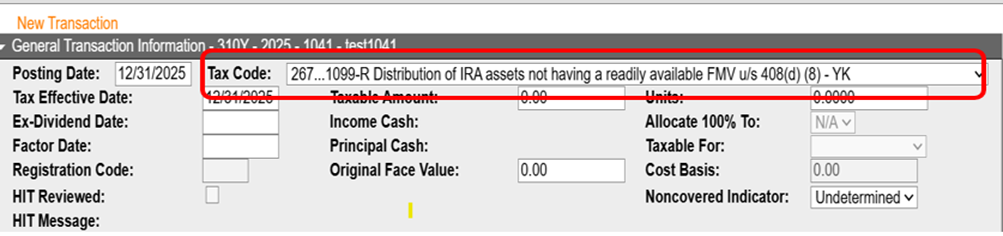
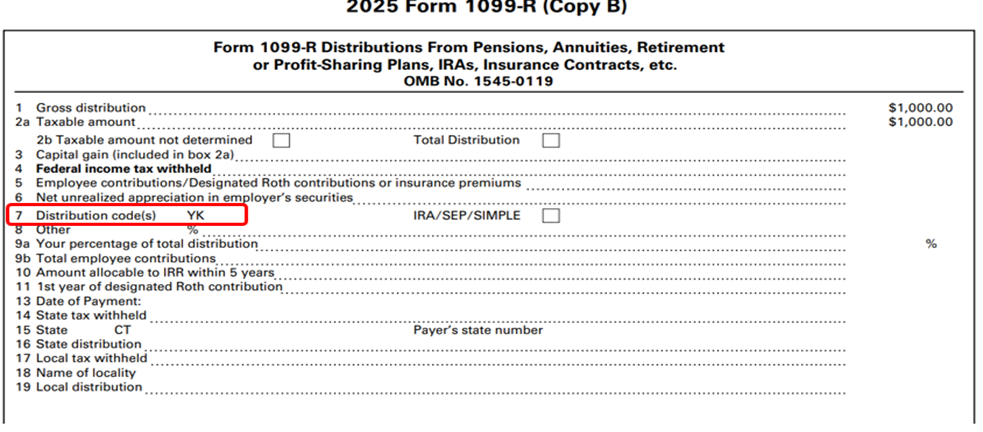
- Tax code267 – 1099-R Distribution of IRA assets not having a readily available FMV u/s 408(d)(8) – YKwas added for reporting YK distributions on 1099-R
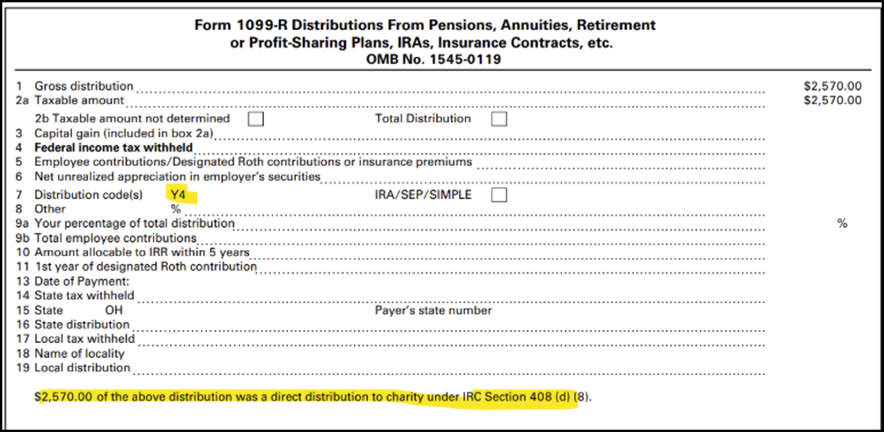
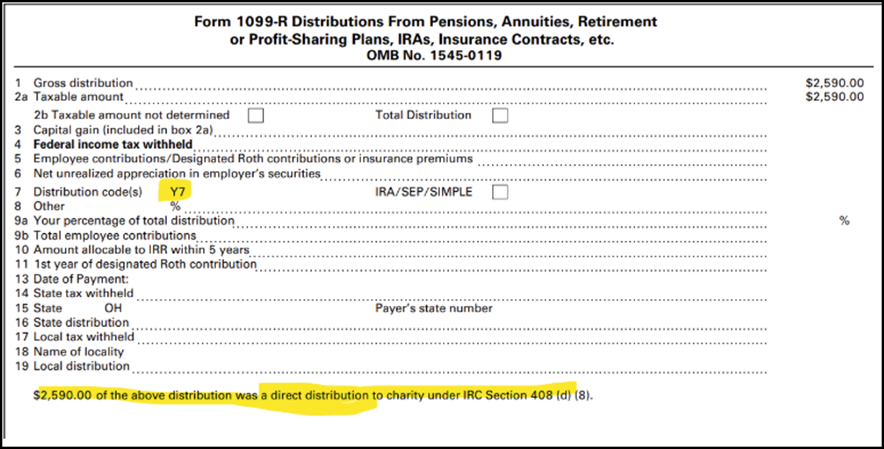
- Tax code 257 was repurposed for distribution code Y4 and tax code 259 was repurposed for distribution code Y7. The highlighted text in the following graphics will only print on returns prior to tax year 2025.
Form 8997- Initial and Annual Statement of QOF Investments
Beginning with this release, the following changes were made to Form 8997:
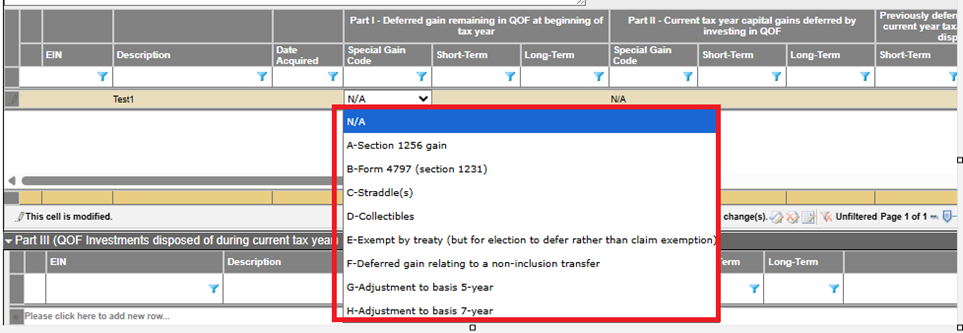
- Special Gain Codedropdown listing now includes the code associated with each description in thePart IandPart IIgrids.
- TheH - Adjustment to basis 7-yearoption was added to the dropdown list.
Form 1042-S
Beginning with tax year 2025, the following changes were made for 1042-S reporting:
- The following Income codes were added:
- 59-Consent fees
- 60-Loan syndication fees
- 61-Settlement payments
- The following Chapter 3 status codeswere added:
- 40-Partnership QDD
- 41-U.S. government entity or tax exempt entity (other than section 501(c) entities)
5227 - Expanded Balance Sheet
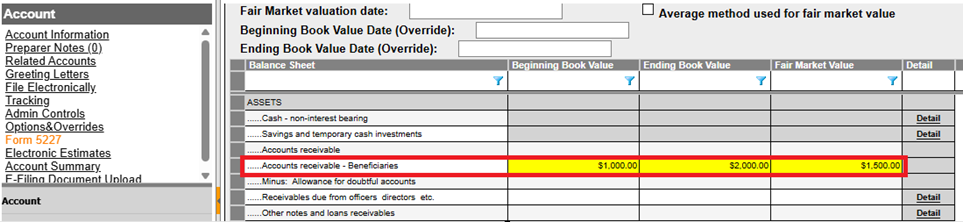
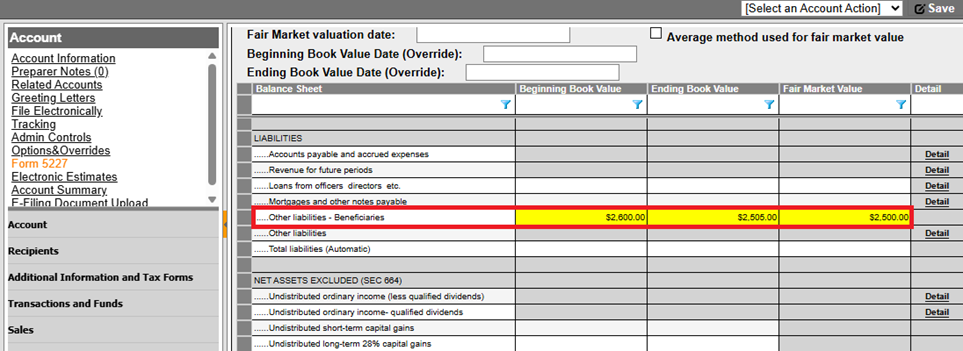
Beginning with tax year 2025, the following fields were added to
Expanded Balance Sheet
collapsible section under Form 5227
subtopic.- Accounts receivable – Beneficiaries (Under Assets section)
- Other liabilities – Beneficiaries (Under Liabilities section)
Register Fields Related to 65-Day Calculation
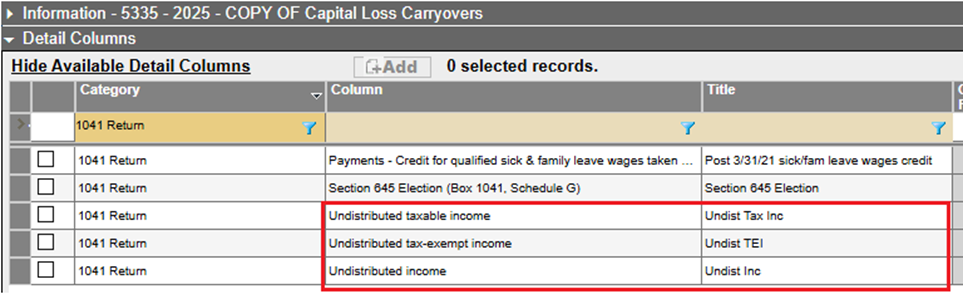
Beginning with this release, the following fields, accessible in the
1041 Return Category
of register properties, are available in custom registers:- Undistributed taxable income
- Undistributed tax-exempt income
- Undistributed income
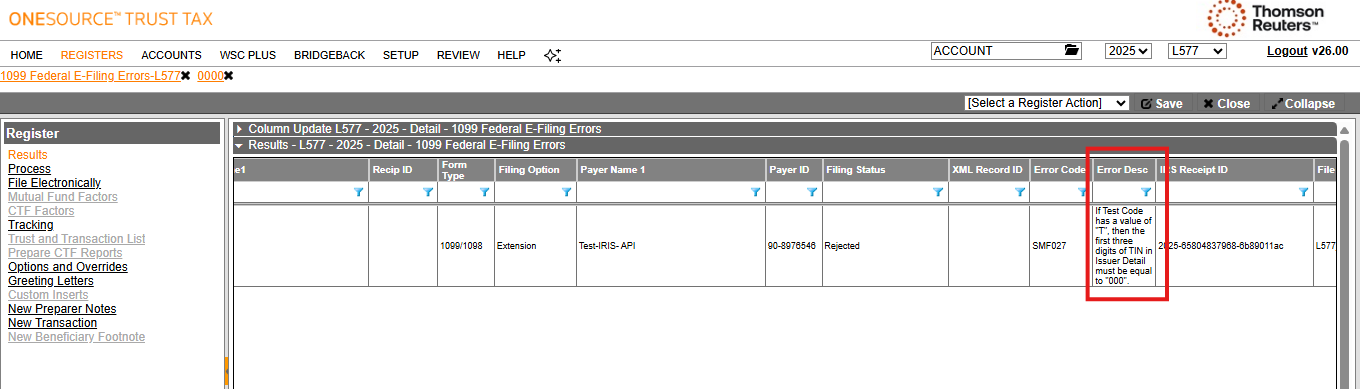
1099 Filing Errors Registers
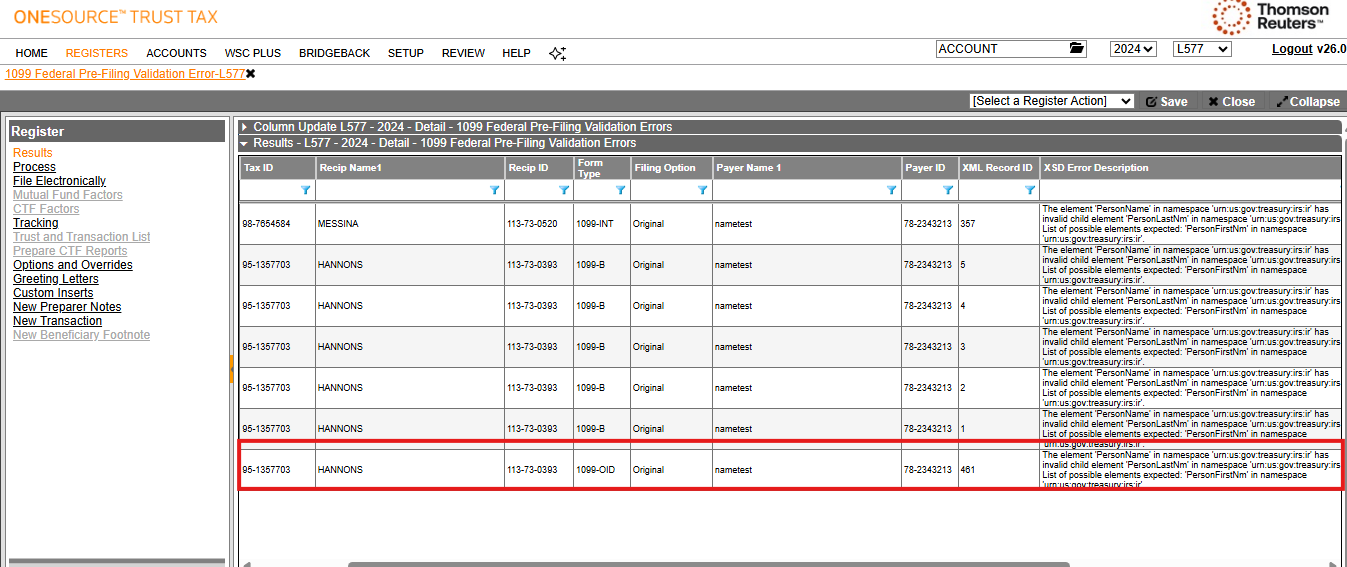
Beginning with this release, the following 1099 error registers were modified to include extension filing errors for 1099/5498/5498ESA extensions.
- 1099 Federal Pre-Filing Validation Errors
- 1099 Federal E-filing Errors
Options and overrides
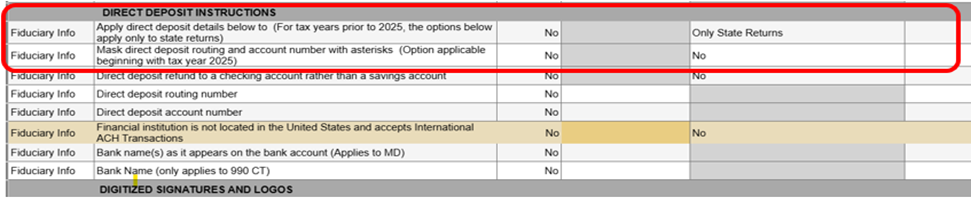
The following changes/additions were made in Options and Overrides under the Setup menu:
- TheDIRECT DEPOSIT INSTRUCTIONSsectionwasmoved from theCompute-Statescategory to theFiduciary Infocategory.
- TheApply direct deposit details below to (For tax years prior to 2025, the options below apply only to state returns)dropdownoption was added within the DIRECT DEPOSIT INSTRUCTIONS section providing three selections:
- Only State Returns(default selection)
- Only Federal Returns
- State and Federal Returns
- TheMask direct deposit routing and account number with asterisks (Option applicable beginning with tax year 2025)option was added withYesas default selection Masking the routing and account numbers pertains to printed returns only. If provided, these numbers will be included in the e-file XML datafile(s) based upon the preceding option if the return is e-filed.
Federal E-filing - EFIN Validation (Vendor Control Number)
Beginning in tax year 2025, EFIN validation is now mandatory for all business returns which includes 1041, 5227, and 990. Thomson Reuters must verify your EFIN by requiring a copy of your EFIN Application Summary. Once verified, a Vendor Control Number (VCN) will be created for each EFIN. If the EFIN entered on the PAN or account binder has not been validated, the
EFIN is not approved for EFiling. Contact your CSM
diagnostic error will generate when processing returns. You must contact your CSM to verify all EFINs being used in your accounts.If an EFIN changes between return processing and e-filing, OTT will update the VCN in the XML if the new EFIN has been verified.
Tax Review - Deductions
Beginning in tax year 2025, the following changes were made to the
Taxes
collapsible section in the Tax Review - Deductions
subtopic:- The title of collapsible sectionTaxes Not Subject to $10,000 Deduction Limitationwas renamed toTaxes Not Subject to Deduction Limitation
- The description of existing fieldState income taxes not subject to $10,000 limitationwas updated toState income taxes not subject to deduction limitation
- The description of existing fieldReal estate tax on non-rental property not subject to $10,000 limitationwas updated toReal estate tax on non-rental property not subject to deduction limitation
- TheModified Adjusted Gross Income Overridecollapsible section containing the following fields was added:
- Adjusted Gross Income (AGI) to be used in state and local income tax limitation (Override)
- Force diagnostic which indicates state tax limitation is incorrect to be an informational rather than a severe diagnostic
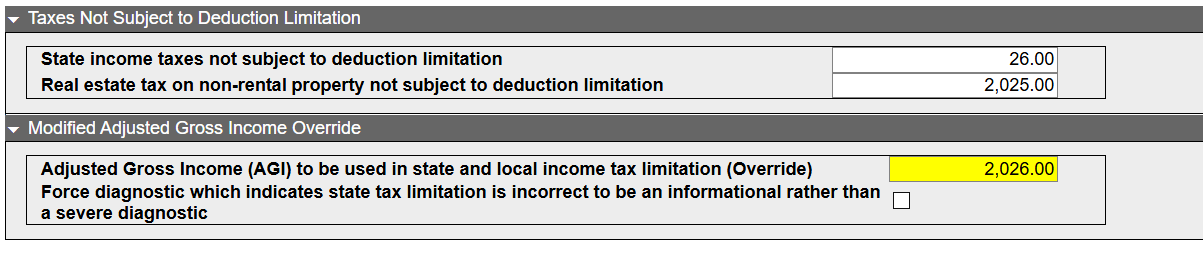
Use of the fields in the
Modified Adjusted Gross Income Override
may be needed when the return calculates a SALT limitation given these complexities in the AGI computation:- Taxes and interest are not deductible in determining AGI, but they are deductible in determining DNI.
- DNI directly impacts computation of the distribution deduction which is a deduction against AGI.
OTT automatically computes AGI and the SALT limitation through an iterative process and checks itself at end of compute to verify that ending AGI equals that used in the SALT limitation. If there’s a mismatch (which should be rare), a diagnostic is generated which provides instructions on how to work around the issue. Here is an example of the diagnostic message: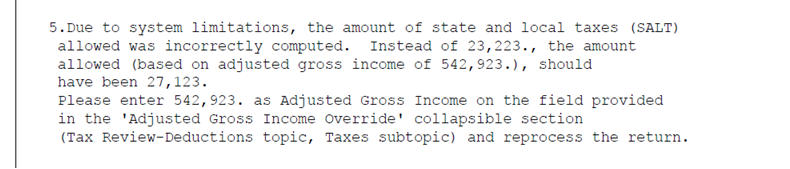
Alabama
Beginning in tax year 2025, the following changes were made in the
Payments and Credits
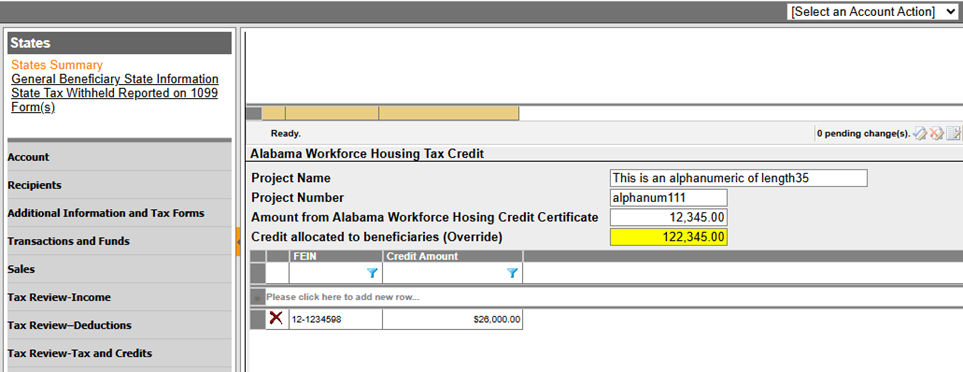
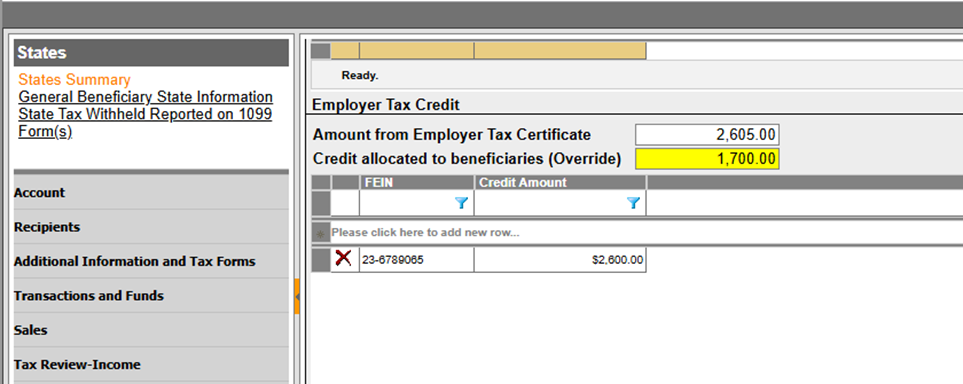
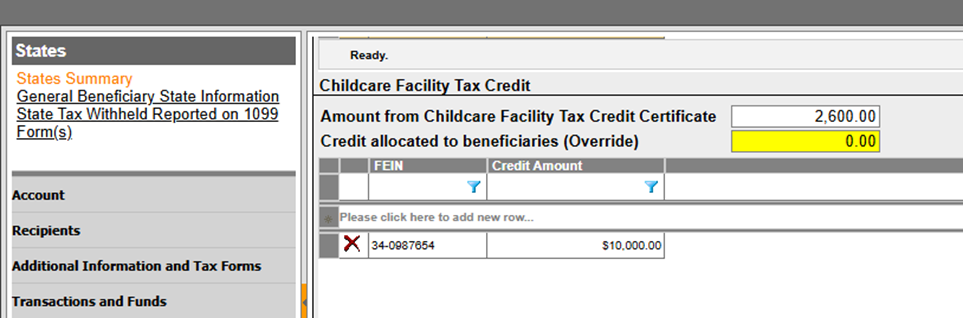
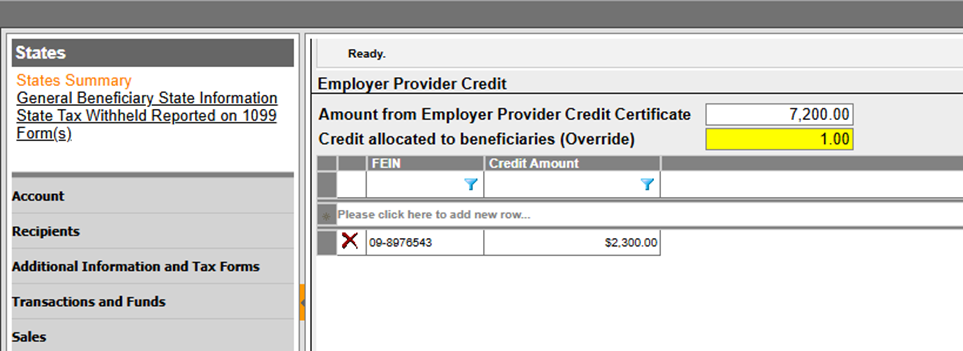
collapsible section:- Four credits were added following the Innovate Alabama Credit. Each credit includes specific fields for entering relevant information, including beneficiary allocation and a grid for entering FEIN and Credit Amount details.
- Alabama Workforce Housing Tax Creditwith Project Name, Project Number, Amount from Alabama Workforce Housing Credit Certificate, and Credit allocated to beneficiaries (Override) fields.
- Employer Tax Creditwith Amount from Employer Tax Certificate, and Credit allocated to beneficiaries (Override) fields.
- Childcare Facility Tax Creditwith Amount from Childcare Facility Tax Credit Certificate, and Credit allocated to beneficiaries (Override) fields.
- Employer Provider Creditwith amount from Employer Provider Credit Certificate, and Credit allocated to beneficiaries (Override) fields.
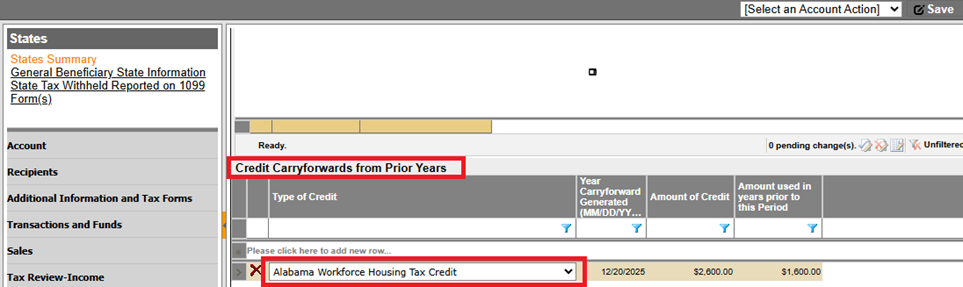
- TheAlabama Workforce Housing Tax Creditwas added to theType of Creditdropdown within theCredit Carryforward from Prior Yearsgrid (located at the bottom of the Payments and Credits section), enabling its carryforward.
- TheApprenticeship Tax Credit Actwas removed as it is no longer applicable.
Louisiana
Beginning in tax year 2025, the following changes were made:
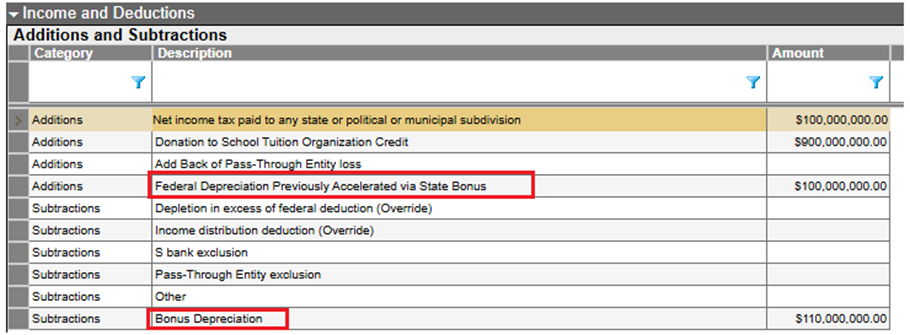
The following fields were added to the
Additions and Subtractions
grid in the Income and Deductions
collapsible section:- Federal Depreciation Previously Accelerated via State Bonusto theAdditionscategory
- Bonus Depreciationto theSubtractionscategory
The following changes were made to the
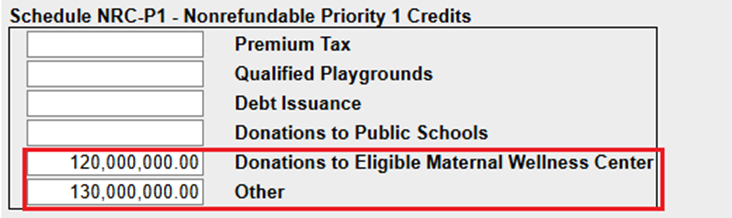
Payment and Credits
collapsible section:- The following fields were added to theSchedule NRC-P1 - Nonrefundable Priority 1 Creditsgroup box:
- Donations to Eligible Maternal Wellness Center
- Other
- TheBone Marrowfield was removed
- ThePrison Industry Enhancementfield was removed from theSchedule RC-P2 Refundable Priority 2 Creditsgroup box
- The following fields were removed from theSchedule NRC-P3 - Nonrefundable Priority 3 Creditsgroup box
- New Jobs Credit
- Eligible Re-Entrants
- Apprenticeship (2007)
Maine
Beginning in tax year 2025, the following changes were made:
- Payments and Creditscollapsible section.
- Following credits were removed from Credit Category:
- Capital Investment Credit
- Other Tax Credits
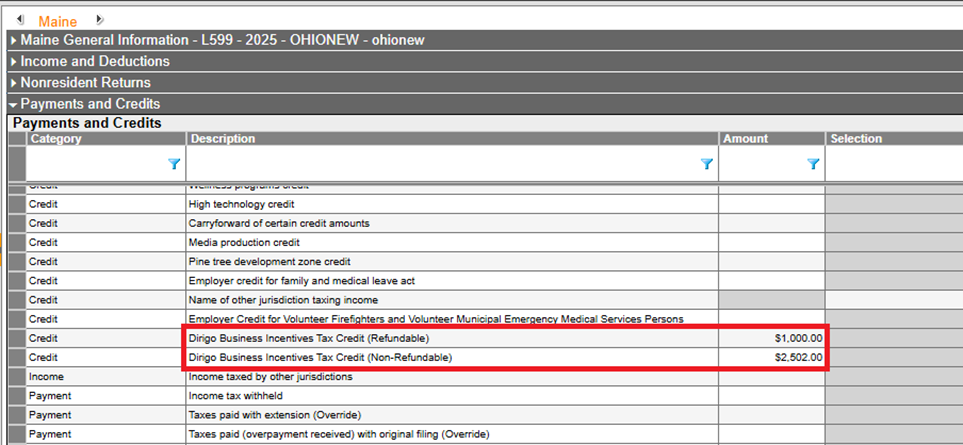
- Following credits were added under Credit Category:
- Dirigo Business Incentives Tax Credit (Refundable)
- Dirigo Business Incentives Tax Credit (Non-Refundable)
- The following credits were added to theRefundablecategory in theOther Tax Creditsgrid:
- Paper Manufacturing Facility Investment
- Professional Baseball Facilities Investment
- Income and Deductionscollapsible section
- Following fields were removed from theAdditionscategory
- State Retirement Contributions
- Maine Capital Investment Credit Bonus Depreciation Add-Back
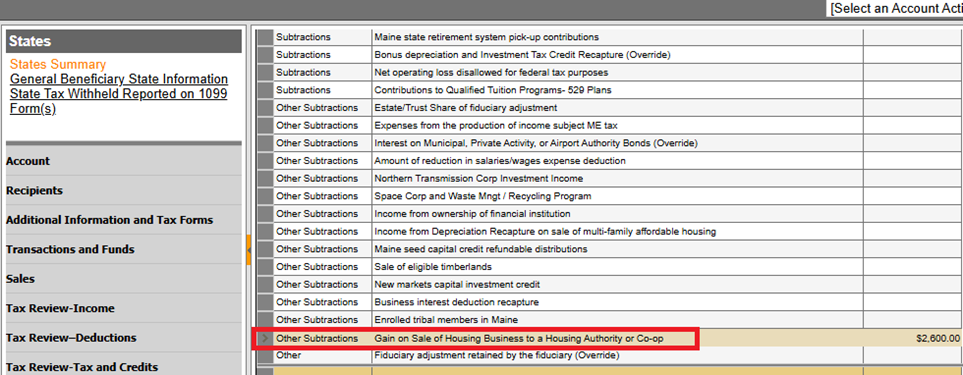
- Following field was added underOther SubtractionsCategory
- Gain on Sale of Housing Business to a Housing Authority or Co-op
Minnesota
Beginning in tax year 2025, the following changes were made.
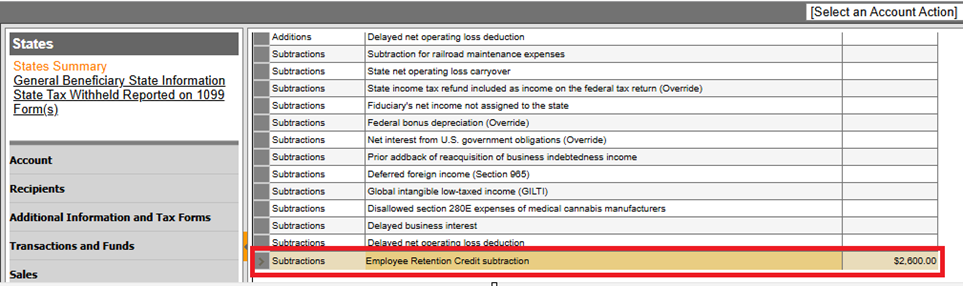
- Income and Deductionscollapsible section
- TheEmployee Retention Credit subtractionfield was added to theAdditions and Subtractionsgrid
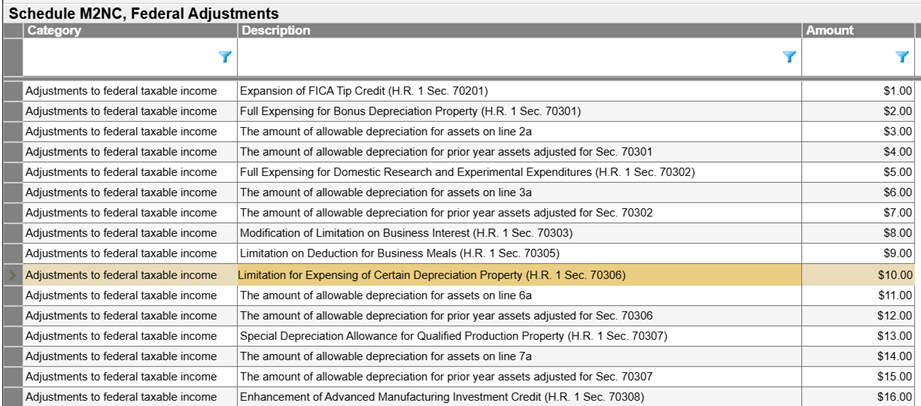
- Schedule M2NC, Federal Adjustments: (US 3075746)grid was completely revised
- Nonresident Returnscollapsible section:
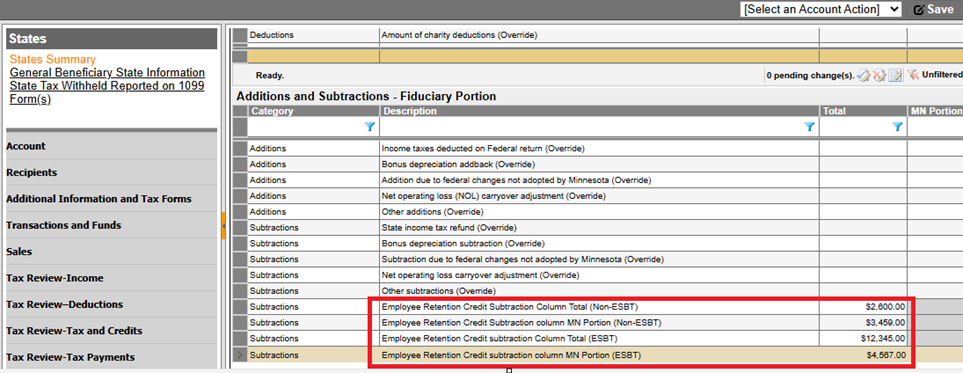
- The following new fields have been added to the subtractions category of theAdditions and Subtractions - Fiduciary Portiongrid in theSchedule M2NM:
- Employee Retention Credit Subtraction Column Total (Non-ESBT)
- Employee Retention Credit Subtraction column MN Portion (Non-ESBT)
- Employee Retention Credit Subtraction Column Total (ESBT)
- Employee Retention Credit subtraction column MN Portion (ESBT)
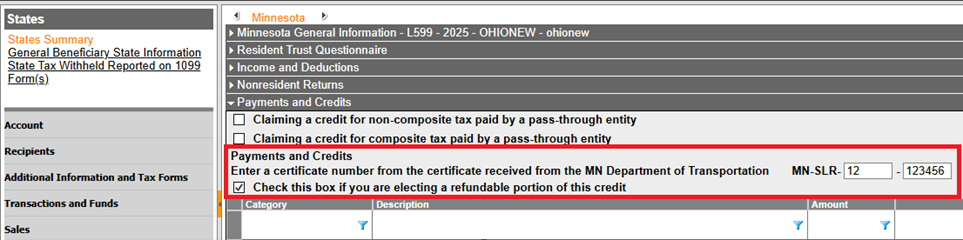
Payments and Credit
collapsible section- TheEnter a certificate number from the certificate received from the MN Department of Transportationfield was added
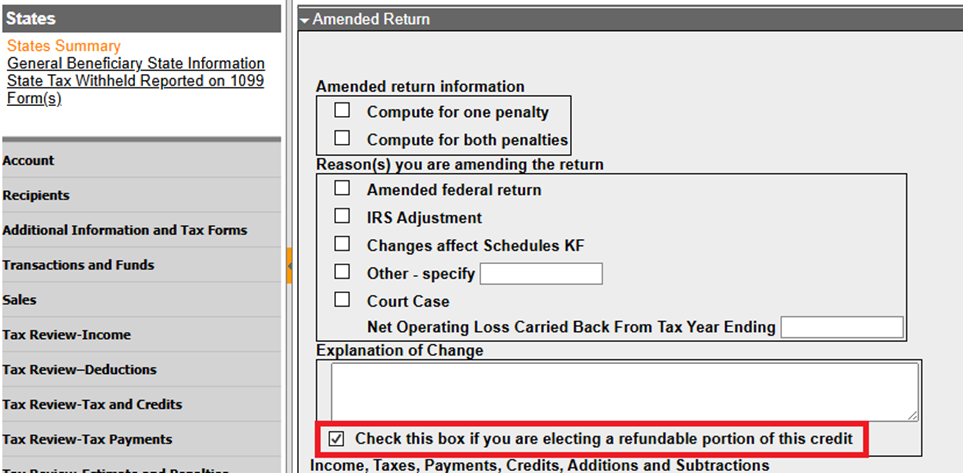
- TheCheck this box if you are electing a refundable portion of this creditfield was added
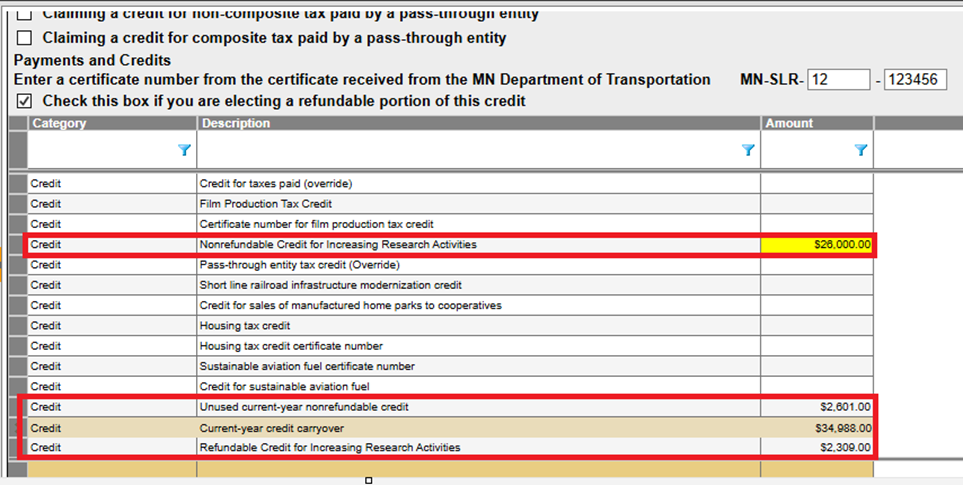
Grid changes:
- Credit for Increasing Research Activitieshas been updated toNonrefundable Credit for Increasing Research Activities
- Unused current-year nonrefundable creditwas added
- Current-year credit carryoverwas added
- Refundable Credit for Increasing Research Activitieswas added
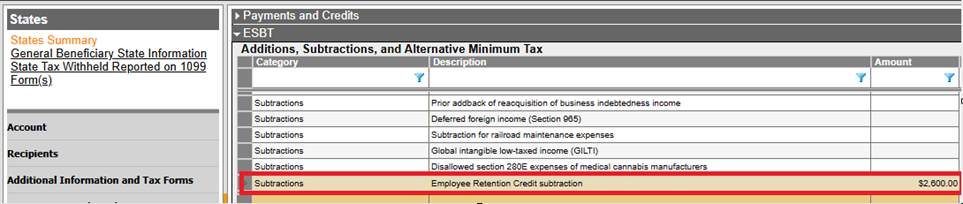
- ESBTcollapsible section
- TheEmployee Retention Credit subtractionfield was added to theAdditions, Subtractions, and Alternative Minimum Taxgrid
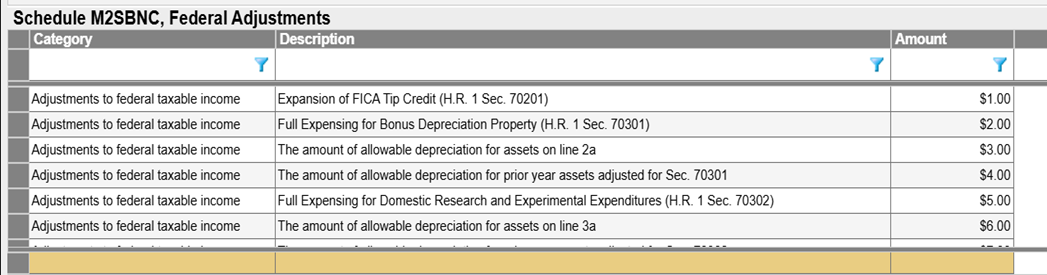
- TheSchedule M2SBNC, Federal Adjustmentsgrid was completely revised
- Amended Returncollapsible section:
- TheCheck this box if you are electing a refundable portion of this creditcheckboxwas added
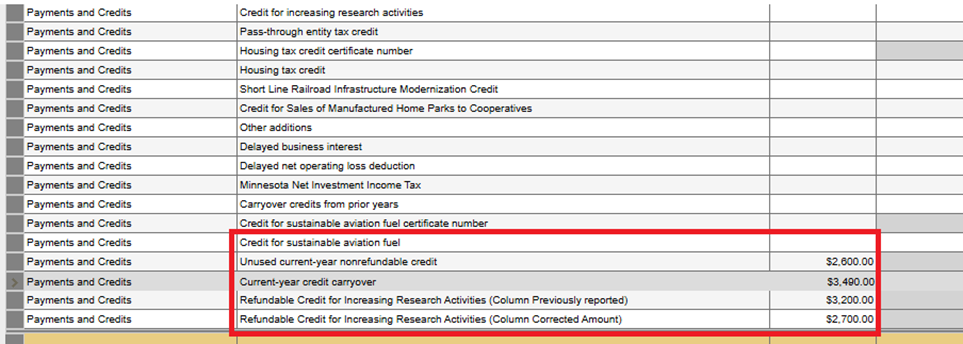
- The following fields were added to thePayments and Creditscategory of theIncome, Taxes, Payments, Credits, Additions and Subtractionsgrid:
- Unused current-year nonrefundable credit
- Current-year credit carryovercheck this box if you are electing a refundable portion of this credit
- Refundable Credit for Increasing Research Activities (Column Previously reported)
- Refundable Credit for Increasing Research Activities (Column Corrected Amount)
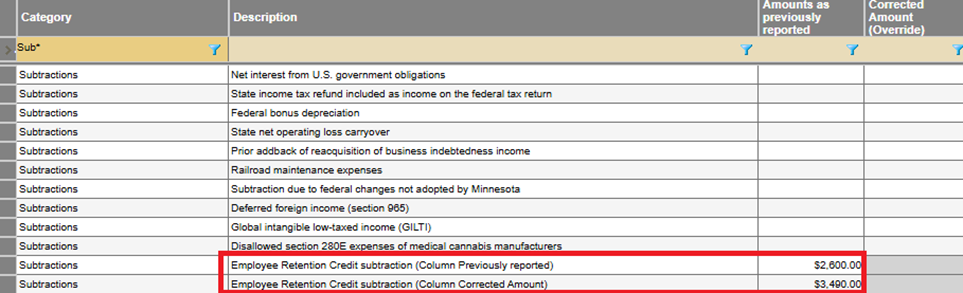
- TheEmployee Retention Credit subtraction (Column Corrected Amount)field was added to theSubtractionscategory of theIncome, Taxes, Payments, Credits, Additions and Subtractionsgrid
New Jersey
Beginning in tax year 2025, the
Received, sold, exchanged, or otherwise disposed of a digital asset in current tax year
check box was added to the General Information
group box in the New Jersey
General Information
collapsible section. 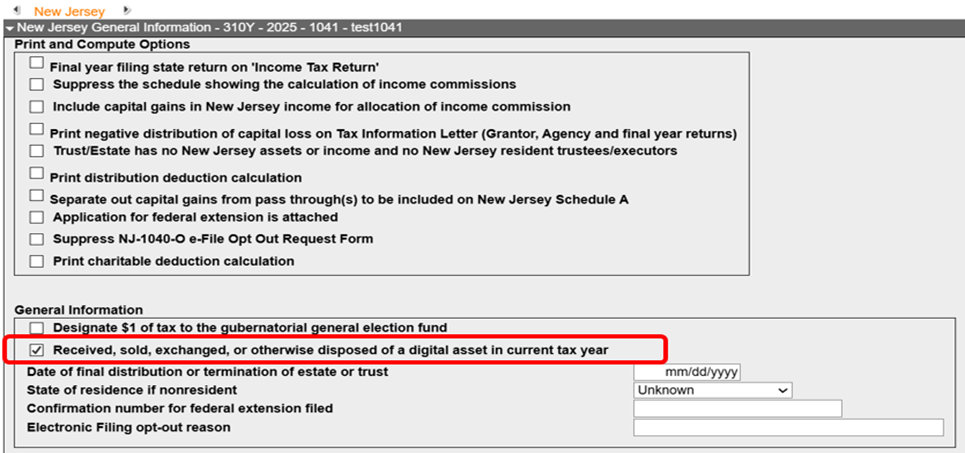
Ohio
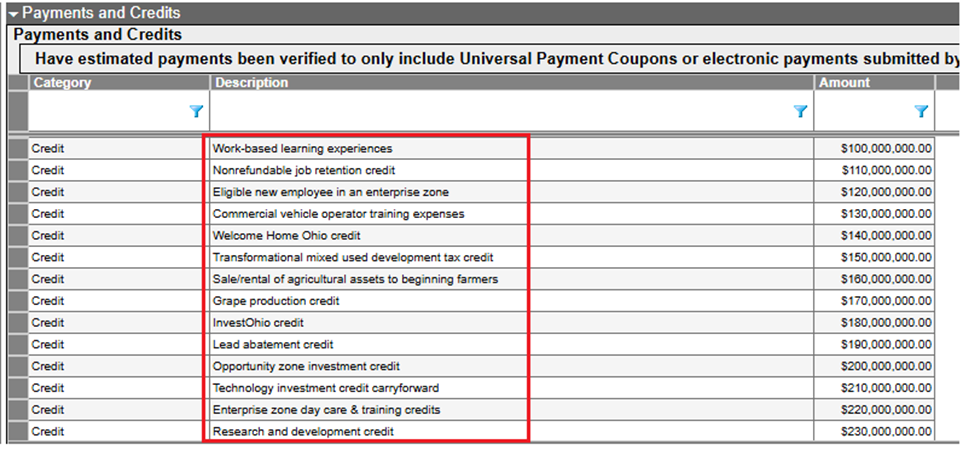
Beginning in tax year 2025, the following fields were added to the
Credit
category of the grid in the Payments and Credits
collapsible section:- Work-based learning experiences
- Nonrefundable job retention credit
- Eligible new employee in an enterprise zone
- Commercial vehicle operator training expenses
- Welcome Home Ohio credit
- Transformational mixed used development tax credit
- Sale/rental of agricultural assets to beginning farmers
- Grape production credit
- InvestOhio credit
- Lead abatement credit
- Opportunity zone investment credit
- Technology investment credit carryforward
- Enterprise zone day care & training credits
- Research and development credit
- Nonrefundable Ohio history preservation credit
- Ohio low-income housing credit
- Affordable single-family housing credit

Utah
Beginning in tax year 2025, the following were added:
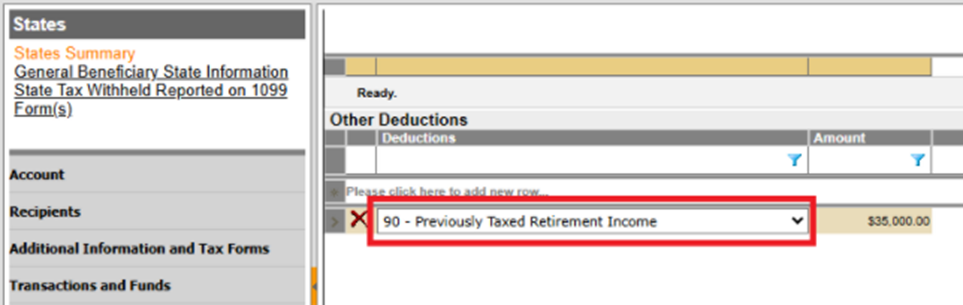
- 90 - Previously Taxed Retirement Incomewas added to theOther Deductionsgrid in theIncome and Deductionscollapsible section.
- The following were added to theNonrefundable Creditsgrid in thePayments and Creditscollapsible section:
- AX: Employer-provided Childcare Construction Credit
- AW: Employer-provided Childcare Expenses Credit
Fixes
For a list of ONESOURCE Trust Tax fixes (closed issues), search Alerts and Notices.
Known Issues
For a list of ONESOURCE Trust Tax known (open) issues, search Alerts and Notices.
Related Content
-
2026 releases
Format: Article