
Company Group
Company Group is managed in the old UI of Pagero Online in
Settings - Company Group
. This area is divided in three parts: Groups
, Companies
and Users
.
Groups:
Company group can be further divided in smaller sections (sub-groups). This is common especially with larger, multi-national chains where users and companies are divided based on locale or market. Alternatively, if there is no need to divide a company group into smaller parts, Groups section is used to list all the companies in the company group which makes it easy to grant individual users access to all the entities in the company group.
To add or remove a company from a group, click a group and navigate to
Companies
tab. Here, you can add new entities with the Add Company
button and remove existing companies with the Delete
button. Note, that deleting a company from a company group does not remove it from Pagero's system, but only from the group management function.
To check the
Access summary
for a specific company within a group, simply click on it. To add, edit or delete users from a specific group, click the group and navigate to the
Users
tab. With the Add user
button you'll find all the user accounts that have been created in companies belonging to the group. After you have added a new user, you can edit their rights with the Edit roles
button. Here you can also remove existing users with the Delete
button. Note, that removing a user from a company group does not delete their user account from Pagero Online, but only deletes their access to other entities in a company group.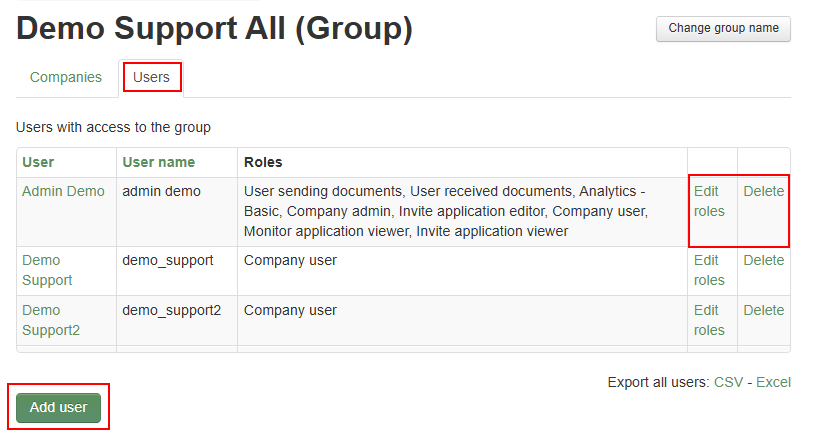
Companies:
Here you will find a list of all the entities belonging to your company group. Clicking on a specific company, you'll find a
summary
which lists all the users and their roles with it. The Groups
tab tells you if the company belongs to any smaller group as described above. On the Access for single users
tab you can add access for other users that exist in your company group, as well as edit their rights. These are done with the Add user
and Edit Roles
buttons.
Users:
Here you'll find a list of all the user accounts within your company group. Here you can also add Company Group Admin rights to other users which will grant them same access as you. This is done with a checkmark on the
Company group admin column
. Note that this is useful during vacations and other out-of-office periods, and mandatory if you are leaving the company or your position as a Company Group Admin.
note
Company Admin User -rights adds Company Group section in Pagero Online, but it does not automatically grant them access to all the sub-groups or companies within a company group. Company Group Admins must manage their own access either in the Groups or Companies sections just like they would manage other users.
Clicking on a specific user will show you
Access Summary
of their user account. Here you can edit their user roles as well, but note that you can't grant them access to new companies or groups. Refer to the above sections in this guide.
Related Content
-
Create new User in Pagero Online
Format: Article,
1 min read
Article,
1 min read