
Copy an existing price list
You can copy an existing price list and adjust the settings to fit your needs instead of creating a new one from scratch.
It is possible to copy existing price lists instead of having to create a new price list from scratch.
To do so, go to .
Search for the price list you want to copy, mark the
Select price list
checkbox, then select Copy price lists
.
A new view will be presented:
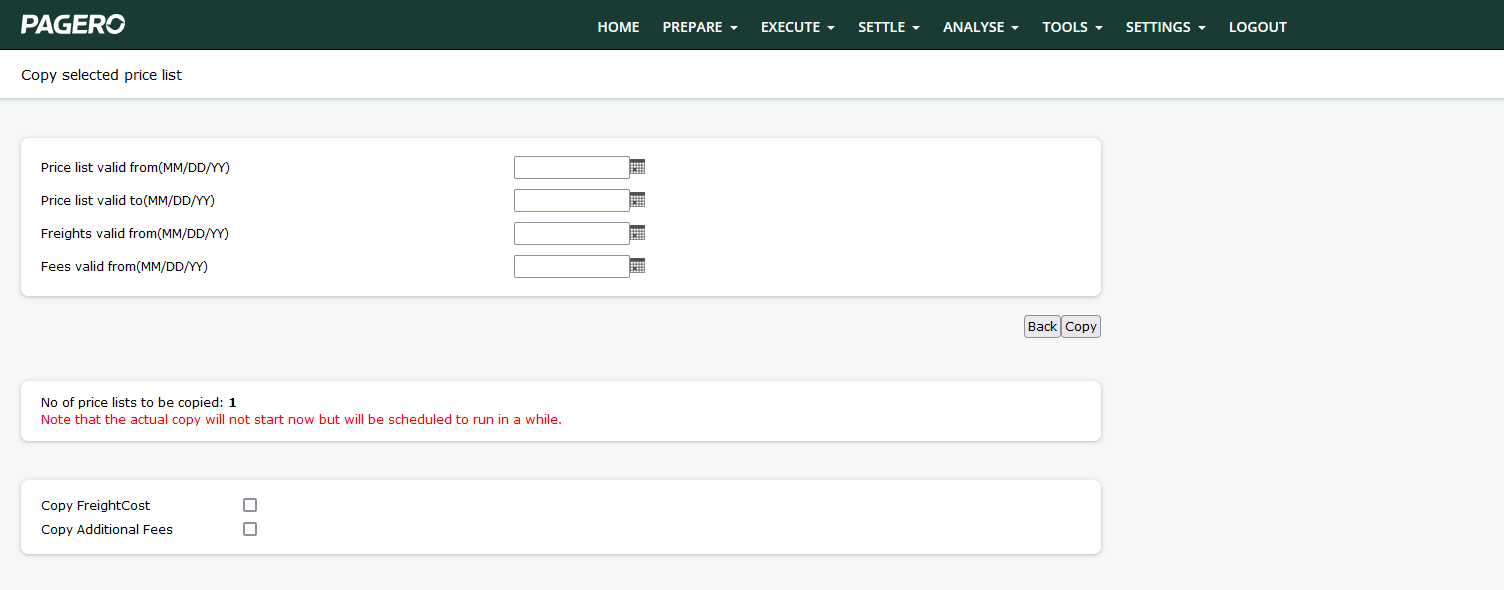
The following parameters are prompted:
Field | Description |
|---|---|
Price list valid from/to | The date range for which the price list is to be considered active. |
Freights/fees valid from | The date for when the new freights and fees are to be considered active. Note that these fields can be left blank if the same date as the Price list valid from date is to be used. |
Copy freight cost/Additional fees | If the costs from the original price list are to be copied over, marking these checkboxes will do so. |
When you are satisfied with the settings, press copy. A background job will now begin copying the price list, note that the process is not instantaneous so it might take a while before the new copy is displayed.
When the copy is ready and uploaded, it will have the same name as the original price list but with the
_Copy
suffix.Related Content
-
Create a Price List Header - Postal Codes
Format: Article
-
Enter your Price List information
Format:
Article