
About the main data-entry screen
When you open a plan, the
Main data-entry
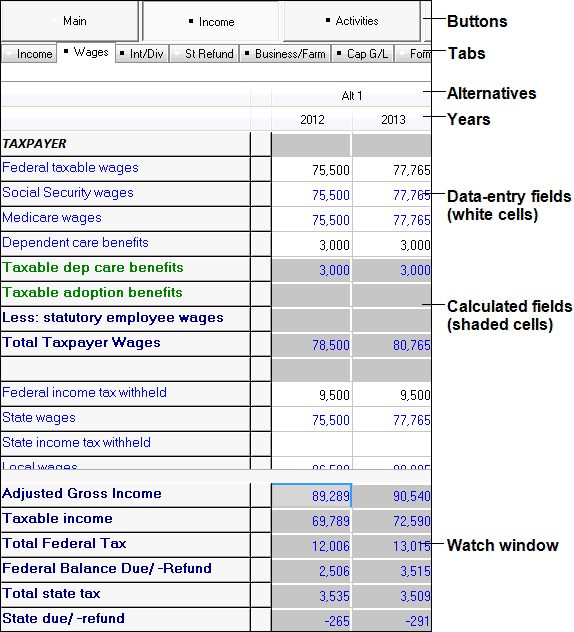
screen in the application includes the following:- Buttons
- Tabs
- Calculated fields (indicated by shaded cells)
- Data grouped by year and alternative
- Data-entry fields (indicated by white cells)
- The Watch Window (optional)
- The title bar on the main window identifies the open plan.
- The menu bar on the main window includes commands for opening and closing plans, editing plans, printing, and more.
- Hover the mouse pointer over any toolbar button to see a tooltip describing the button’s function.
- The buttons in the main data-entry window (for example,Main,Income, andActivities) group tax information by category, like UltraTax CS input screen folders. Planner CS marks a button with a black square when you enter data on any tab within that button.
- Each button contains tabs, like UltraTax CS input screens. These tabs hold the fields where you enter plan data. Planner CS marks a tab with a black square when you enter data on that tab.
- Planner CS lists each alternative below the tabs. Alternatives are tax-planning scenarios that span one or more years. A plan can include any number of alternatives, and each alternative can include any number of years.
- TheWatch Windowshows how your entries affect key fields in the plan. Select to show, hide, or modify the Watch Window.
Related Content
-
Planner CS overview
Format: Article