
Practice CS: "ClientName Is Set Up for Recurring Billing" Message When Detail Billing
When you select a client or engagement to bill, before the Detail Billing screen opens you receive a message similar to the following.
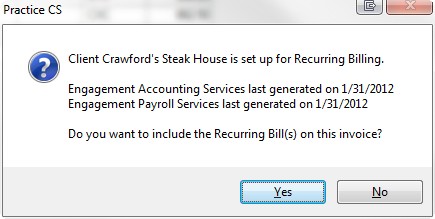
The message is informing you that the client is set up for recurring billing for one or more recurring bills and asking if you want to include that billing in the detail invoice you are producing instead of generating the recurring bills separately. Respond
Yes
if you are billing for work beyond the recurring billing and only want to send 1 invoice for the period.note
If you are selecting engagements to bill, you'll see this message only if you select an engagement that is set up with a recurring bill and only the recurring bill associated with the selected engagement will be included on the detail bill. If you are selecting Clients to bill, the message will appear if any engagements are set up with recurring bills and will offer to add all recurring bills to the detail bill.
If you respond positively to the request, you would then see the recurring bills on the Time & Expense tab in detail billing.
These are the billing items added for the 2 recurring bills listed in the message earlier.
Because the Recurring Bills are set up with a method of Progress, they are entered as progress bills with carryover equal to the negative amount of the bill as would be for any progress bill entered manually.
If the method on a recurring bill being included in a detail bill is set to relieve WIP, such as Fixed Time & Expenses, the amount of the recurring bill will be distributed proportionally to all WIP for the engagement of the recurring bill (including previous progress bills).

