
Change from signing manually to eSign
Learn how to change a return from manual signing back to eSign so the taxpayer can sign using the original or a resent link.
If a taxpayer accidentally selected to sign manually but wants to eSign instead, you can change the return status back to
Awaiting E-Sign
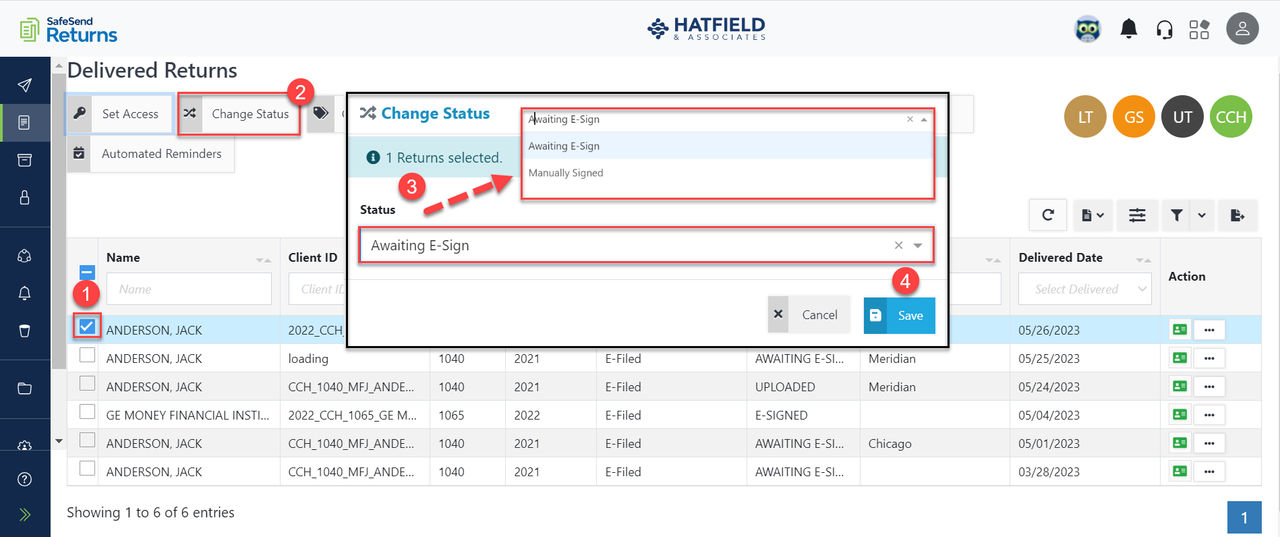
without recalling it.- Mark the checkbox next to the return (status will be Awaiting Upload).
- Select from the status dropdown.
- SelectSaveto update the status.
- SelectAwaiting E-Sign.
- SelectSaveto update the status.
The taxpayer can eSign using their original link, or select
Send Reminder
to resend it.
