
UltraTax CS® return out of order
Taxing authorities out of order
SafeSend orders the uploaded e-file forms and vouchers by the taxing authority. They are listed as federal first, then states. The tax return appears in the same order as the uploaded PDF.
If the taxing authorities appear out of order, it is likely because the state and federal returns were printed separately. They should be printed together to prevent this.
Printing the state and federal returns separately can also result in an error or non-supported status on upload.
Follow the steps below to ensure the state and federal returns are printed together.
- Go to .
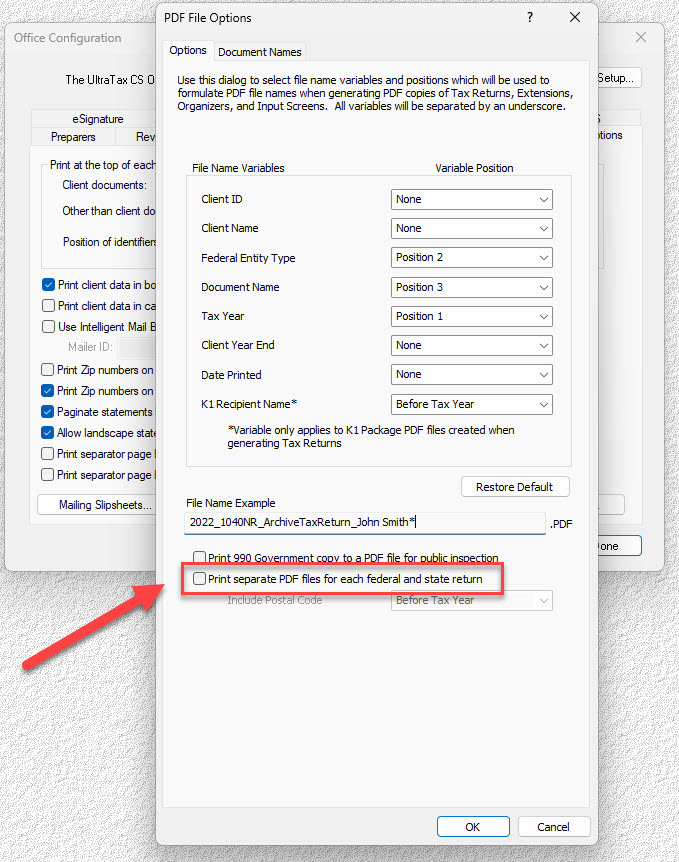
- De-select thePrint separate PDF files for each federal and state returncheckbox.
Summary printing first
If you would prefer that the 2 year summary pages print at the end of the return rather than the beginning, you can adjust the bookmark settings in UltraTax®.
- Go to .
- De-select thePrint PDF return files with bookmarkscheckbox.