
Return stuck in upload or preparation
Occasionally a return can get stuck in an
Uploaded
or Preparing for Delivery
status. This is usually caused by an interruption during upload. An option to delete those returns will populate within 24-48 hours. The following steps may help you correct the issue.
Return Stuck in Uploaded.
You can attempt to re-upload the return before the delete option becomes available.
- Clear your cache and cookies.
- Make sure your browser is up to date.
- Ensure you have a stable internet connection.
- Don’t include special characters in one or more file names or Client ID.
- Don’t password protect the PDF or secure it in any other way.
- Re-print the return from your tax software; the PDF may be corrupted in some way.
Return Stuck In Preparing for Delivery.
Returns stuck in this status won’t be delivered and you won’t be charged for them.
You can attempt to re-deliver before the delete option is available for the stuck return.
Follow the previous steps . If that doesn’t resolve the issue, the additional steps following may correct this.
- If there is a cover page for the return, usually page 1 of the PDF, delete the page and save a copy of the return.
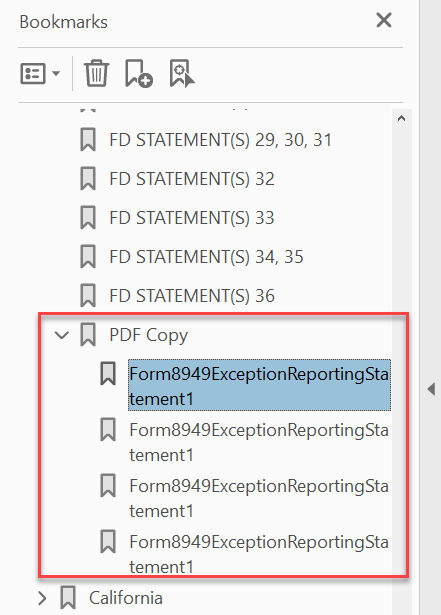
- If there are nested bookmark attachments within the PDF, these documents should be saved as a separate PDF and deleted from the original PDF.
- The original PDF can then be uploaded, and the separately created PDF can be added as an attachment during processing.
- In the example below, there is a nested bookmark under the Federal bookmark causing the issue.
If the issue is still happening after these steps have been followed, contact support@safesend.com for additional assistance.