
View Firm Libraries in an Engagement
If you have a Firm Library containing disclosure notes, you can view the contents of the library while working with a checklist in the center pane.
To view a Firm Library:
- In the right-hand pane of the interface (Disclosure Libraries) select the Firm Library name from the drop-down menu.
- The contents of the Firm Library will display in the right-hand pane. You can then expand the categories to view the disclosure notes. You can add notes from the Firm Library to the Engagement Library from this view.
Disclosure Libraries Pane Toolbar
When viewing a disclosure note library in the right-hand pane, there are a number of actions available from the bottom toolbar. These actions are context sensitive and some will be disabled depending on if you have a note in the library selected or not.
View Note(s)
 – Highlight a note in the firm library and click the
 View Note(s)
icon in the toolbar to display the note in the View Note pop-up window. You can page through all the notes in the library by clicking the Previous
and Next
buttons. Preview Engagement Library Notes
 – Display a preview of all the notes in the currently displayed firm library.
Refresh Firm Libraries
 – Click the
 Refresh
button at the bottom of the Disclosure Checklist window to refresh the list of firm libraries and get any available updates.note
- A best practice would be to utilize the shared database installation method. The location of the firm libraries displayed in the Disclosure Libraries pane defaults to the same database where the engagement is located. This location can be changed by selectingPoint to Firm Library Databasefrom theTools > Optionsmenu.
- Firm Libraries cannot be edited from theDisclosure Librariespane. You must use the Firm Library application to maintain your firm libraries.
Using PPC Libraries
PPC has created firm libraries for commercial, nonprofit, and governmental entities, each containing hundreds of example note disclosures. Depending on the Practice Aid titles you own, you are licensed to download one or more of these libraries for use in this application.
To download a PPC Firm Library:
- SelectDownload PPC Disclosure Librariesfrom theFilemenu.
- In the pop-up window, select one or more check boxes next to the PPC Libraries you want to download.
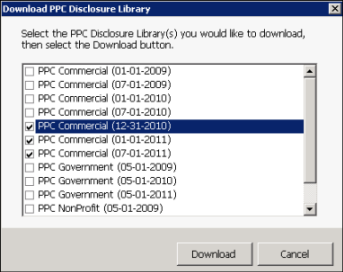
- ClickDownload.The application downloads the libraries you choose and adds them to theOther Librariesdrop-down list in the right-hand pane.

- To access a library, select it from this menu.