
Rollforward Integration
If you are a user of both SMART Practice Aids and Workpapers CS, you can perform a rollforward of prior period engagements that are related between the two products using the following steps.
To perform a rollforward of prior-period engagement:
- Open the engagement binder inWorkpapers CS.
- On theFilemenu, clickRoll Forward.TheRoll Forward Wizardwindow appears.
- Here, define the settings for the rolled forward binder in theNew Binder Propertiespage.
- In theWorkpapers Settingspage, specifyRoll Forward Settingsfor the SMART workpapers in your engagement binder.For a workpaper, selectReplace - SMART Practice Aidssetting to create aplaceholderworkpaper in the rolled forward engagement binder in Workpapers CS. Upon completing and saving the rolled forward workpaper in SMART, theplaceholderworkpaper in Workpapers CS will be automatically replaced with the updated SMART workpaper.
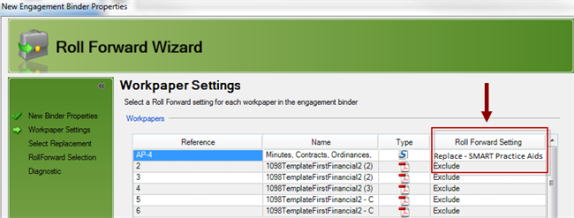 noteYou can also choose to not include a SMART workpaper in the rolled forward engagement by selecting theExcludeoption underRoll Forward Settings.
 - TheWorkpapers to Roll Forwardpage of the wizard will indicate the SMART workpapers selected for the roll forward.
- Finally,PPC SMART Practice Aids Integrationpage of the wizard displays the Workpapers CS engagements selected for the roll forward.
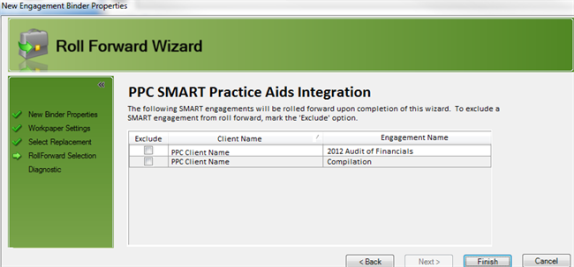 noteIf you want to exclude an engagement from the roll forward process, enable the corresponding check box underExcludecolumn.
 - ClickFinish.Workpapers CSwill then pass on the prior-period Workpaper ID along with thenewWorkpaper ID for the selected rolled forward workpapers toSMART Practice Aids.
- This will openRollForward Engagementwindow from SMART Practice Aids. Follow the prompts to finish the Roll Forward process in SMART.noteSee Engagement Rollforward Best Practices section for tips on how to best perform an engagement roll forward from SMART.
- You can then update the rolled forward engagement workpapers inSMART Practice Aids. UponSavingthe changes in the rolled forward documents, associatedplaceholderworkpapers inWorkpapers CSwill be replaced with the updated SMART workpapers.