
Add a Control
Objectives listed on a Control Activities Form consist of controls. When working on a Control Activities Form, you can add a new control to one or more objectives.
note
You access the Control Activities Form from links on the Financial Close and Reporting and General Computer Controls location forms, which are found under Control Activities on the
Navigation
pane. To add a control:
- Click theView Control Activities Formlink.The Control Activities Form appears.
- Select an objective.
- SelectAdd Controlfrom theInsertmenu.The Add Control window appears.
- Complete the information by describing the control, assigning a control reference number, selecting the related objectives, and specifying assertions.
- In theSelect the Related Objectivesscroll box, click the+symbols to drill down to the Objectives level.The objective you highlighted before opening theAdd Controlwindow is already selected.
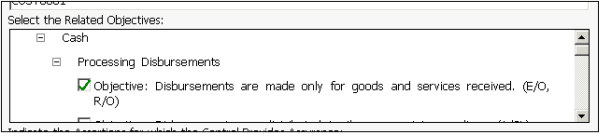 You can assign the new control to any objective listed on the Control Activities Form for any audit area, Financial Close and Reporting, and General Computer Controls.
 - Select or clear check boxes to indicate your choices.noteIf usingPPC’s Guide to PCAOB Audits, the assertions presented come from section AU 326 of the PCAOB interim auditing standards rather than from SAS No. 106, Audit Evidence.
- In theIndicate Assertions for which the Control Provides Assurancescroll box, select or clear the applicable check boxes.
- ClickOKto add the control.