
Version 20 - October 2025 (template release)
Template release pack
This release focuses on feature updates for the period ending March 2025. The template is available on platform 6.28.9259 / 6.29.9459 / 6.30.9574 / 6.31.9627 / 6.32.9713 / 6.33.9810 / 6.34.9900.
Release notes
- Period end: March 2025
- Update type: Minor (Features)
Overview
This India (AS) Corporate Template Content Version 20.0 is a Minor release that includes features.
Legislative updates
There are no legislative updates included in this release.
Corrections
There are no corrections for this release.
Features
Item ID | Title | Details and limitations |
|---|---|---|
3000240 | Alignment of column names and share column header names | This update introduces two key enhancements for all Non-Standard Tables within the Report Structure, including full Financial Statements, Notes, and [Custom] report elements:
|
3000241 | Addition of dynamic column headers for the non-standard tables so that the table column headers will link up to the grid column heading names | This update introduces dynamic column headers for all non-standard tables in the Report Structure. With this enhancement, table column headers are now linked directly to the grid column heading names, allowing them to automatically update whenever the grid column headers are changed. To implement this functionality, the previously hardcoded headers have been replaced with the following expression:
|
3000242 | Addition of 2 columns for all non-standard tables Adjustment to Extra1 and Extra 2 column exceptions | Default Addition of "Extra 1" and "Extra 2" Columns to Non-Standard Grids
Adjustment to "Extra 1" and "Extra 2" Column Exceptions for Non-Standard Tables with Reconciliation Sections For non-standard tables featuring a "Reconciliation" section at the end of the table, the approach to "Extra 1" and "Extra 2" columns has been updated. Instead of omitting these columns, "Extra 1" and "Extra 2" are now included to help address out-of-balance issues within reconciliations.
User Guidance:
Applicability:
|
3000244 | Ensure 2 total column options are available | When adding a total column to a non-standard table, two columns will now be included:
Sub-Total Columns: If the table includes sub-total columns, the same approach will be applied to those columns.XBRL Templates: For XBRL templates, please ensure both total columns are appropriately tagged. |
Content changes
There are no content changes for this release.
XBRL changes
note
If you are not hosted by Thomson Reuters, please contact the Support desk to obtain the new taxonomy package or in case any assistance is required to map the new taxonomy.
There are no XBRL changes for this release.
Known issues
ITEM ID | DETAILS AND LIMITATIONS |
|---|---|
1 | The illustrative model content in this template does not include all the available concepts in the taxonomies. Therefore, the onus will be on users to create and tag any additional content required to produce a valid XBRL file. |
2 | Value errors from MCA validation were forcefully cleared in the XBRL instance document by replacing all values with zero. This cleared all validation errors resulting from calculation relationships between tagged values in the XBRL instance document. Users of the template are required to source and clear their value errors derived from entity-specific values from their use of the template. |
3 | Users of the template are required to source and clear their pre-scrutiny errors derived from entity-specific values from their use of the template. |
4 | It is a known Platform 6.29.9459 issue that any report elements with the display setting never show in the report when viewing the parent folder in isolation using either Design, Preview, or Edit XBRL mode. |
5 | There is a character limitation in the grid column heading. Headers can take up to 60 characters only. |
6 | For XBRL templates we are not changing the display conditions of sections from 'Always' to 'conditional' & for totals from 'Always' to 'AsRequired' as it might throw an XBRL validation error. This might result in an unforeseen situation making changes every time, so to avoid confusion we are suggesting users make their display conditional choice in their entity. |
Additional information
ITEM ID | DETAILS AND LIMITATIONS |
|---|---|
1 | We have replaced the hyphen (-) in the edit style number settings with a zero (0). This change is expected to improve the clarity and reliability of data parsing through automated systems, reducing potential errors in financial reporting while validating the MCA XBRL Validation tool. 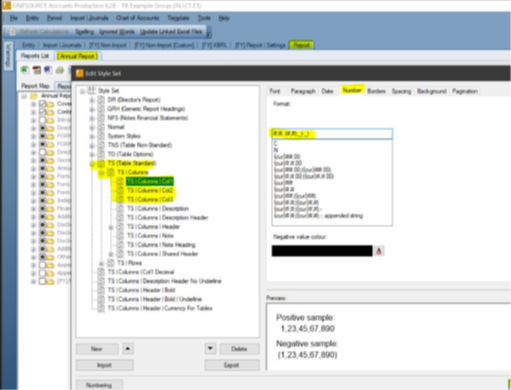 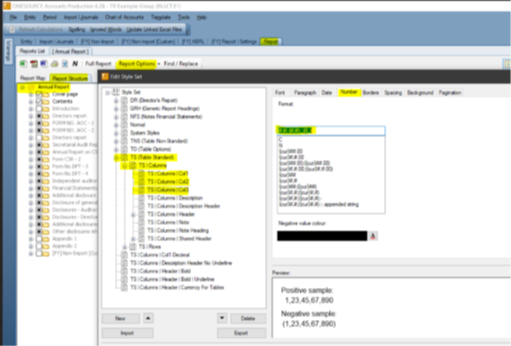 |
Impact on existing clients
There are no impacts identified for this release.
Deviations from standard configuration
There are no deviations identified for this release.
Appendix
There are no appendix items for this release.
Related Content
-
India AS
Format: Article