
Version 9 - July 2025 (XBRL template release)
Template release pack
This release focuses on the XBRL, features, and correction updates for period ending December 2024. The template is available on platform 6.28.9259, 6.29.9459, 6.30.9574, 6.31.9627, and 6.32.9713.
Release notes
- Period ended: December 2024
- Update type: Major (XBRL, FeatureS, and Corrections)
Overview
This template release includes important XBRL updates and minor features and corrections. The template is available on platform 6.28.9259, 6.29.9459, 6.30.9574, 6.31.9627, and 6.32.9713.
This is the first XBRL template and the annual report content contains sample tagging using
sg-sfrs-ent_2020-01-01.xsd taxonomy reference only
. XBRL tagged areas are as follows:- Filing information
- Statement of directors
- Independent Auditors’ Report
- Income statement by nature
- Statement of financial position
- Statement of cash flows
- Trade and other receivables
- Property, plant and equipment
- Intangible assets
- Right of use assets (in Lease)
- Loans and borrowings (in Financial assets and financial liabilities)
- Revenue (in Revenue from contracts with customers)
- Selected income (expense) (in Other income / expenses)
- Related party
Also separated taxonomy tables are available in notes to the financial statements and linked grids are located under [FY] XBRL tab. Due to the newly added tables for taxonomy, number of new categories have been added. Please kindly refer to the SG.I.CT (07.2025) (P 6.28.9259 C9.0 – Standard Categories).
Filing information grid is available Entity > General tab, please input appropriate values in the grid before the validation in BizFinx. Also dropdown option has been added at the bottom of the filing information. Select “Full XBRL” in Type of XBRL filing, and “Full_XBRL_2022_v1.0” in Taxonomy version as our template only includes sg-sfrs-ent_2020-01-01.
Corrections
Item ID | Title | Details and Limitations |
|---|---|---|
2935879 | Fixed display setting in “Purchase of treasury shares” in the statement of changes in equity. | “Purchase of treasury shares” in prior year was set to always therefore it is now fixed to display NonZero. |
2856010 | Removed “(restated)” in intangible assets | Removed “(restated)” from total in Intangible assets net book value table. |
Features
Item ID | Title | Details and Limitations |
|---|---|---|
2910279 | Modified style set to display 0 instead of “-“ to get validated | To be able to validate successfully, it is required to display 0 instead of “-“ in standard table throughout report. Affected styles are as follows:
|
2931697 | Dropdown list has been created for the enumeration values in Filing information in Entity > General | Some of the line items in Filing information require a specific input, therefore a new dropdown feature has been implemented to allow users to select the options easily. |
2932794 | Dropdown box has been added to “Type” column in General > Entity > Entities and modified Group, Company and consolidated wordings in variables. | It is considered that some of the users want to have more flexibilities for entity setting as well as consolidated (Group) / company (Company) wordings, a new dropdown box has been added in Type column.  When Consolidated is set in Type column E1 cell, Group and consolidated wordings will be displayed and when Company is selected, Company wording will be displayed only in EntityDescription variable. Also please refresh calculations to get the values updated.   |
XBRL changes
note
If you are not hosted by Thomson Reuters, please contact the Support desk to obtain the new taxonomy package or in case any assistance is required to map the new taxonomy.
Item ID | Title | Details and limitations |
|---|---|---|
2904845 | Primary statements tagging and additional line items for taxonomy | All taxonomy concepts have been tagged to the appropriate line items. There are a few taxonomy concepts were not available in our existing model contents, therefore new section has been created and added new taxonomy items. Also new categories have been created accordingly.  As the taxonomy taggings were added to the existing primary statements which were aligned to our model contents, some of the items were not available in the taxonomy hence those items are not being tagged. |
2904840 | Taxonomy configuration set up | sg-sfrs-ent_2020-01-01.xsd has been added to XBRL taxonomies. [FY] XBRL tab also has been added in between [FY] Report | Settings and Report tabs. When users want to edit XBRL, please run a full report first to be able to see “Edit XBRL” option next to Design on top right corner of the report. When users want to export XBRL instance file, please also run a full report with Preview mode then click “Export report to XML formats” on the left top corner then select “XBRL only”.  |
2904846 2904849 2904850 2904857 2904853 2904854 2910224 2910225 2910226 2910227 2910228 2910229 2910230 | Addition of the taxonomy related tables with tagging included | Taxonomy tables have been added as per the taxonomy concepts and tagged accordingly. Also new categories have been created for taxonomy tables. The listed items below have taxonomy tables:
All these XBRL tables are located in the Taxonomy folders, which you can find inside the note folders. Property, plant and equipments  |
2904849 | Addition of condensed balance sheet in the statement of financial position folder | Taxonomy includes condensed balance sheet therefore this table has been added in the statement of financial position folder. This is not a requirement as per our model content therefore it is set to display never. |
2904846 | Addition of Filing information | Filing information table has been added in financial statements folder.  This corresponding grid is available in . All options have been selected to None as a default, however please select values through the dropdown. Also please refresh calculations to get the values updated. This corresponding grid is available in . All options have been selected to None as a default, however please select values through the dropdown. Also please refresh calculations to get the values updated.  |
2904845 | Primary statements tagging and additional line items for taxonomy | All taxonomy concepts have been tagged to the appropriate line items. There are a few taxonomy concepts were not available in our existing model contents, therefore new section has been created and added new taxonomy items. Also new categories have been created accordingly.  As the taxonomy taggings were added to the existing primary statements which were aligned to our model contents, some of the items were not available in the taxonomy hence those items are not being tagged. |
To download the XBRL taxonomy, visit the official government website, where you will find the latest versions available for download. The following taxonomy references can be loaded into the application via Manage XBRL Taxonomies on the OneSource Accounts Production Platform.
Impact on existing clients
If exiting clients have been using E2 only, BizFinx does not validate only E2 enabled. After XBRL has been implemented, now E2 needs to be used with E1, cannot be used E2 only as BinzFinx does not validate only E2 enabled.
Legislative
There's no legislative updates.
Content changes
There's no content changes.
Deviations from standard configuration
There are no deviations identified for this release.
Appendix
There are no appendix items for this release.
Known issues
- For users who would like to work on the6.29.9459platform, there is a Display setting issue because of the platform error. When viewing notes individually,Reportelements that are set toNeverare still appearing in both Preview and Design modes. However, these elements are correctly hidden when you view the full report.
- Grid column headers can only have up to 60 characters. Previously all column headers were linked to the grid column. If a header is longer, you'll need to unlink it from the grid column and type the full heading manually.
- Text panel has been added to a few grids for the enumeration values references. Especially for filing information, there is a system limitation which it is unable to expand the text panel. Therefore dropdown option has been added.
Additional information
Item ID | Details and limitations |
|---|---|
1. | Statement of cash flows tagging – the taxonomy does not allow us to set E2 as “Separate” therefore E1 is only being tagged to resolve the xbrl warning. If users wish to produce E2 cash flows table, please manually type the values in BizFinx tool. |
2. | To get validated successfully, users must enable E1 then select “Company level” in Nature of financial statements when they wish to produce company xbrl instance and enable both E1 and E2 then select “Consolidated” for consolidated xbrl instance. BizFinx does not allow users to enable only E2 no matter what selections in Nature of financial statements in filing information. If users wish to set only E1 as consolidated, for validation purposes, please select both E1 and E2 and leave E2 empty in Import | Journals. |
3. | Only sg-sfrs-ent_2020-01-01 taxonomy has been imported in this template, therefore please ensure to select “Full XBRL” in Type of XBRL filing and “Full_XBRL_2022_v1.0” in Taxonomy version have been selected in filing information. Otherwise users will not be able to import xbrl instance in BizFinx successfully. |
4. | The taxonomy requires to display Income statement by nature however for our model content, only Income statement by function is required. For users who wish to produce xbrl report, please select Income statement by nature table. |
5. | Reconciliation row is not available in taxonomy tables in notes to the financial statements. |
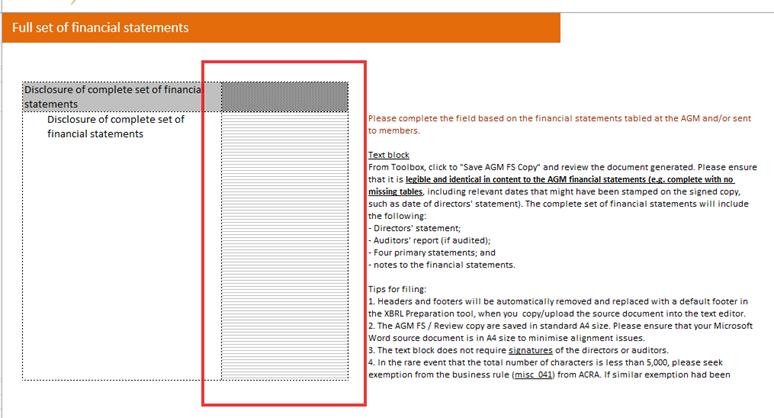
6. | When users wish to export AGM FS copy in BizFinx, please follow the below steps:
|
7. | It is unable to add footnotes through our AP, therefore if users wish to add footnotes in Review Copy in BizFinx, please add manually in the report or through BizFinx tool. |
8. | If users wish to use the other taxonomy reference, please update href and name space accordingly through taxonomy references in [FY] XBRL tab. |
9. | Company label and Notes column in BizFinx – Some of the users may want to include these two columns in their report. However, these columns cannot be generated from our AP because there is no relevant content in the taxonomy. If users wish to enable them, please kindly add manually through BizFinx toolbox and enter the required information. |
10. | Footnotes – This cannot be achieved through AP as there are no contents available in the taxonomy. If users wish to add footnotes, please add them through BizFinx toolbox as part of the customisation. |

Related Content
-
Singapore IFRS
Format: Article