
Version 12 - May 2025 (template release)
Template release pack
This release focuses on the features and corrections updates for the period ending December 2024. The template is available on platform 6.28.9259 / 6.29.9459 / 6.30.9574 / 6.31.9627 / 6.32.9713.
Release notes
Period ended: December 2024
Update type: Minor features and corrections
Overview
This
Vietnam
Corporate Template Content Version 12.0
is a Minor
release that includes feature update and corrections.This release is a mid-year release therefore no legislation updates and the financial year-end stays December 2024. This release is on platforms 6.28.9259, 6.29.9459, 6.30.9574, 6.31.9627 and 6.32.9713
Additional folders have been created to store dated content at the bottom of each of the folder level of the annual report as well as the category structure, please review these elements and create duplicated to retain elements if needed.
Corrections
Item ID | Title | Details and limitations |
|---|---|---|
2564774 | Tested out translate to English button is available after changing language format to English in web OAP | “Translate to English” button was missing as it was informed in Known Issues in the version 11 release note. This has been fixed on web OAP and translate to English button is now available after changing language format to English (United Kingdom). |
Features
Item ID | Title | Details and limitations |
|---|---|---|
2812123 | Created element folders and category folders for outdated content | Pre 2024 [to be reviewed for deletion YE 2029] ([Trước năm 2024 [sẽ được xem xét để xóa vào năm 2029]) has been added under Tóm tắt các chính sách kế toán chủ yếu > Thuế > Thuế thu nhập hoãn lại to retain outdated content. Also NLUC category has been renamed to Trước năm 2024 [sẽ được xem xét để xóa vào năm 2029]. The content retainment instruction is available in the element folder to provide instruction on how to keep the content. The old content in the folder is scheduled for review of removal in 5 years, therefore please duplicate and relocate the folder and additional paragraph element to the appropriate section within the report structure. If there are any changes or updates on this feature update, it will be informed in the release note. |
2829734 | Addition of content retention instruction | Related to ID 2812123, additional adjustment to element folders and category folders. |
2547301 | Standadise display setting throughout report | Changed display setting to “Always” in following elements:
Also usage guide paragraph has been added to “General information”, “Directors report” and “Auditors report”. |
Content changes
There's no content changes.
XBRL
There's no XBRL for this template.
Legislative updates
This release doesn't include any legislative updates.
Known issues
There is a system limitation that relation to ID 2021954 [Ensure non-zero values apply to all sections and columns], if a table has only one section above total row then set to display “AsRequired” in total row, the total row is greyed out. Please change the display setting to “Always” if the total row requires to be displayed.
There is a character limitation in grid column heading. Headers can take up to 60 characters. In the feature update ID 1937486 [Addition of dynamic column headers for the non-standard tables so that the table column headers will link up to the grid column heading names], all column headers have been linked to the grid column. However, if the column header will exceed more than 60 characters, please remove the link to the grid column and type manually.
Upgraded OAP file to 6.29.9459 is available in this release pack. However, for users wishing to update to the 6.29 platform, please note that there is a known issue where even when elements are displayed as “Never”, the report will still display the element.
Unable to export to excel document in the web OAP due to the platform issue. Once this issue is resolved, it will be informed via release notes.
Additional information
Item ID | Details and limitations |
|---|---|
1 | Additional folders have been created to store dated content at the bottom of each folder level of the annual report, as well as within the category structure. Please review these elements and create duplicates to retain them if needed. |
2 | There may be issues when exporting to word document and misalignment in the exported document in Web OAP. If users would encounter this issue, please change the Language Format from vi-VN to en-GB in Regional Settings then export to word document. Please also be noted that it is required to close the entity and open it again in order to refresh the report after changing the Language Format. Once this issue is resolved, it will be informed via release notes. |
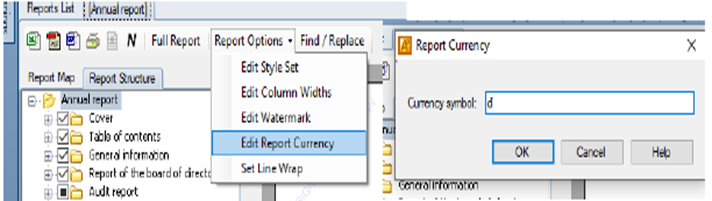
3 | Exporting any reports under “Report lists” to excel will not work in the default currency symbol. To allow this, please change the currency sign from “VND” to its currency symbol of “đ” and number style format in “Edit style set”.
Please note that this is only for when exporting reports to Excel, hence this template has kept the original default setting “VND” and number style. |
4 | Related to the ID 2230692 “Adjustment to Extra 1 and Extra 2 column exceptions” above in “Correction”, as Extra 1 and Extra 2 columns are available in some tables with reconciliation row, please do not change their ID when using these columns. The ID is used to link the grid to the table, therefore changing ID will cause data loss and linking. |


Appendix
There are no appendix items for this template release.
Related Content
-
Vietnam
Format: Article