
Version 13 - December 2025 (template release)
Template release pack
This release focuses on legislative content changes, features, and correction updates for the period ending December 2025. The template is available on platform 6.28.9259, 6.29.9459, 6.30.9574, 6.31.9627, 6.32.9713, 6.33.9810, and 3.34.9900.
Release notes
- Period ended: December 2024
- Update type: Minor features and corrections
Overview
This template is a major release that includes content related technical enhancement, along with features and corrections.
This release is a year-end and the financial year end has been rolled forward to December 2025. The major update in this release is the content related technical enhancements provided by our content provider, refer to the content changes section for more information.
The roll-forward issue has been fixed, and enhancements have been made to the statement of cash flows and the signatory element in this release.There is a correction to the calculation expression in the statement of cash flows. This may impact on the existing data due to re-linking, hence please ensure to retain the existing data before updating.
This release is on platforms 6.28.9259, 6.29.9459, 6.30.9574, 6.31.9627, 6.32.9713, 6.33.9810, and 6.34.9900.
Corrections
Item ID | Title | Details and limitations |
|---|---|---|
2998779 | Fixed “New financial period” under configure FPD for council members’ grid | This bug was raised by the client support team: a roll-forward bug has been fixed in this release. The "New financial period" setting for council members in CFPD is now set to "set current and comparative value from prior period.". This update will only be enabling the roll-forward function successfully without affecting any existing data display or pre-filled data. After this fix, when users roll-forward to the next year, the data will be still retained in the respective grids.  |
2881321 | Fixed consolidated wording variable display condition | The consolidated wording variable display condition has been fixed. When E1 (consolidated) is selected in the Entity grid, the consolidated wording will now display throughout the report. The updated variables are:  When E1 is ticked, the “consolidated wording is displayed. When E1 is ticked, the “consolidated wording is displayed. When E2 is ticked on the “consolidated” wording disappears. 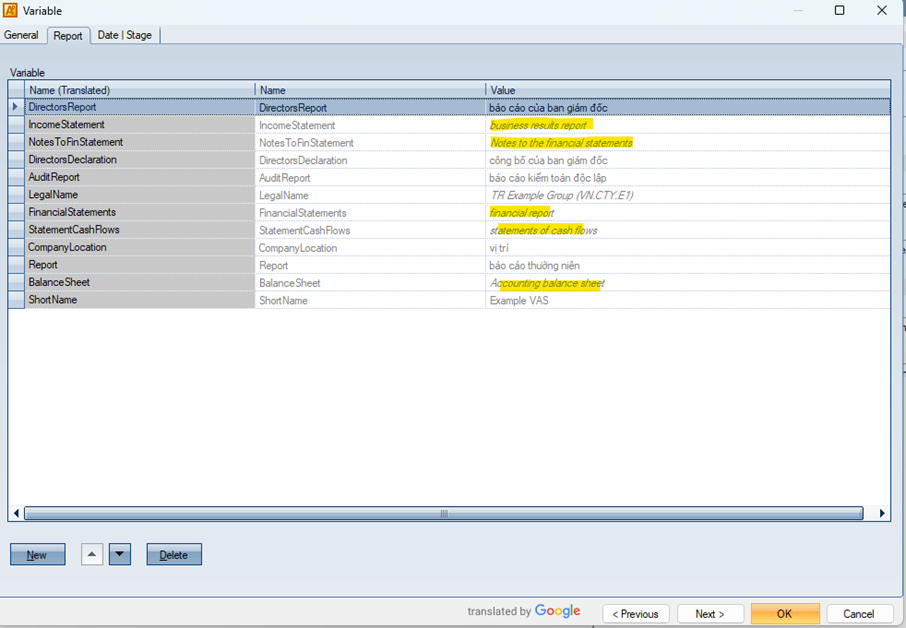 |
3046843 | Added extra reconciliation sections in the cash flows statement | Extra reconciliation rows have been added to the cash flows statement to align with the streamline model. The following line items have been added:
 |
3066985 | Added total calculation rows and fixed calculation expression in the cash flows statement | Optional calculation rows have been added for code numbers 20, 30, 40 and 50. These optional total calculation rows are set to display as “Never”.  Additionally, it was identified that the total calculation expressions in the “cash and cash equivalent” grid were applied only to the indirect table even though those lines were also linked to direct tables. This caused incorrect total values. To resolve this, separate line items for direct and indirect tables have been created, and all items have been re-linked to appropriate tables. For existing users, it may impact on losing pre-filled date. Therefore please ensure to retain the existing data before upgrading.  |
3069940 | Corrected style set applied to the cash flows statement to align reconciliation header correctly | Corrected TS | Columns | Code style set. In the previous version, this style has been set to Paragraph: Right, Indentation: 0mm, Cell alignment: Top Right. This setting was causing misalignment in the reconciliation header. Therefore, this has been updated to Paragraph: Left, Indentation 5mm / 5 mm, Cell alignment: Top left. For the users who have been using this style with the previous alignment set, please be aware that it may impact on the display feature of the report. 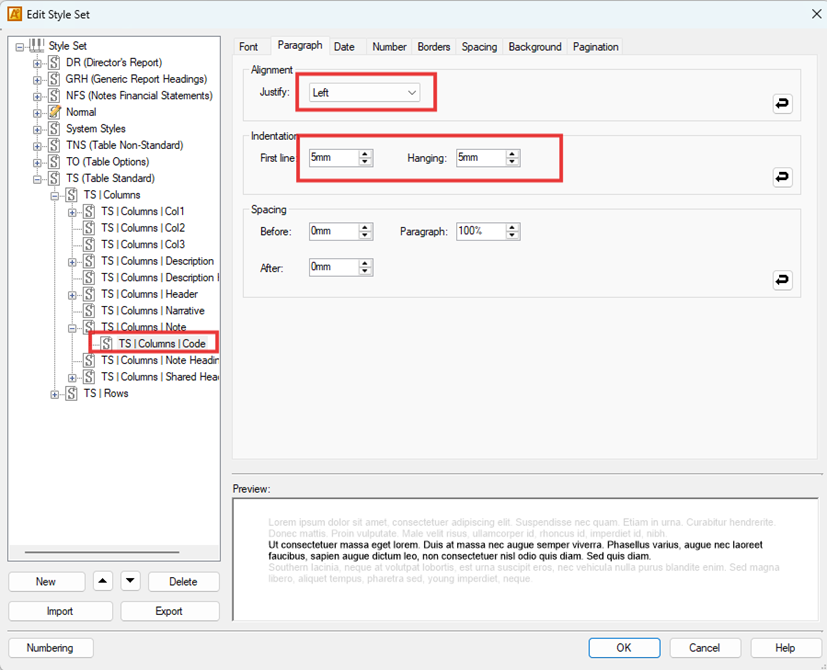   |
Features
Item ID | Title | Details and limitations |
|---|---|---|
3066984 | Enhanced signatory element in the primary statements and note 38 | A new signatory element, aligning with the streamline template, has been added to the primary statements and note 38. The old signatory element has been ticked off as a default.   In the new signatory element, the “Name of signer” column has four dropdown options “None”, “Primary statements”, “Events occurring after the balance sheet” and “Both”. This allows users to select where they wish the names to be displayed.  Additionally, some items have been set display “true” as per our model content, please modify this display expression as needed.  |
2139215 | Added the reconciliation of the cash flows statement | Additional reconciliation sections have been added to both the direct and indirect method tables in the cash flows statement to align with the streamline model and provide breakdown details of the cash flows statement. A “cash flow information” folder has been added under “Cash and cash equivalents” note. This folder contains three subfolders with one standard table each as well as an additional non-standard table for the last folder. Each of these have corresponding grid that has been added to [FY] Non-import tab. This additional reconciliation section is optional therefore it has been set display “Never”.   |
3026590 | Created “Entity specific account assignment report” | “Entity specific account assignment report” has been created in the Report List to align with the streamline model.  |
2998786 | Updated the value in “New financial period” in CFPD | The "New financial period" setting in all items in CFPD has been updated to "set current and comparative value from prior period.". This update is also related to the ID 2998779. Until the previous version, the “New financial period” field had been left empty, and this was causing the issue during the year roll-forward process. This update will not impact on the report display or pre-filled data in the grids. |
Content changes
Item ID | Title | Details and limitations |
|---|---|---|
3043988 | Updated the financial year | The financial year has been updated to 2025 throughout the report. |
3043987 | Technical enhancement for FY 2025 | Contents have been updated for a technical enhancement. Some of the line items in the primary statements have been updated as well as paragraphs throughout the report. The “EntityDescription” variable has been updated to Nhóm Công ty from Công ty which appears throughout the report. Also the board of managers and peopled signed grids for the signatory element has now “Location of signing” column available. Additionally, some typos and inconsistencies were identified. The words listed below were corrected throughout the report: năm > nắm hang > hàng tinhs > tính ảnh > ánh môṭ > một chiụ > chịu chınh́ > chính đınh̀ > đình Sồ > Số For further details, please refer to the “VN.CT (12.2025) (P 6.28.9259 C 13.0 – Content Change List (Full Version)).pdf”. |
XBRL
There's no XBRL for this template.
Known issues
There is a system limitation that relation to ID 2021954 [Ensure non-zero values apply to all sections and columns], if a table has only one section above total row then set to display “AsRequired” in total row, the total row is greyed out. Please change the display setting to “Always” if the total row requires to be displayed.
There is a character limitation in grid column heading. Headers can take up to 60 characters. In the feature update ID 1937486 [Addition of dynamic column headers for the non-standard tables so that the table column headers will link up to the grid column heading names], all column headers have been linked to the grid column. However, if the column header will exceed more than 60 characters, please remove the link to the grid column and type manually.
Upgraded OAP file to 6.29.9459 is available in this release pack. However, for users wishing to update to the 6.29 platform, please note that there is a known issue where even when elements are displayed as “Never”, the report will still display the element.
Unable to export to excel document in the web OAP due to the platform issue. Once this issue is resolved, it will be informed via release notes.
Additional information
Item ID | Details and limitations |
|---|---|
1 | As the CUD for YE 2024 mentioned, Pillar 2 content is not available in our model content. Our content provider has confirmed that the explanatory note that Pillar 2 disclosure is not covered in our model content will be omitted to avoid any potential confusion to our clients and readers. |
2 | Exporting any reports under “Report lists” to excel will not work in the default currency symbol. To allow this, please change the currency sign from “VND” to its currency symbol of “đ” and number style format in “Edit style set”. “Currency Symbol” field under ‘Tools’ tab > ‘Number, Date and Culture Format’.  “Currency symbol” field under ‘[Annual report]’ > ‘Report Option’ tab > ‘Edit Report Currency’. Change to “N” in “Number” tub in these styles below.   Please note that this is only for when exporting reports to Excel, hence this template has kept the original default setting “VND” and number style. |
3 | Related to the ID 2230692 “Adjustment to Extra 1 and Extra 2 column exceptions” above in “Correction”, as Extra 1 and Extra 2 columns are available in some tables with reconciliation row, please do not change their ID when using these columns. The ID is used to link the grid to the table, therefore changing ID will cause data loss and linking. |
Impact on existing clients
Regarding the ID 3066985 – Due to the correction of the expressions in “cash and cash equivalents” tab in cash flows statement, it may impact on the existing data due to re-linking. Hence, please ensure to retain the existing data before upgrading.
Related Content
-
Vietnam
Format: Article