
NFR - Matching Form 1065 (Sch K-1) proforma based on beginning capital (CCH Axcess Tax only)
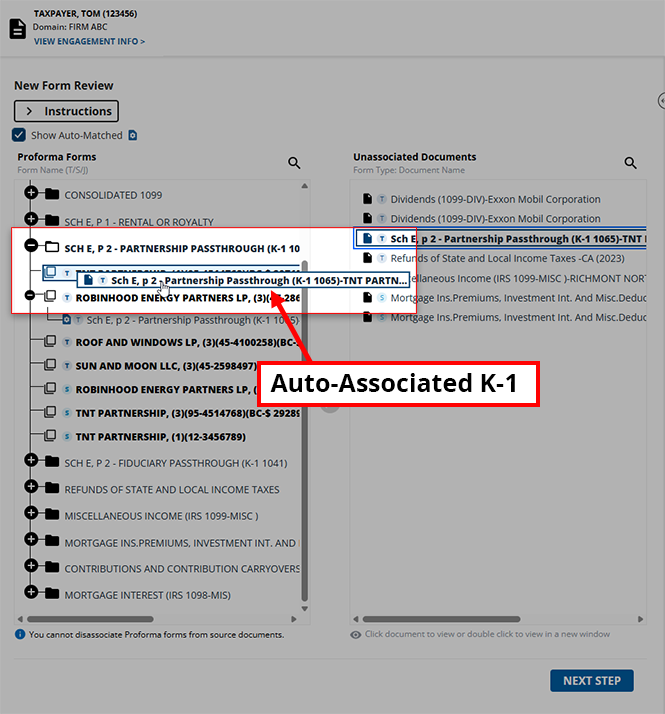
When you are working on a CCH Axcess Tax binder, the NFR (New Form Review) step will show you the previous year's ending capital amount as the current year's beginning capital for each Schedule K-1 name in the
Proforma Input Forms
panel of the NFR wizard. If the beginning capital amount matches, SurePrep will automatically associate the Schedule K-1 to its proforma input form. To help associate Schedule K-1 correctly to their respective proforma, the capital amounts will appear in parenthesis at the end for Schedule K-1 - Form 1065.
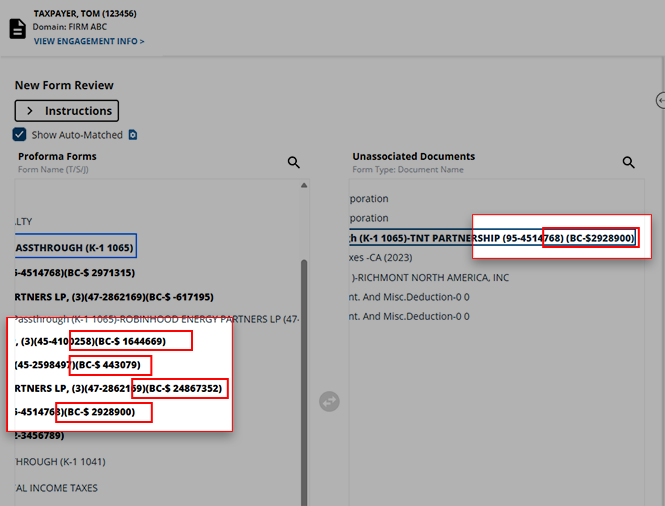
If multiple schedule K-1s appear with the same name then SurePrep will first try to match with K-1 based on the default identifier fields (SSN, EIN) If there are still any unmatched Schedule K-1 then SurePrep will match Schedule K-1 based on the matching beginning capital amount value.
Requirements
Tax Software | Review Wizard step | Form Type |
|---|---|---|
CCH Axcess Tax | NFR (New Form Review) | Schedule K-1 - Form 1065 |

