
Matching Masked EINs
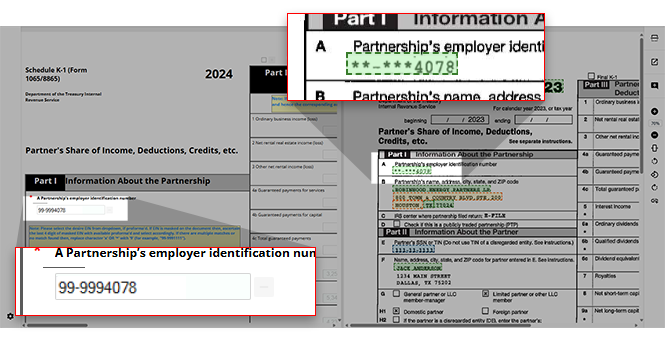
During verification, Schedule K-1 templates will display EIN fields as drop-down menus. Users can edit or correct the EIN if the OCR fails to accurately capture it due to masked information in the source document.
When the EIN is masked in the source document (i.e. appearing as
xx-xxx1234
or **-***1234
), the system will match the last four digits of the masked EIN with the proforma'd EIN. If the proforma'd EIN matches the last four digits on the EIN masked in the source document, the system will select the proforma'd EIN during verification.If the source document's masked EIN does not match with the proforma'd EIN, the system will replace the masked characters with the number
9
(i.e. an EIN with no proforma'd matches shown as xx-xxx1234
will be displayed in the Verification Wizard as 99-9991234
).
Related Content
-
Step 2 - Verification
Format: Article

