
Restore OCR Data
In Verification Wizard, the
Restore OCR Data
feature allows you to restore any deleted or modified data from a page template to how it was originally captured by OCR. Restoring the template back to its original state can be useful in instances where you accidentally deleted data from all the field(s) or all the pages. Restore OCR Data
can also help restore information that may have been erroneously updated. Follow these steps to restore OCR data back to the template:
- Click theRestore OCR Data
 icon in the Verification Wizard toolbar.
noteTheRestore OCR Data icon will be disabled if a document is already in its original status
icon in the Verification Wizard toolbar.
noteTheRestore OCR Data icon will be disabled if a document is already in its original status
- Select the checkbox for pages you want to restore the data for.Restore OCR Datawill undo any modification that you've potentially made to the selected page template and override them with the original OCR data.
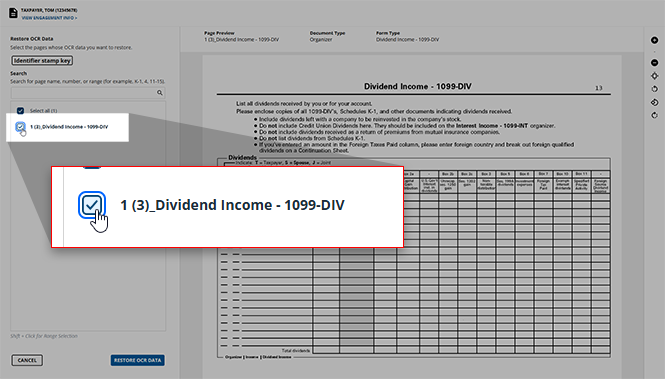 noteIf you'd like to select all of the pages listed, you can click theIf you're searching for a specific page that you cannot locate on the list, you can type the name of this page into theSEARCHbar for quicker navigation.
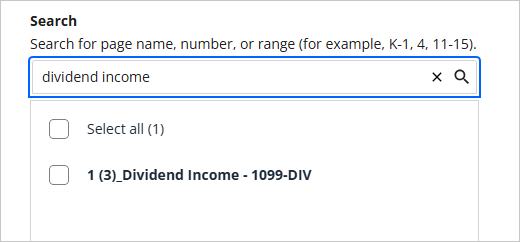 Select Allcheckbox to instantly select all of these pages.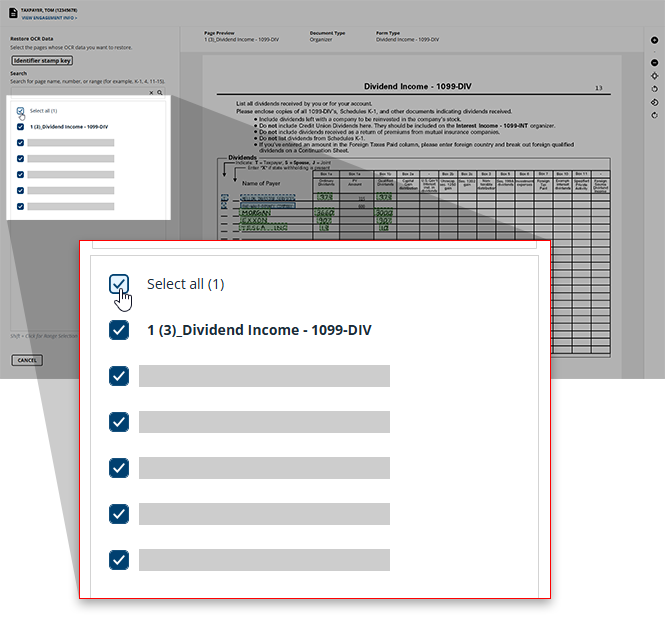
- Once you've selected all of the pages you'd like to restore, clickRESTORE OCR DATAto restore the selected pages. If you'd like to close theRestore OCR Data Confirmationwindow without restoring the data on the selected pages, clickCANCEL.
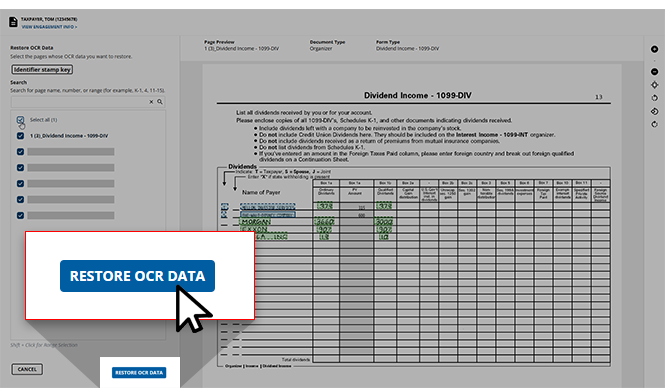
- You will see a dialog box asking you to confirm your choice to restore the OCR data for the selected pages. If you wish to continue with disassociating, clickCONTINUE, otherwise clickCANCELto return to theRestore OCR Datadialog box.

Related Content
-
Step 2 - Verification
Format: Article

