
Enable expedited processing
With SurePrep, you can process 1040SCANverify binders at a faster pace compared to the standard due date. When creating a binder, people at your firm will have the option to mark the
Expedited processing
checkbox to speed up the processing time for the binder. You can check your firm's Account Usage History for expedited processing.
note
Additional fees will only apply if you mark the
Expedite Processing
checkbox during the binder submission process.Enable/disable expedited processing
Follow these steps to enable Expedited Processing for your firm:
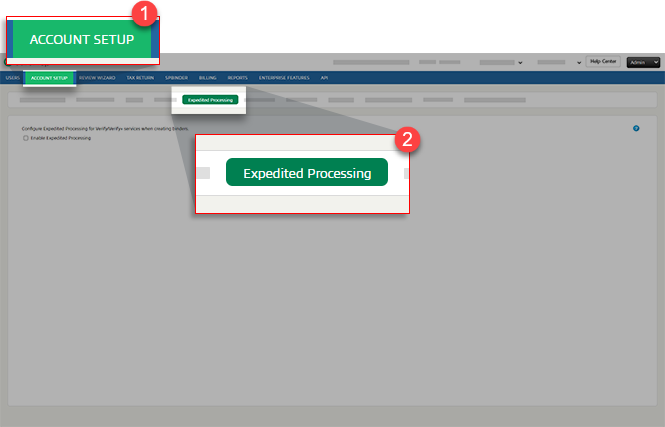
- SelectFileRoom,Admin,Account Setup, thenExpedited Processing.
- Select theEnable Expedited Processingcheckbox to enable theExpedited Processingoption for 1040SCANverify binders.Clear the checkbox to disable expedited processing.
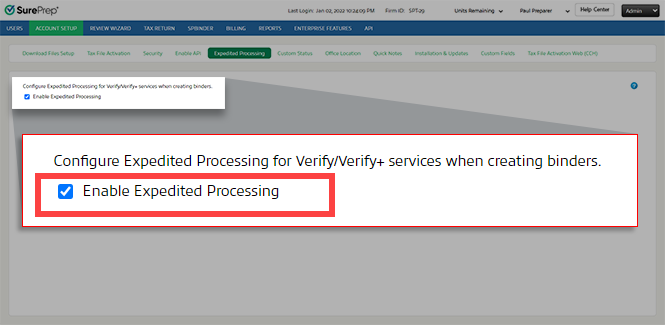 noteEnabling expedited processing lets everyone at the firm selectExpedited Processingas an option when creating a 1040SCANverify binder. Additional fees will apply if someone selects theExpedited Processingcheckbox during the binder submission process.You can check Account Usage History for expedited processing.
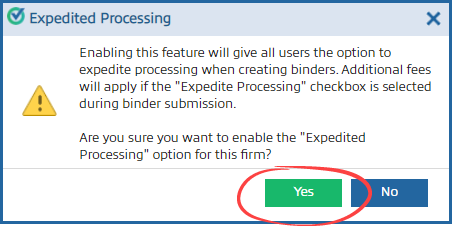
 - In the confirmation window, selectYesto enable expedited processing. Enabling expedited processing lets everyone at the firm selectExpedited Processingas an option when creating a 1040SCANverify binder.
After you enable expedited processing, you'll see the
Expedited Processing
checkbox on the Create New Binder
window for 1040SCANverify Onshore/Offshore services. Additional fees will apply if you select theExpedited Processing
checkbox.

