
Requiring highlights/references when entering data
You can control whether you're required to place references (highlights) before being able to enter applicable data when processing the Verification (Step 2) of the Review Wizard.
tip
This section will not be visible if you opt to skip
Step 2: Verification
from Skip Selected Review Steps
section. - Go toFileRoom,Admin, thenReview Wizard.

- Locate theStep 2: Verificationsection.
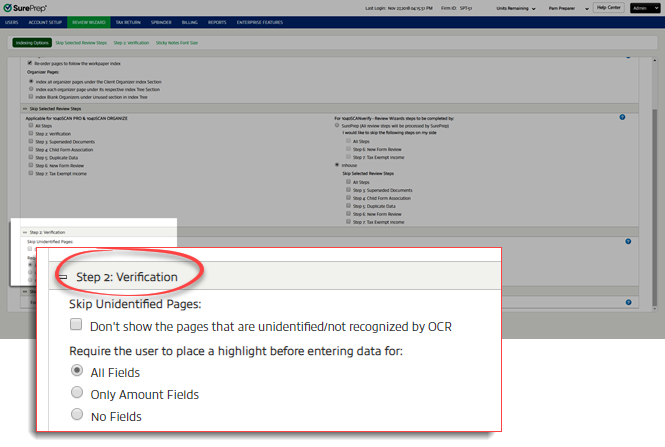
- UnderRequire the user to place a highlight before entering data for, select one of the following options:
- All FieldsIf this is selected and if you need to add data during verification, you'll need to place a reference on the source document to manually open the field to input data. Without a reference, blank fields will be grayed out. This will need to be done for all fields, including descriptions, dates, amounts, check boxes, and dropdowns.
- Only Amount FieldsIf this is selected and if you need to add data during verification, you'll need to place a reference on the source documents for amount fields to manually open the field to input those amounts. Without a reference, blank amount fields will be grayed out. Descriptions, dates, check boxes, and dropdowns can be entered without placing references. References are generated automatically for all data that is entered without placing references.
- No FieldsIf this is selected, you can input data in any field without first placing a reference. References are generated automatically for all data that is entered without placing references.


