
7216 Consent > Activate 7216 Consent
note
7216 requires that tax preparers receive taxpayer consent before disclosing taxpayer information to third-party individuals who provide substantive determinations or advice affecting the tax liability reported by taxpayers or any individual located outside the United States.
The
7216 Consent
feature lets firms restrict their offshore customers from viewing binders when 7216 consent isn't granted. The activation process includes selecting the Enable 7216 Consent Feature
checkbox in FileRoom
, then Admin
and assigning permissions in User Group Management to restrict the user group from accessing binders or TaxCaddy Client Profiles unless the consent has been given. Users can then update 7216 consent for existing binders to indicate 7216 has been granted.For TaxCaddy Clients, restricted customers can't be Owners or Assigned Members if 7216 consent hasn’t been received. You can update 7216 Consent from the Client Profile.
When you turn on the 7216 Consent feature, the 7216 access restriction applies to all binder services and TaxCaddy Client Profiles.
Follow these steps to turn on or turn off this feature:
note
When you turn on this feature, you'll need to assign the related permission to user groups that you want restricted from viewing binders without 7216 Consent.
- Go toFileRoom,Admin, thenENTERPRISE FEATURES.

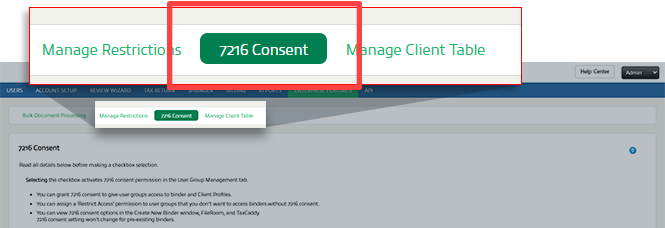
- Select7216Consent.
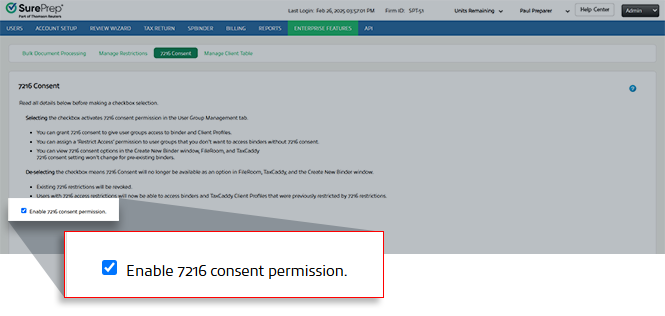
- Select the field next toEnable 7216 Consent Features.To turn off the7216 Consentfeature, clear the checkbox.
Turning on the 7216 Consent restriction will:
- Show you a new required field on theCreate New Binderwindow, you will need to select if 7216 Consent is granted or not when creating a new binder.
- Show you an option to apply the 7216 Consent restriction to a group of users. Go toAdmin,Account Setup, andUser Group Management.
- Show a new column in FileRoom labeled7216 Consent. However, this does not appear by default, selectColumn SetupinFileRoomto make the7216 Consentcolumn visible. Pre-existing binders will showNA(i.e., not applicable).
- Not modify access to pre-existing binders. These pre-existing binders will continue to be accessible for all users, irrespective of 7216 restrictions. Please contact SurePrep Support if you would like to update pre-existing binders7216 ConsenttoNo.
Turning off the 7216 Consent restriction will:
- Remove 7216 restrictions from existing binders. Users with restricted access due to7216 Consent, will now be able to access the 7216 restricted binders and TaxCaddy Client Profiles.
- Option to set 7216 Consent will no longer appear in the Create New Binder window , FileRoom, and TaxCaddy.
If the domain setting is re-enabled, binders that haven’t received 7216 consent will again be restricted. 7216 consent received/not received status associated with each binder and TaxCaddy Client Profile won’t change as a result of enabling or disabling the domain-level 7216 consent feature.

