
Tax exempt income
You can choose the settings for Tax Exempt Income allocation for state purposes. Follow these steps to configure Tax Exempt Income options.
- Go toFileRoom>Admin>Tax Return.

- On the location dropdown, select the office location. The tax return option changes will apply to the selected office location.noteWhen selecting tax return options, if no office location is selected then the blank location (first option) settings will be used by default. Any new office location added will inherit the blank location settings.
- Go to theTax Exempt Incomesection.
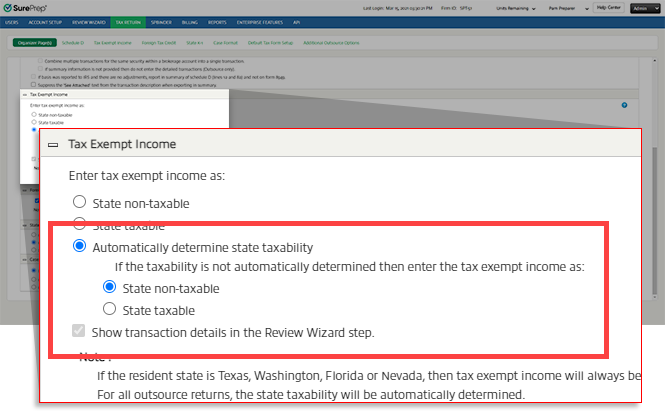
- By default,State non-taxableis selected. When this's chosen, all tax exempt income will be considered State non-taxable.
 SelectState taxableif you want all tax exempt income to be considered State taxable.
 electAutomatically determine state taxabilityto have the system determine the state taxability automatically by matching the security descriptions with the predefined list, abbreviation table, and state names. If you chooseAutomatically determine state taxability, you'll need to choose how to consider unmatched descriptions. They can be considered eitherState non-taxableorState taxable.If you selectedAutomatically determine state taxability, then the checkbox next toShow transaction details in the Review Wizard stepwill be selected and grayed out by default. When state taxability is determined automatically, the detailed tax exempt income transaction will always be shown in the Review Wizard.
 noteThe ability to automatically determine state taxability begins processing for new binder around Feb 15th of the calendar year.
 - If you chose to always consider tax exempt income asState non-taxableorState taxable, you can choose whether you want the transaction details to be shown in the Review Wizard step by either marking or unmarking theShow transaction details in the Review Wizard stepcheckbox.
note
When the resident state in the tax return is Texas (TX), Washington (WA), Florida (FL), or Nevada (NV), the Tax Exempt Income step of the Review Wizard will not appear regardless of the settings chosen in
Admin
> Tax Return
> Tax Exempt Income
or in the Submission Wizard. For all outsource returns, the state taxability will be automatically determined.note
In SPbinder, you can select the  to check which tax return options were applied to the binder when it was created.
Binder Information
icon to check which tax return options were applied to the binder when it was created. Related Content
-
Tax Return options overview
Format: Article

