
How are binders matched for roll forward?
In FileRoom you don’t need to roll forward binders manually. The system automatically checks for certain criteria and rolls forward the necessary data.
As soon as you enter the
SP Client ID
in the Create New Binder
window, the system attempts to match the SP Client ID
with the immediate prior year binder of the same return type.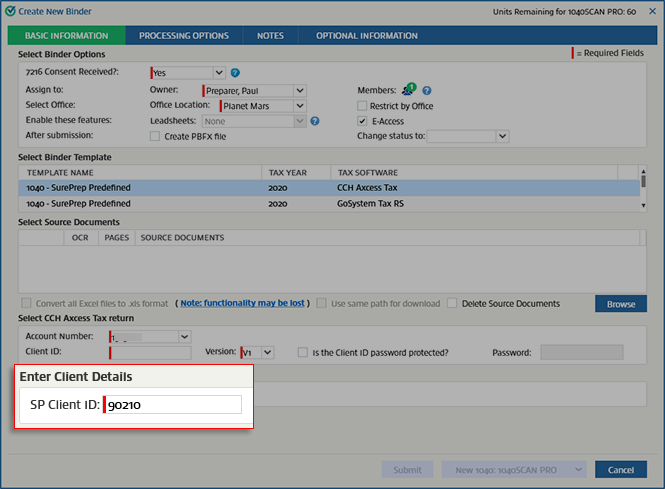
note
Contact SurePrep support if you want to roll forward binder across domains (that is, BL-01, BL-02) within the same firm.
1040 binder types
If the SP Client ID doesn’t match, the system will try to match the Taxpayer SSN, then the Spouse SSN.
If the SP Client ID, Taxpayer SSN or Spouse SSN match, then the system will roll forward permanent notes along with linked workpapers and the workpapers marked for rollforward. If a permanent note is cleared, then it will also appear cleared in the following year's binder.
1041 binder types
If the SP Client ID doesn’t match, the system will try to match the EIN.
If the SP Client ID or EIN match, the system will roll forward permanent notes along with linked workpapers and the workpapers marked for rollforward.
If the system is unable to match either the SP Client ID, Taxpayer SSN or Spouse SSN in the case of 1040 engagements or SP Client ID or EIN in the case of 1041 engagements, the system won’t roll forward any information.
note
The system will only check to match the SP Client ID for GoSystem Tax RS, CCH Axcess Tax, and tax software "Other". If the system is able to find a match to the SP Client ID but the workpapers that had been marked for rollforward in the prior year binder are not found, a placeholder will be created in the Index Tree. You will see the following message in the document viewing area when you select the placeholder icon.

note
If you are using different tax preparation software for the current tax year than you used for the prior tax year, the system will be unable to perform the match and roll forward.
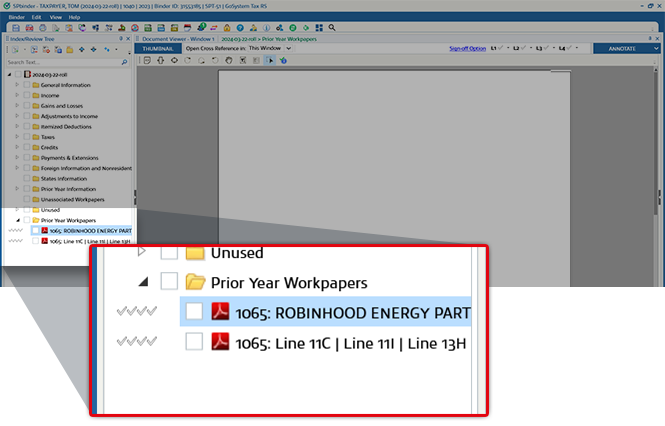
In the following year, the workpapers you marked to roll forward will be seen in the
Prior Year Workpaper
folder in INDEX TREE
.
Workpapers will roll forward Linked Notes, Sticky Notes, and Cross-references (if both the workpapers cross-referenced are rolled forward).

