
CCH Axcess Tax Activation methods
There are 2 methods of integrating CCH Axcess Tax with SurePrep depending on the SurePrep service type and your method of logging into CCH Axcess Tax. You can either use the
TFA (Tax File Activation)
window or Tax File Activation Web (CCH)
. For a proper setup, use the activation method that matches your requirements.You can use the following criteria to determine your activation method:
- CCH Axcess Tax Login Mode
- Service Type
- All 1040/1041 Services (Except Outsource)
- OutSource Sevice (1040/1041/BTR)
CCH Axcess Tax Login Mode
How do you log in to CCH Axcess Tax?
- Credentials:Use this if you log into CCH Axcess Tax by entering yourUser IDandPasswordto open the tax software.
- ADFS/SSO:Use this if you launch CCH Axcess Tax through a universal login through your firm's portal (using SSO / Single Sign-On) without entering separate credentials for CCH Axcess Tax.
After you find your CCH Axcess Tax login method (Credentials vs ADFS/SSO), go to the next step to select the activation method that works for you.
Service Type
All 1040/1041 Services (Except Outsource)
After determining your CCH Axcess Tax Login Mode (Credentials vs ADFS/SSO ), use the Activation Method linked below that matches your CCH Axcess Tax login mode:
CCH Login Mode | Activation Method |
|---|---|
Credential | TFA Window |
ADFS/SSO | TFA WEB |
E.g., If you use Credentials then Use TFA Window)
The above activation methods apply to all 1040 and 1041 services (excluding Outsource).

OutSource Sevice (1040/1041/BTR)
Use the listed Activation Method and create a service user if required:
CCH Login Mode | Activation Method | Create Service User? |
|---|---|---|
Credential | TFA (OS section) | N/A |
ADFS/SSO | TFA (OS section) | Yes |
The following services are Outsource Services for 1040 and 1041 binder types.
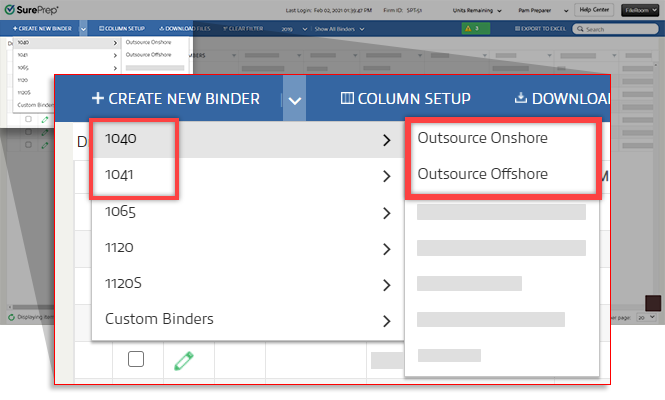
The following services are Outsource Services for business tax returns:

Activation Method
TFA window - Credential Authentication
To activate CCH Axcess Tax using the
Tax File Activation
window, go to Admin
, Account Setup
, Tax File Activation
(window), then CCH Axcess Tax
. Enter your login credentials under Credential Authentication (Login Mode)
.
TFA WEB
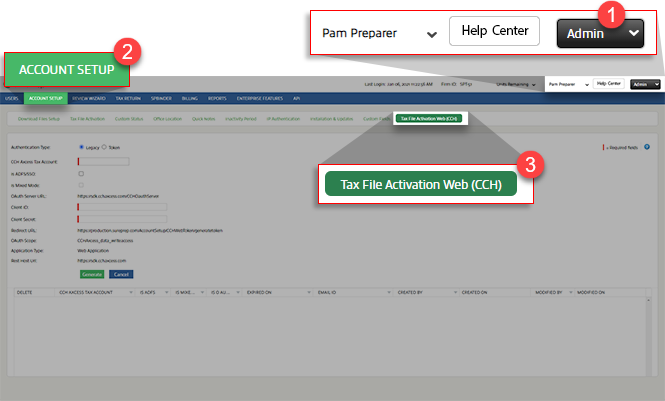
Based on the requirements, if you are required to activate tax file activation on the web, go to
FileRoom, Admin, ACCOUNT SETUP, then Tax File Activation Web (CCH)
.
note
If you are activating CCH Axcess Tax from Tax File Activation on the web then you
must
use the Token
authentication method. TFA window - Outsource only section
If you are using OutSource Sevice for 1040, 1041, and BTR (Business Tax Returns), go to
Admin
, Account Setup
, Tax File Activation
(window), then CCH Axcess Tax
. Enter your login credentials under CCH Axcess Tax User Logins (For Outsource only)
.
note
If you previously created any SurePrep users in CCH (SurePrepTest and OutSource.Support) then locate the user and remove/delete the SurePrep outsource user from your firm the list and create a user with the new instructions.

