
Create a binder in Lacerte
Creating a binder is a starting point from where you can submit your client's tax documents and have them processed through OCR, get verified, and go into SPbinder for preparation. You can create a binder for your client by providing basic information about the type of binder you want to create. At this stage, you can set which firm user should be the Owner, the office location, binder access permissions, and binder tax year.
When you create a binder in FileRoom, SurePrep gets your client's information from the tax application and creates a binder specifically catered for that taxpayer client. The information fetched from your client's tax application file is used to create placeholders called "proforma" (for example, W-2 proforma placeholder for 'ABCD, Inc.'). In SPBinder, you can organize documents to their respective (proforma) categories and export the data to the correct entities in the tax application.
You will need to upload the client's most recent tax application file details. Before creating a binder, make sure the client is created or proforma (roll forwarded) to the current tax year.
note
- Make sure you have the latest version of the Lacerte SDK driver installed on your machine/environment to:
- Create binders in FileRoom
- Export binder data to tax application
- Create Custom DRL in TaxCaddyLatest release:December, 19, 2023.
Uninstall the previous version before installing a new version. - If you are using1040SCANverify Onshore&1040SCANverify Offshoreservices then follow the instructions listed under the followingIn-housesection.
In-house binders
- In FileRoom, point to theCreate New Bindercaret icon.

- Point to1040.

- Select from the following services:
- 1040 SCAN PRO
- 1040SCAN ORGANIZE
- SPbinder
- * 1040SCANverify Onshore&1040SCANverify Offshore
 *while1040SCANverify Onshore/Offshoreare not In-house services, the same instructions can apply as other In-house services.
 - TheCreate New Binderwindow will appear. UnderSelect Binder Template, select the template with the tax year andLacerteas the tax application.

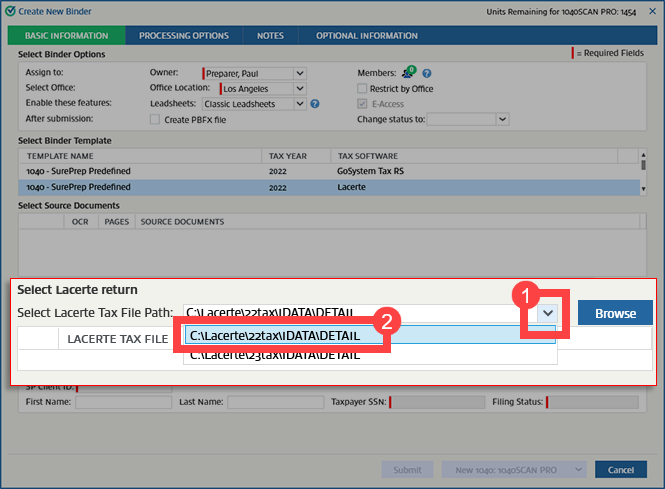
- When theSelect Lacerte returnpanel appears, aSelect Lacerte Tax File Pathfield will display the path set in .

- If you need to change the file path, select the path and then select the path you want to use.note
- Data Path should be located in the Lacerte installed folder on your network or local path. Add the following folders based on the return type:
- If more than 1 Lacerte path exists, the path that was last selected will be remembered, and you won’t be required to reselect it.
- UnderSelect Source Documents, selectBrowse. Select your source documents, and selectOpento attach the source documents.
- To access the client data, permission is required. On theAccess Confirmationwindow, selectGrant. TheAccess Confirmationwindow only appears once.noteYou must haveLacerte ODBC Driverinstalled to access client data. You won’t see theAccess Confirmationwindow if you don't haveLacerte ODBC Driverinstalled.
 Any subsequent attempts to access the client data will only require sign in once every 24 hours.
 - On theSign inwindow, enter your Lacerte sign in credentials, then selectSign In.noteYou will need to enter your Lacerte sign in credentials again when your sign in session expires in 24 hours.

- If the name of the 1st source document file and the name of the ID2 file is the same, then the ID2 file will be selected automatically as a ZIP file.noteEach tax year will have a different extention based on the last digit of the tax year. For example:
- 2022extension is ID2
- 2021extension is ID1
- 2020extension is ID0

- If the (first) PDF file name doesn't match the tax client ID, selectBrowseunderSelect Lacerte returnand attach the ID2file.
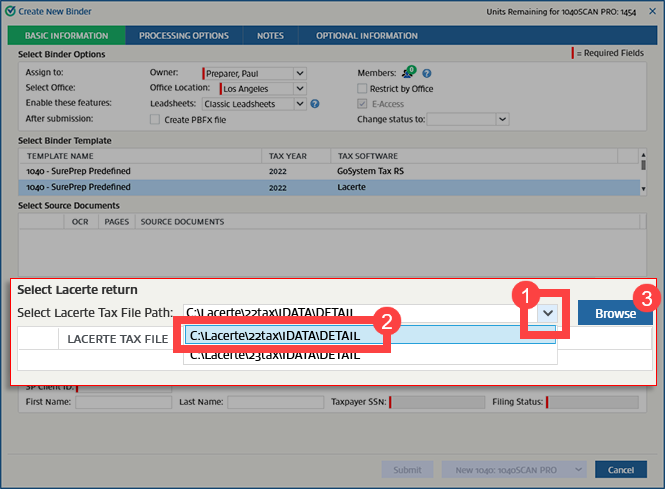
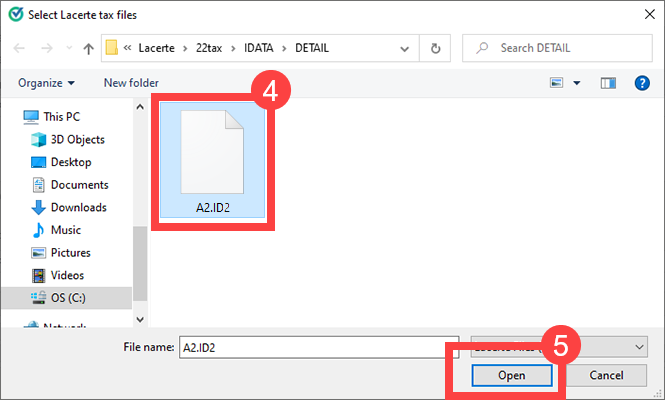
- TheClient ID,First Name,Last Name,Taxpayer SSN, andFiling Statuswill be automatically populated underEnter Client Details. In the case of a 1041 binder, the trust's EIN and type of entity will also be populated automatically. The taxpayer's SSN and filing status are mandatory.noteAll data that requires manual input in the ID2file should be entered before uploading the binder or after exporting the data into the tax application. Proforma'd dependent information won't be imported from Lacerte into SPbinder. Data for dependents won’t be captured or exported into Lacerte. The organizer page for dependents will be bookmarked in the SPbinder.

Outsource binders
- To submit an outsource binder, you'll first need to back up the return. OpenLacerteand select the tax application file you want to submit.

- Go to your designated outsource folder (that is, C:\SurePrep\Submit To SurePrep), then create a new subfolder. The folder name should match theClient No.in Lacerte.For example, if your client'sClient No.is "A3" in Lacerte, then create a folder called "A3" (that is, C:\SurePrep\Submit To SurePrep\A3).

- In Lacerte, once you have selected the client, go toClient, thenBackup, or pressCtrl+B.
 You can also select theBackup selected client(s)icon on the toolbar.
- TheBackup Clientswindow will appear.

- SelectBrowse. Go to theSubmit To SurePrep, thenClient No.folder in which you want to save the backup of the tax application files (that is,C:\SurePrep\Submit To SurePrep\A3).noteTheClient No.folder must match theClient No.in Lacerte.
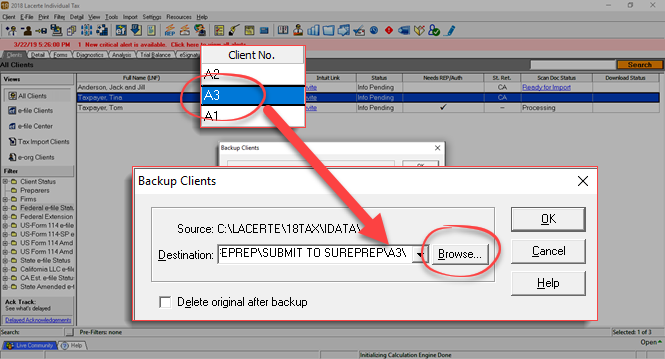
- The backup will be created in the selected folder.noteYou don't need to zip the backup tax files.

- In FileRoom, point to theCreate New Bindercaret icon.
- Point to1040.
- Select from the following services:
- Outsource Onshore
- Outsource Offshore
 For1040SCANverify Onshore&1040SCANverify Offshoreservices, please scroll to the top and use the In-house (tab) instructions instead.
 - TheCreate New Binderwindow will appear. UnderSelect Binder Template, select the template with the tax year andLacerteas the tax application.

- Select the path inSelect Lacerte Tax File Pathand choose the location of the Lacerte tax application backup files.noteTo view theSubmit To SurePrepfolder path, it must be set inTax File Activation, thenLacerte.
- UnderSelect Source Documents, selectBrowse.

- Select your source documents, then selectOpento attach the source documents.noteTo automatically match the proforma, the file name must match theClient No.(that is, C:\SurePrep\Submit To SurePrep\A3)

- To access client data, permission is required. On theAccess Confirmationwindow, selectGrant. TheAccess Confirmationwindow only appears once.noteYou must haveLacerte ODBC Driverinstalled to access client data. You won’t see theAccess Confirmationwindow if you don't haveLacerte ODBC Driverinstalled.Any subsequent attempts to access the client data will only require sign in once every 24 hours.
- On theSign inwindow, enter your Lacerte sign in credentials, then selectSign In.noteYou will need to enter your Lacerte sign in credentials again when your sign in session expires in 24 hours.
- If the name of the 1st source document matches the client number, the tax file is automatically zipped and attached.
 Enter Client Detailssection will autofill once the match has been found.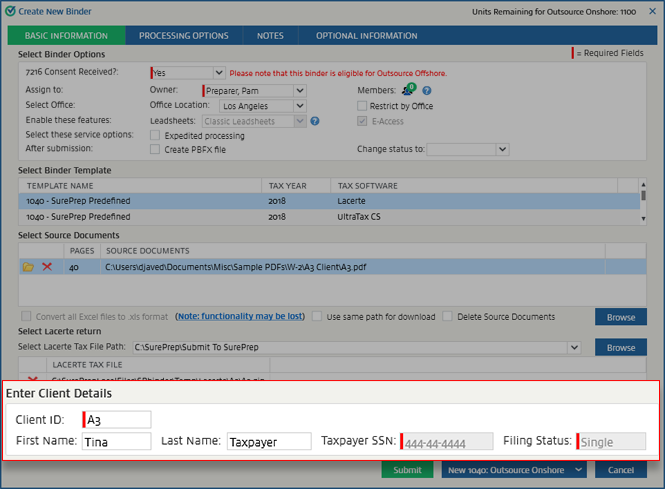
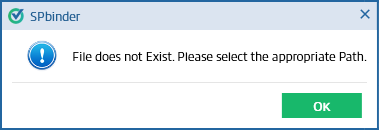
- If the name of the source document file doesn't match the client number, the Lacerte path is incorrect, or the Lacerte tax file doesn't exist at the selected path, you will get an error. In that case, set the location of the backup file you created in .
- Alternatively, you can manually select the client's backup folder directly.noteManually selecting the client's backup folder loads the client's proforma details, whether the file name matches the client or not. Make sure you select the folder.
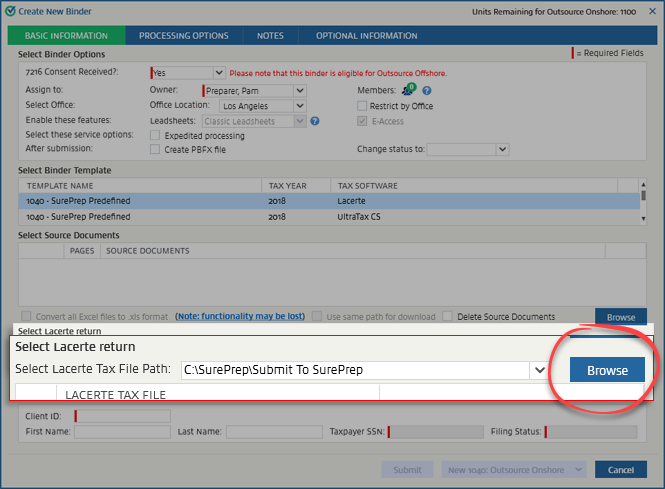 Select the client's backup folder, then selectOK.
Troubleshooting
When creating a binder, you may see the
Cannot Find Client
message if SPbinder is unable to locate the tax file. 
To resolve this, make sure the following items have been completed prior to making a binder.
- Tax File Activation for the selected tax year: Ensure the Tax File Activation path is setup for the selected tax year. New paths need to be added when a new tax year is released.

- Check if the client exists in Lacerte for the selected tax year. In Lacerte, add a new client or roll forward last year's client to the current year .
- Update Lacerte. Go to .

- Install Lacerte SDK (ODBC Driver) if it is not already installed.
- Once you've completed all the previous steps, restart your workstation then try again.

