
Restore tax files for ProSystem fx Tax
When a binder is completed, you'll need to download the ProSystem fx Tax files from FileRoom and restore them to ProSystem fx Tax.
- Download the ProSystem fx Tax files from FileRoom.
- OpenProSystem fx Tax.
 Production Processingwindow will appear.
- Go toFile, thenTransfer Clients.

- TheTransfer Returns Inwindow will open.
- Tax Year: Select the tax year.
- Tax Product: Select the engagement type.
- Data drive: Select the drive letter in which a work directory resemblingx:\fx\15\ud\999999resides in.
- Account Number: Your 6 digit ProSystem fx umber.
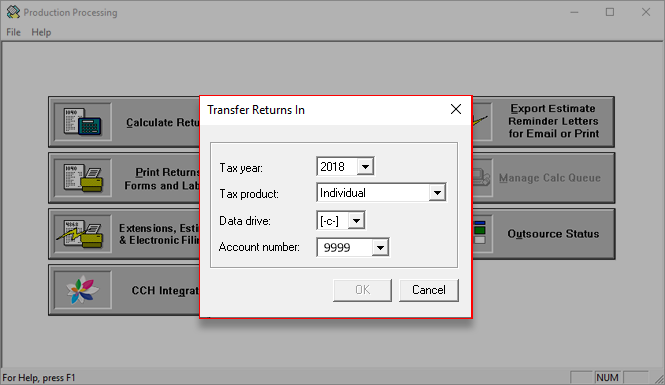
- SelectOK.
- Select the client you want to restore underReturnsand selectAdd.

- When all the returns that need to be restored have been listed underReturns selected for transfer, selectTransfer.

- To replace the proforma'd version of the tax return, setRtn versionto1.

- TheBatch Logwindow will open confirming the transfer. SelectClose.


