
Activation Other (non-supported) tax software
SurePrep allows you to integrate/activate your tax software with SurePrep in order to use SurePrep services. By default, SurePrep supports integration with:
- GoSystem Tax RS
- UltraTax CS & UltraTax Virtual Office CS
- Lacerte
- CCH Axcess Tax
Even if your firm uses other tax software that is not listed here, you can still use SurePrep's
1040SCAN ORGANIZE
and SPbinder
services.Follow these steps if you want to use
1040SCAN ORGANIZE
and SPbinder
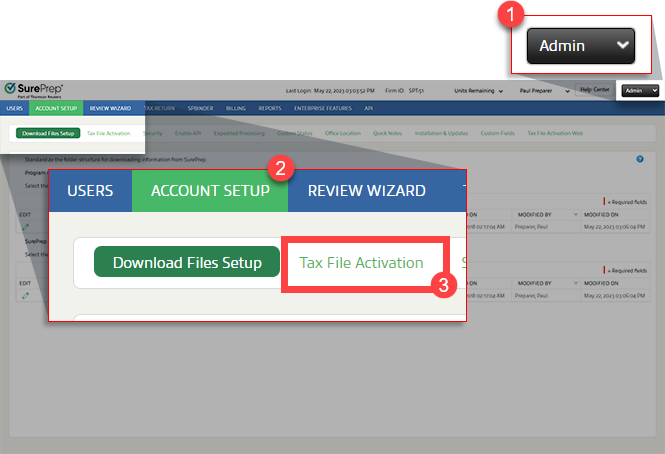
service for other (non-supported) tax software:Go to
FileRoom
, Admin
, Account Setup
, then Tax File Activation
.
Open the PBFX file once it completes downloading.
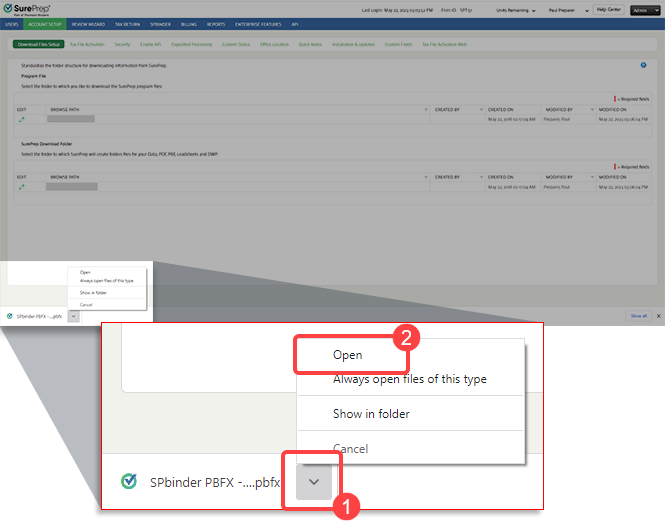
note
In Chrome and Edge, you can select '
Always open files of this type
' to automatically launch the PBFX file the next time you need to create a binder or update your Tax File Activation
settings.When the
Tax File Activation
window appears, select the Other
tab.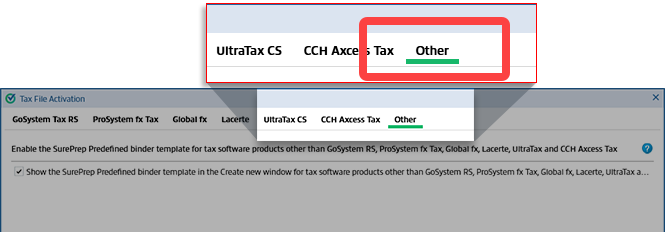
Select the 1st checkbox :
Show the SurePrep predefined binder template in theCreate New Binderwindow for tax software other than ...
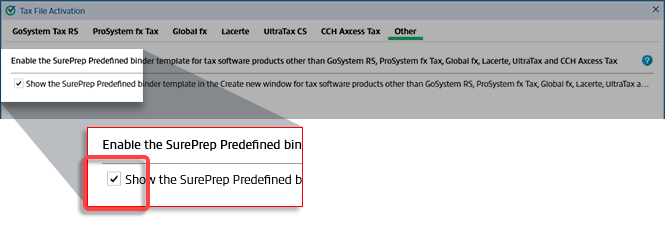
These initial steps were a one-time process, you can now continue to make binders as needed.
Create binders for other tax software
After completing the one-time activation steps, you can follow these steps to create new binders for
1040SCAN ORGANIZE
and SPbinder
services.- Go to FileRoom and point to theCREATE NEW BINDERarrow.
- Point to1040or1041to select the binder type that matches the tax return.
- Select1040SCAN OrganizeorSPbinder.

- When you're creating a binder for other non-supported tax software, select theTAX SOFTWAREasN/A.


