
2025-12-21 Release (FileRoom UI, Bulk Delete Users, SPbinder Export)
Release note for December 21, 2025
FileRoom: Hide Error Columns
In FileRoom, the '
All Binders
' tab shows users three columns that highlight if a binder is in error and what actions are required to resolve the error. However, these three columns may not always be needed (as in ERROR CATEGORY
, REQUIRED ACTION
, RESOLUTION STEPS
). With this new enhancement, users can now select the Hide Error Columns
button to hide the error columns.
After you log in, users will now also see a pop-up notification that displays the number of binders in error in your firm's account. You can select the link to switch to the relevant tab in FileRoom directly. The table is broken down into the following two error categories:
- User Action Required: Binders in error that can be resolved by a user at the firm.
- SP Action Required: Binders in error that can be resolved by SurePrep.
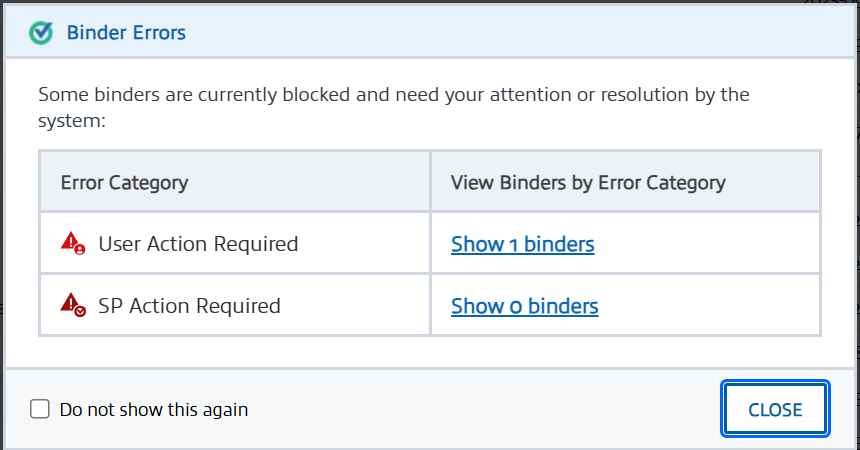
note
You can select '
Do not show this again
' to permanently dismiss this notification from appearing in the future. To enable this feature again, please contact Support.Account Admin: Bulk Delete
You can now bulk delete multiple firm users. In
Account Admin
, User Management
page, select the checkboxes for users you want to delete, then select the Delete User
button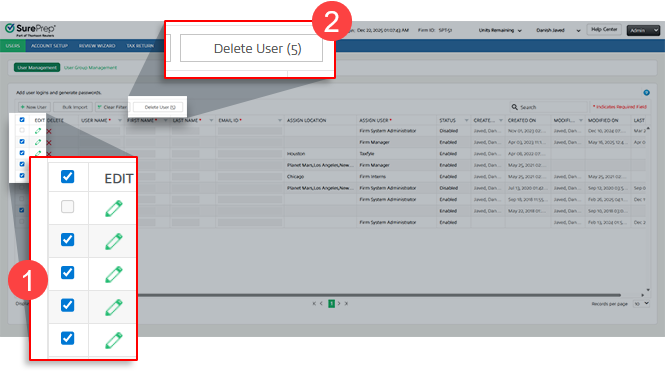
note
You can't bulk-delete users who meet either of these conditions:
- Have theFirm System Administratorrole
- Have aDisabledstatus
SPbinder: Export progress
SPbinder now displays a progress bar in the
Export
window, allowing users to track the export's progress in real time.
The progress bar is available for
CCH Axcess Tax (All Leadsheets)
and GoSystem Tax RS (Classic/Simplified Leadsheets)
now, and will expand in the next release to GoSystem Tax RS (None/Without Leadsheets)
, UltraTax
, and Lacerte
.UltraTax Activation Reminder
Starting with tax year 2025, SurePrep and UltraTax have introduced a new, simplified integration process for UltraTax CS customers (local desktop and Virtual Office/SaaS) who use both products and services. This
mandatory one-time setup
replaces the previous integration method and significantly reduces the complexity of connecting SurePrep services with UltraTax CS. This is a mandatory, one-time integration that ALL firms using SurePrep and UltraTax CS must complete to create binders and Document Request Lists (DRLs) for the 2025 tax year.
note
- Refer to theAction Required: Activate New SurePrep-UltraTax CS Integrationarticle.
- All firms using SurePrep with UltraTax CS must complete this new integration setup or you will not be able to create binders or Document Request Lists (DRL) for tax year 2025
- Firms using SurePrep Single Sign-On (legacy) must migrate to Thomson Reuters SSO as soon as possible. Your firm users will not be able to create binders or DRL for the 2025 tax year until you update your SSO connections. Contact SurePrep Support for more information.
Related Content
-
1040SCAN release notes
Format: Article

