
2026-04-27 Release (FileRoom enhancements, Binder audit log, Word to PDF, API, Dev Portal migration)
Release note for April 27, 2026
Hi there! We have an update for you today:
- FileRoom enhancements
- Binder audit log
- Binder Template Tax Year Restrictions
- Word to PDF conversion
- Auto-Save in SPbinder
- Active Leadsheet Tab Highlighting in 1040/1041 Binders
- Collapsable forms
- Binder template tax year changes
- Increased Zoom Range for Review Wizard
- API enhancements
- Dev Portal migration
FileRoom: Permanent Visibility for Options Column Icons
Based on customer feedback, we're optimizing the FileRoom experience. The action icons in FileRoom's
Options
column are now always visible
for all binder rows, meaning no hover required! This makes it faster and easier to access binder actions like Add Documents, Download, Export to Tax, Lock, Print, Send Back, Transfer, and Delete. The enable/disable behavior of each icon remains unchanged based on binder status and permissions.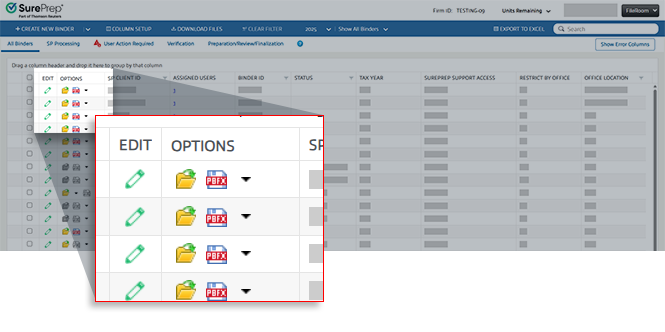
FileRoom: Binder Audit Log
Did you ever need to track who at the firm performed a certain activity in the binder? The
Binder Audit Log
feature provides comprehensive activity tracking directly within the FileRoom interface.To view the activity log, select the
Options
menu on any binder row, and select Binder Audit Log
to open a half-window panel that slides in from the right.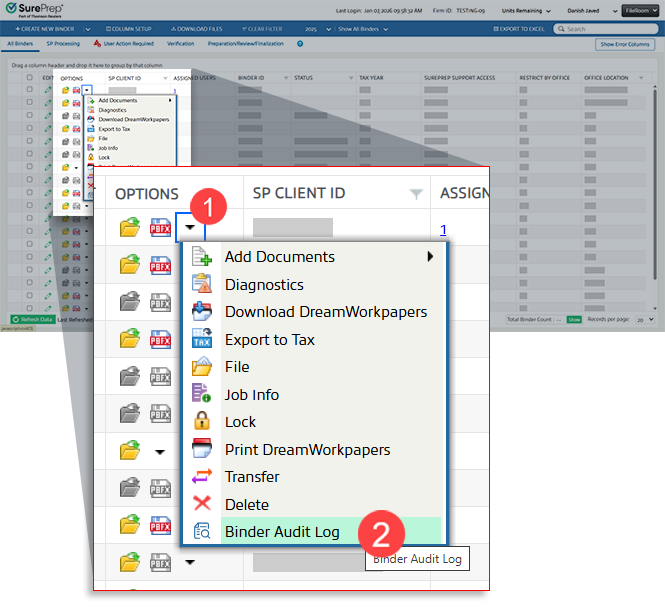
The
Binder Audit Log
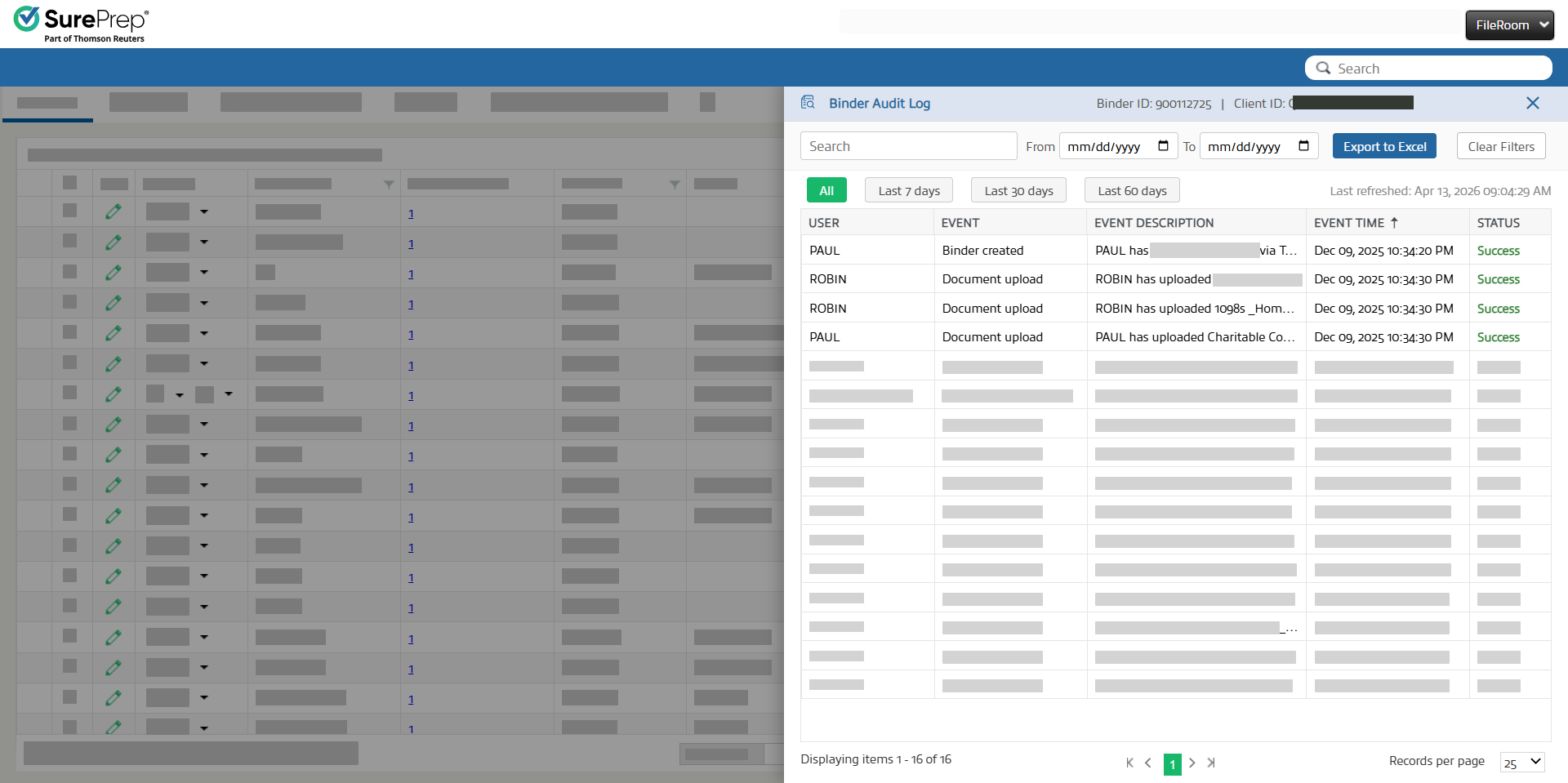
panel will appear with activities. The Binder Audit Log
panel includes:
- Chronological record of binder events
- Columns forUser,Event,Event Description,Event Time, andEvent Status
- Search and filter capabilities (Last 30 days, Last 60 days, or all data)
- Export to Excel for reporting and compliance purposes
- Pagination controls for large datasets
Type of activities logged:
- Document Uploads
- Changes to the binder's owner
- Changes to the binder's assigned members
- Changes to the binder's office location
note
Additional activities will be added in future enhancements.
Account Admin: Binder Template Tax Year Restrictions
To ensure tax professionals work with up-to-date, relevant templates, users can now create or copy binder templates for supported tax years only. Supported Tax Years:
- Current Tax Year
- Previous Two Tax Years

SPbinder: Automatic Word Document Conversion to PDF
When you upload a Word document to SPbinder through any supported channel (for example, FileRoom, TaxCaddy, GFR, or the SurePrep API), SPbinder will now automatically convert it to PDF. This includes Word documents uploaded via Create New Binder, Add Document, drag-and-drop, or Binder Template. Ensuring a consistent way of document handling and enhanced usability across your binder workflow.
A "Converted Word to PDF" stamp appears on converted documents in SPbinder. However, the stamp can be shown or hidden using the existing Show/Hide Annotation controls.

Additional notes:
- Converted PDFs are excluded from the verification queue and treated as non-OCR documents.
- Each page of the original Word document is rendered as a separate thumbnail, just like in standard PDFs.
You will also see a reminder note on the
Create New Binder
and Add New Documents
window.
SPbinder: Auto-save your work
The
Save
icon has been removed from the Quick Access Toolbar
and Binder
dropdown. SPbinder will continue to automatically save your progress as you work, just as it always has, so no manual action is needed.
SPbinder: Active Leadsheet Tab Highlighting in 1040/1041 Binders
From the 2025 tax year onwards, tax professionals working within 1040 and 1041 binders can now more easily identify their active leadsheet at a glance. Leadsheet tabs now feature a soft orange background by default when inactive, transitioning instantly to white when selected, ensuring only the currently active tab appears white at any given time. This helps improve tab navigation efficiency for tax professionals managing multiple Leadsheet tabs.

SPbinder: Collapsible Input Form Sections
To reduce scrolling and improve efficiency when working with multi-section forms (such as the 1099-DIV), input form sections now load collapsed by default, except for the identifier section, which remains expanded. Individual sections can still be expanded or collapsed by clicking the section name.

Two new Expand All and Collapse All icon buttons are available in the form toolbar
Review Wizard (Web): Increased Zoom Range
The maximum zoom level in all Review Wizard screens has been increased from 100% to 200%. This applies to Pre-Verification, Verification Wizard, Superseded, CFA, Duplicate Data, NFR, and the Review Wizard Image Viewer popup.

API: 1041 CCH Axcess Tax Support (1040SCAN PRO)
We're excited to announce that you can now create 1041 binders through API!
The SurePrep API V7 now supports 1041 fiduciary return binders for CCH Axcess Tax using the 1040SCAN PRO service with Classic Leadsheets. This extends the existing
CreateBinder
, UploadBinderDocuments
, and SubmitBinder
API methods to handle 1041-specific fields, including Estate or Trust EIN, Type of Entity, Estate or Trust Name, and Home State code. All domain-level settings configured in FileRoom Admin
→ API
→ Firm Defaults
are applied during binder creation.
note
For the initial release, you can only create 1041 binders for 1040SCAN PRO service with CCH Axcess Tax. Additional services and tax software are coming soon.
API: FileRoom User Management
Firms using the SurePrep API (v7) can now create, update, and delete FileRoom users remotely via API. Saving your firm time from manual Admin work. This can be especially useful for firms that onboard a large number of seasonal employees.
/V7/User/Create | Create new FileRoom users. Newly created users automatically receive onboarding confirmation emails. |
/V7/User/Update | Update an existing FileRoom user's records (for instance, Name, OfficeLocation, UserGroups, and more) |
/V7/User/Delete | Delete FileRoom users from your domain |
note
A user must have the necessary account admin permissions to manage their firm's FileRoom users.
Users can be assigned to Office Locations and User Groups during creation or update. Mandatory fields are validated with clear error codes, and changes sync in real time with the FileRoom UI and TaxCaddy (for TaxCaddy-enabled domains).
UserGroups
lookup:To help you assign user group permissions correctly, we also introduced a new User Group Lookup endpoint.
- - returns all valid User Group IDs and names for your domain, making it easy to retrieve the correct IDs when creating or updating users./V7/Lookup/UserGroups
You can review any creation, update, or deletion events in the
Logging Events
report (Admin
, Reports
, Logging Events
). 
API: Get Binder Residency Status
We've added a new API endpoint for firms looking to retrieve a binder's state residency status for all states associated with a binder, supporting both single-state and multi-state residency scenarios.
/V7/Binder/ResidencyStatus
Support
SUPPORT | DETAILS |
|---|---|
Tax Year | 2024 and 2025 onwards |
Binder Type | 1040, 1041 |
Tax Software | GoSystem Tax RS, CCH Axcess Tax, Lacerte* *Lacerte support only includes Resident status |
This endpoint supports all tax software integrations and is available to 1040 and 1041 binder types for TY 2024 and TY 2025 onwards. It is fully compatible with GoSystem Tax RS and CCH Axcess tax, howe
API: GetBinderDetails Enhancements
The API call now returns additional output parameters. These additional fields include:
GetBinderDetails
- AccountNumber
- CustomField
- Locator_Pwd
- OfficeLocationID
- ServiceTypeID
- BinderTypeID
- TemplateID
- Has_Leadsheet_Id
- Is7216ConsentReceivedID
- HomeState
note
There will be no impact on your existing API implementation. This update provides more binder details than before without impacting any existing output parameters.
These fields are returned for binders created from any source (for example, FileRoom, API, GFR, or TaxCaddy)
API: SurePrep Dev Portal migration
The legacy SurePrep API Developer Portal will be retired on April 30, 2026
. Starting May 1, 2026, SurePrep's API documentation will be exclusively available on Thomson Reuters' Developer Portal. The Thomson Reuters Developer Portal hosts comprehensive documentation for all SurePrep APIs, including Version 5.0 and Version 7, previously not hosted on the legacy SurePrep Developer Portal.Our APIs are already documented in the new Developer Portal, meaning that users interested in familiarizing themselves with the new platform can do so by visiting the Thomson Reuters' Developer Portal here.
Key dates
Date | What's happening? |
|---|---|
Now | Thomson Reuters Developer Portal is live and ready to use |
April 30, 2026 | The legacy SurePrep Developer Portal is permanently retired |
Review the
2026-04-15 SurePrep API Developer Portal is moving
announcement article for further information regarding the content migration.Related Content
-
1040SCAN release notes
Format: Article

