
2026-05-31 Release (Additive integration, API, SPbinder forms)
Release note for May 31, 2026
Hi there! We have an update for you today:
- Additive Integration
- Review Wizard: Desktop application retirement
- Review Wizard on Web webinar registration
- Expanded API Support for 1041
- Changes to adding new documents via API
- API Version 5 retirement
- API Developer Portal documentation migration
- Input Form performance improvements
- Buttons for 'Required Actions'
- New UltraTax CS Forms
SurePrep Integration: Native SPbinder Additive integration
We are excited to announce a native Additive integration with SurePrep binders! Additive is an advanced document-processing solution that uses generative AI to capture complex Schedule K-1 and related information. In this update, you can use 1040SCAN and Additive from a single workflow!
Enable Additive Processing
To enable Additive, contact your Sales representative.
Using Additive
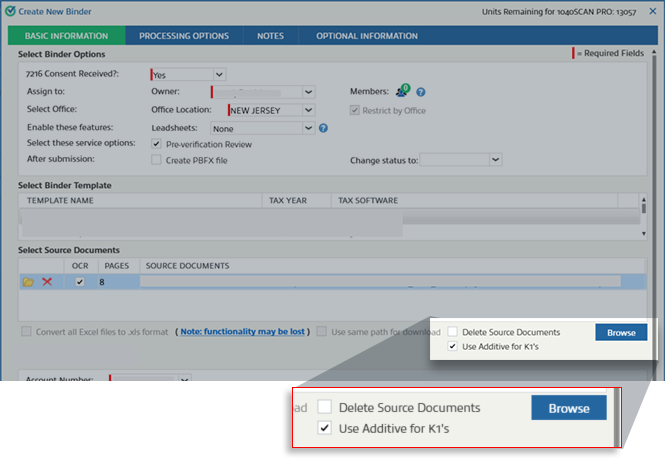
Once your firm has enabled Additive, you can process Schedule K-1 and supplemental documents to Additive during the binder creation process.
In the
Create New Binder
window, select Use Additive for K1
.Create New Binder window
note
If Additive checkbox is enabled for a binder, the setting is permanently set for that binder. This option cannot be changed after the binder is submitted. It applies to all future submissions where you will be adding additional documents.
You can also select this checkbox if you anticipate receiving K-1s in the future that you would like to process through Additive, as this setting cannot be changed after the binder is created.
Add documents
- Once Additive is selected for a binder, you can continue adding documents to your binder throughout its lifecycle without interrupting your current work. Whether you are in the middle of verification, completing post-review, or preparing for export, the system handles your Schedule K-1 submissions in the background.Additive statuses
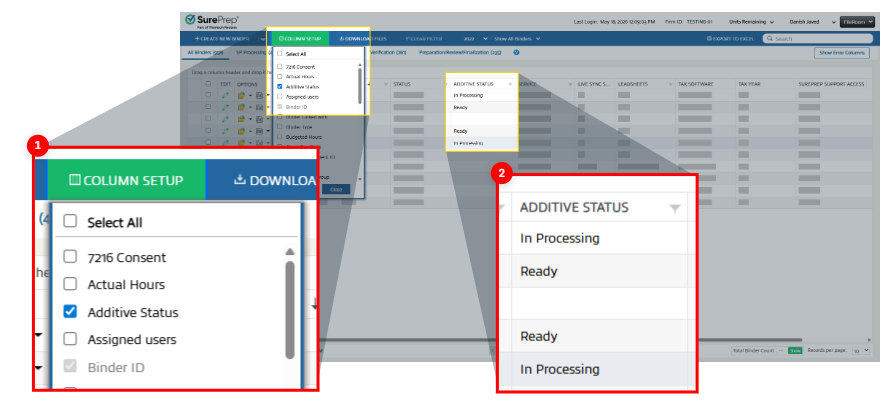
- K-1 documents sent through Additive process separately. You can view the status of your Additive documents from FileRoom. To view the status of your K-1 documents in Additive, select Column Setup
, Additive Status
, then Save
.Additive Status Column
Field | Value |
|---|---|
Tax Year | 2025 onwards |
Tax Software | CCH Axcess Tax |
Leadsheet | All (Classic, Simplified, None) |
Service |
|
K-1 Entity | 1065 |
Binder Type | 1040 |
Review Wizard: Desktop application retirement
The 1040SCAN Review Wizard desktop application has been a trusted verification software used by thousands of tax professionals over the years. SurePrep has brought the same technology into a web browser, which comes with a lot of benefits and capabilities along with a modern infrastructure. The
1040SCAN Review Wizard desktop application will be retired on August 31, 2026.
Beginning September 1, 2026, all Review Wizard work must be completed exclusively in Review Wizard on Web, which includes every feature offered in the desktop application without the need to install additional software!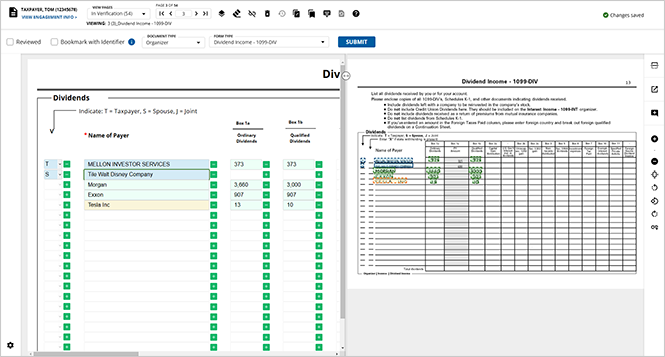
The retirement of the desktop application does not mean the end of your work in Review Wizard. Contact your firm administrator today to activate Review Wizard on Web.
We strongly urge you to familiarize yourself with the Web experience by reviewing the
1040SCAN Review Wizard on Web
section of the SurePrep Help & Support page for comprehensive documentation.Review the
Review Wizard Desktop App Retirement
announcement article in the Related Content
section for more information.Review Wizard: Register for a webinar on Review Wizard Web
To help you transition smoothly, we're hosting biweekly webinars featuring a live demo of Review Wizard on Web and an open Q&A with our team. Whether you're brand new to the web platform or simply looking to build confidence before the desktop application is retired, these sessions are designed for you.

Visit the
Register for the biweekly Review Wizard on Webinars
article in the Related Content to register for a webinar session!API: Expanded support for 1041 binders
We are pleased to announce that 1040SCAN PRO service binders can now be created through API for GoSystem Tax RS and CCH Axcess Tax.
Tax software | Supported Leadsheet for 1041 binders created from API |
|---|---|
GoSystem Tax RS |
note
Type of Entity: Accepts valid entity codes (A, B, C, E, G, M, O, P, S, Z); defaults to "Simple trust" if a blank value is provided. |
CCH Axcess Tax |
|
tip
For firms using GoSystem Tax, you can enhance your API automation by opting into optional features that automatically create client locators in the tax software for new clients or roll forward previous year's locators. No manual steps required. If they are a new client then API will automatically create the client with dummy placeholder values for first name, last name, and more.
Contact Thomson Reuters SurePrep Support if you're interested in enabling this feature for your firm.
Use the
CreateBinder
, UploadBinderDocuments
, and SubmitBinder
API calls for version 7 of the API. Review the developer portal for additional information.API: Changes to Add Documents
When you're adding additional documents to an existing binder through API, SurePrep will now use the
AccountNumber
and Service_Type_Id
input parameters from the original binder submission, ensuring the client details remain the same.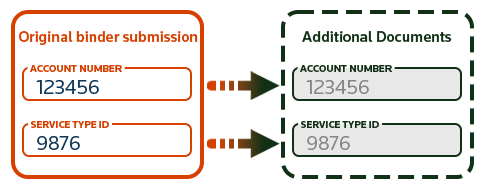
API: Version 5 retirement notice
API version 5 will be officially retired on
August 31, 2026
. After this date, API version 5 will no longer be available or supported. We highly recommend all customers currently using API version 5 to upgrade to API version 7 as soon as possible to avoid any service disruptions. All new API enhancements are currently only released on version 7. 
For assistance with the upgrade process, please refer to our migration guide called "
API version 7 changelog
" or contact Thomson Reuters' SurePrep Support team.API: Developer Portal documentation migration
The legacy SurePrep API Developer Portal was retired on April 30, 2026. Beginning May 1, 2026, SurePrep's API documentation became exclusively available on Thomson Reuters' Developer Portal, which hosts comprehensive documentation for all SurePrep APIs.

All SurePrep APIs are documented in the new Developer Portal. Users can familiarize themselves with the new platform by visiting the Thomson Reuters Developer Portal.
SPbinder: Input Form performance improvements
Opening input forms in SPbinder is now significantly faster thanks to lazy loading improvements:
- Only theIdentifier section(the top highlighted grid) loads automatically when a form opens
- Other collapsed sections loadon demandwhen you expand them. Previously loaded sections do not reload if you collapse and re-expand them
- When navigating to a form from a binder reference (such as a document link or K1 reclass), the relevant sectionautomatically expands and scrolls into view
FileRoom: Buttons for 'Required Actions'
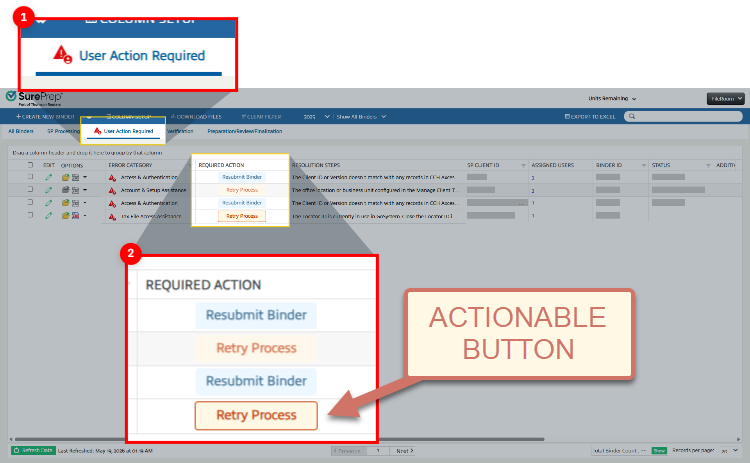
Previously, the
REQUIRED ACTION
column gave users a helpful tip on how to self-correct issues pertaining to their binders.Now, certain
REQUIRED ACTION
statuses will also be actionable buttons, allowing users to trigger the next step in the process with a click.FileRoom - Required Action column
note
These buttons will appear more prominently with a border around them to help differentiate them from statuses that are not buttons.
SurePrep Integration: New UltraTax CS Forms Supported
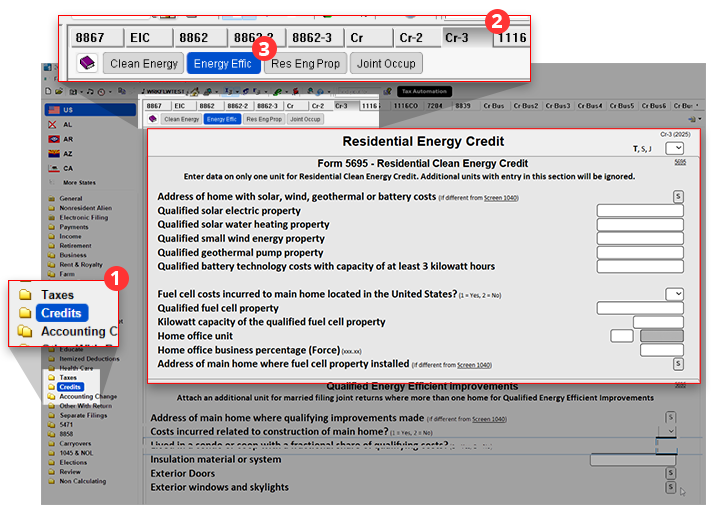
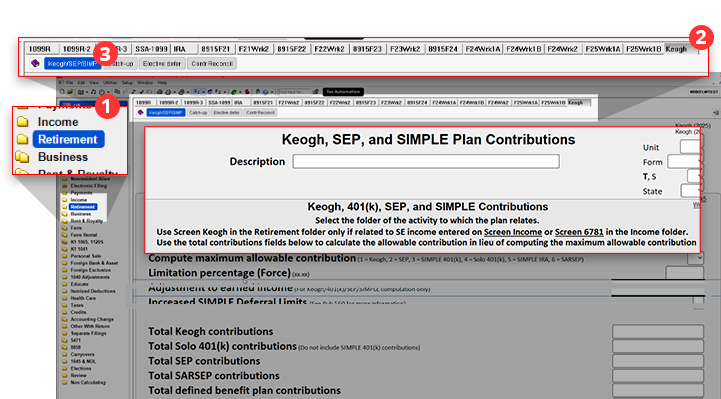
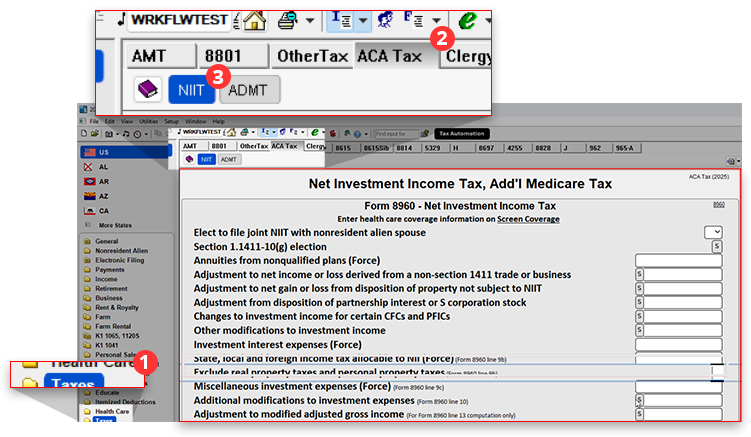
For binders created after May 31, 2026, SurePrep now supports three new UltraTax form fields available to 1040 binders:
- Form 5695: Residential Energy Credit: In UltraTax, navigate toCredits>Cr-3>Energy Effic
- Keogh, SEP, and SIMPLE Plan Contributions: In UltraTax, navigate toRetirement>Keogh>Keogh/SEP/SIMP
- Net Investment Income Tax, Add'l Medicare Tax: In UltraTax, navigate toTaxes>ACA Tax>NIIT
Related Content
-
1040SCAN release notes
Format: Article
-
2026-05-31 Register for the biweekly Review Wizard on Webinars
Format:
Article
-
2026-05-31 Review Wizard Desktop App Retirement
Format:
Article
-
Get started with Additive-SurePrep integration
Format:
Article

