
2026-06-29 Release (FileRoom, Review Wizard, API)
Release note for June 29, 2026
Hi there! We have the following new updates for you today:
- FileRoom: Review Module & Two Year Comparison
- FileRoom: Real-Time SP Processing Progress %
- Review Wizard: Fullscreen Template panel
- API: Expanded support for 1041 binders
- Reminder: The Review Wizard desktop application is retiring soon!
- Reminder: Register for a webinar on Review Wizard Web
- Reminder: Version 5 API retirement
FileRoom: Review Module & Two Year Comparison
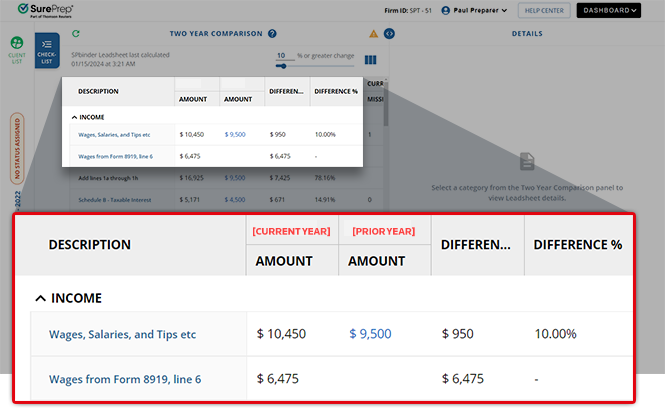
Users can now compare current year (CY) and prior year (PY) tax return amounts side by side using the Two Year Comparison (TYC) checklist, making it easier to spot discrepancies at a glance. Client data is imported into the Two Year Comparison Leadsheet in SPbinder and reflected automatically in the TYC checklist. Firm partners, signers, reviewers, and other firm users can review client data directly in the web browser without needing to open each binder individually.
You can open the Two Year Comparison from FileRoom using the
More Options
menu of the binder you want to review. Select Review Module
to open the Review Module in a new tab of your browser. 
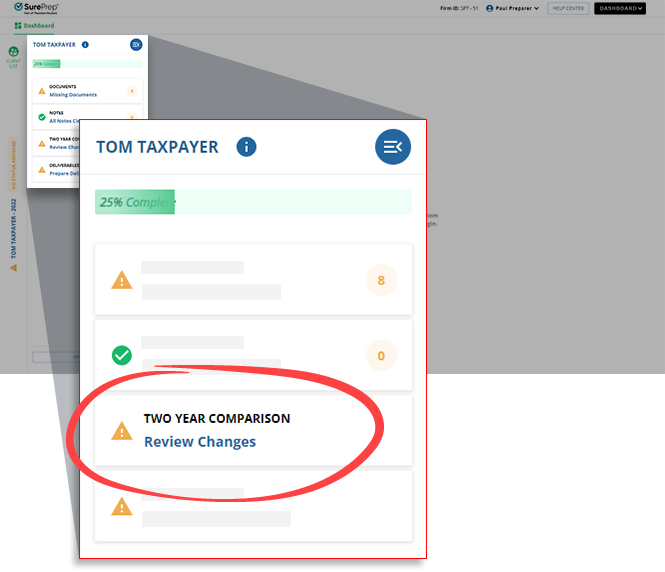
Go to a client's checklist and select
TWO YEAR COMPARISON
.
The prior year and current year amounts will appear in the middle panel. A side-by-side comparison will help you review any variances.
note
The
TWO YEAR COMPARISON
checklist only appears for clients with Leadsheet binders created for GoSystem Tax RS or CCH Axcess Tax. FileRoom: Real-Time SP Processing Progress %
FileRoom now shows the progress percentage for binders of the following Service types when in the
SP Processing
status:- 1040SCAN PRO
- 1040SCAN Organize
- SPbinder (service)
To view the progress for a binder, select the
Refresh
icon to get the latest update.
The percentage does not update automatically; use the
Refresh
icon next to the status to view the updated percentage.note
Changes coming soon:
1. Currently, in
Column setup
, the Service
column must be selected. This will not be required after next month's release.2. The SP Processing progress will release next month for nested binders (as in binders created without Leadsheets that contain additional submitted documents).
Review Wizard: Enhanced Fullscreen View
Previously, you needed to stretch a single window across dual monitors to see the form template on one screen and the document on another; however, this prevented full-screen across both monitors. With the new enhancement, each section can be viewed separately in its own window.
Follow these steps to view both sections independently in Fullscreen mode:
- Select theExpand Templateicon on the top toolbar.
- Select theOpen in New Windowicon on the right toolbar.

Verifiers can now view the form template in one window and the documents in another window, allowing you to fullscreen both windows simultaneously on each monitor. This enhancement gives reviewers greater control over their workspace, making it easier to focus on the details that matter most without the constraints of the default panel layout.

API: Expanded support for 1041 binders
API coverage has expanded for 1041 return binders.
Tax software | Service type | Leadsheet type |
|---|---|---|
GoSystem Tax RS | 1040SCAN verify (Onshore/Offshore) | None |
CCH Axcess Tax | 1040SCAN PRO | None |
Reminder: The Review Wizard desktop application is retiring soon!
The 1040SCAN Review Wizard desktop application has been a trusted verification software used by thousands of tax professionals over the years. SurePrep has brought the same technology into a web browser, which comes with a lot of benefits and capabilities along with a modern infrastructure. The
1040SCAN Review Wizard desktop application will be retired on August 31, 2026.
Beginning September 1, 2026, all Review Wizard work must be completed exclusively in Review Wizard on Web, which includes every feature offered in the desktop application without the need to install additional software!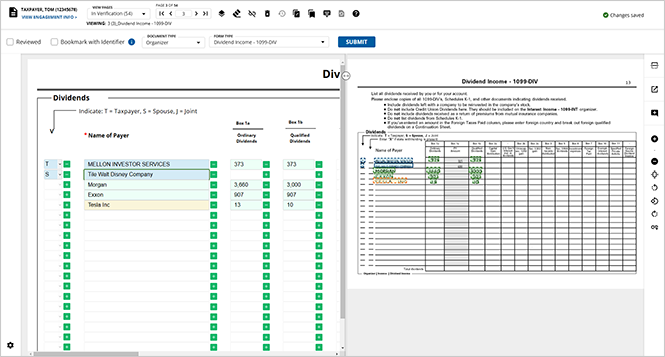
The retirement of the desktop application does not mean the end of your work in Review Wizard. Contact your firm administrator today to activate Review Wizard on Web.
We strongly urge you to familiarize yourself with the Web experience by reviewing the
1040SCAN Review Wizard on Web
section of the SurePrep Help & Support page for comprehensive documentation.Review the
Review Wizard Desktop App Retirement
announcement article in the Related Content
section for more information.Reminder: Register for a webinar on Review Wizard Web
To help you transition smoothly, we're hosting biweekly webinars featuring a live demo of Review Wizard on Web and an open Q&A with our team. Whether you're brand new to the web platform or simply looking to build confidence before the desktop application is retired, these sessions are designed for you.

Visit the
Register for the biweekly Review Wizard on Webinars
article in the Related Content to register for a webinar session!Reminder: Version 5 API retirement
API version 5 will be officially retired on
August 31, 2026
. After this date, API version 5 will no longer be available or supported. We highly recommend all customers currently using API version 5 to upgrade to API version 7 as soon as possible to avoid any service disruptions. All new API enhancements are currently only released on version 7. 
For assistance with the upgrade process, please refer to our migration guide called "
API version 7 changelog
" or contact Thomson Reuters' SurePrep Support team.Related Content
-
1040SCAN release notes
Format: Article
-
2026-05-31 Review Wizard Desktop App Retirement
Format:
Article
-
2026-05-31 Register for the biweekly Review Wizard on Webinars
Format:
Article
-
2026-06-17 Retiring Version 5.0 of SurePrep APIs
Format:
Article
-
Two Year Comparison (TYC) checklist
Format:
Article

