
Action Required: Activate New SurePrep-UltraTax CS Integration
New integration setup required for all UltraTax firms using SurePrep
Starting with tax year 2025, SurePrep has introduced a new, simplified integration process for UltraTax CS customers (local desktop and Virtual Office/SaaS). This
mandatory one-time setup
replaces the previous integration method and significantly reduces the complexity of connecting SurePrep services with UltraTax CS. This is a mandatory, one-time integration that ALL firms using SurePrep and UltraTax CS must complete to create binders and Document Request Lists (DRLs) for the 2025 tax year.
Action Required: Complete New Integration Setup
important
New
mandatory
requirements for the upcoming 2025 tax year:- All firms using SurePrep with UltraTax CSmustcomplete this new integration setup oryou will not be able to create binders or Document Request Lists (DRL) for tax year 2025
- Firms using SurePrep Single Sign-On (legacy)mustmigrate to Thomson Reuters SSO as soon as possible. Your firm users will not be able to create binders or DRL for the 2025 tax year until you update your SSO connections. Contact SurePrep Support for more information.
Step 1: Main Integration Setup (Required for ALL UltraTax CS customers)
Follow these steps to complete the one-time integration setup:
- OpenUltraTax CS
- Navigate toSetup,System Configuration.
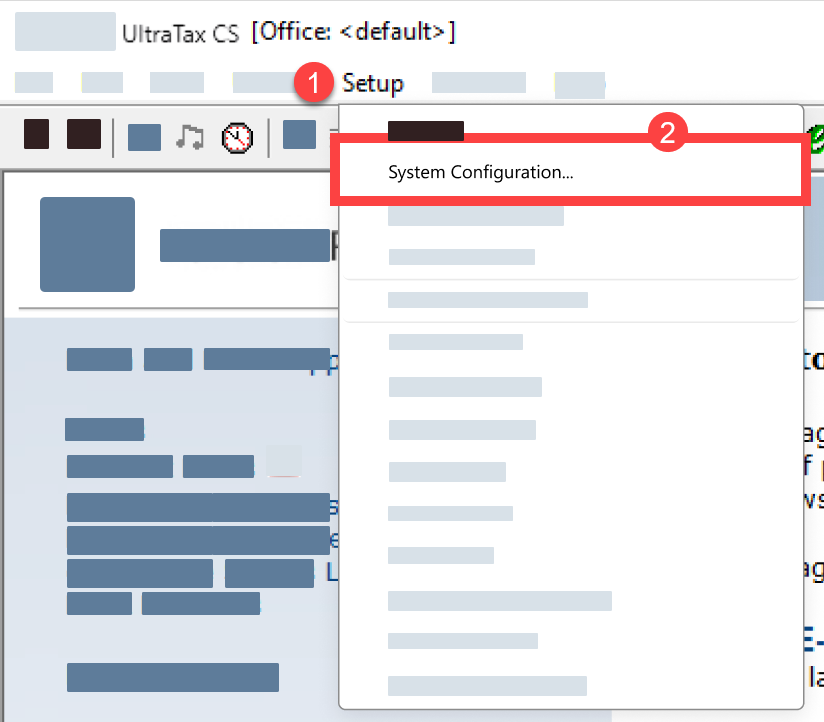
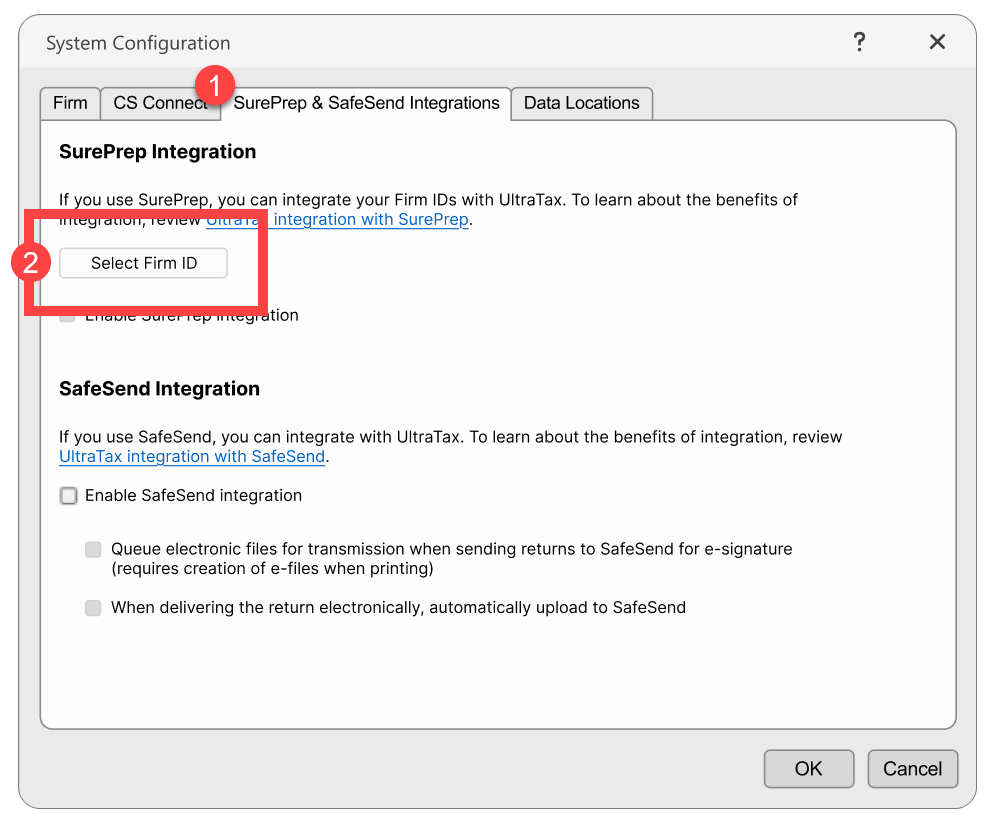
- Select theSurePrep & SafeSend Integrationstab, then theSelect Firm IDbutton.
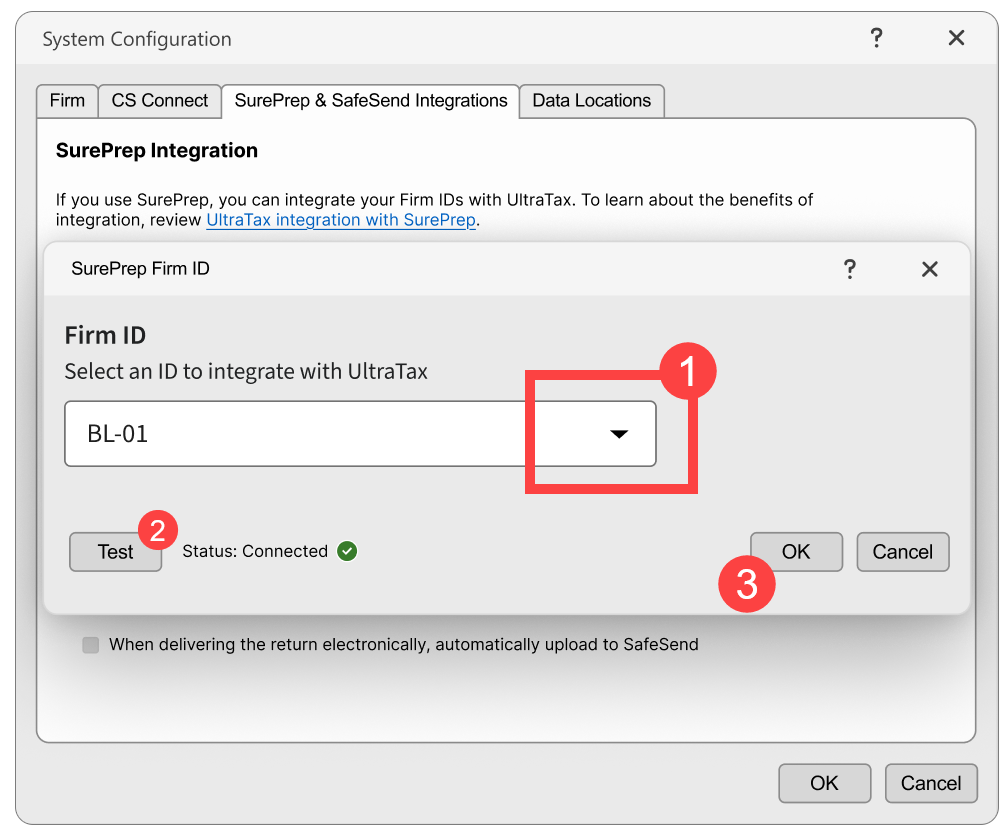
- Select yourFirm IDfrom the drop-down menu, thenOK.
- SelectEnable SurePrep Integration(if not already selected)
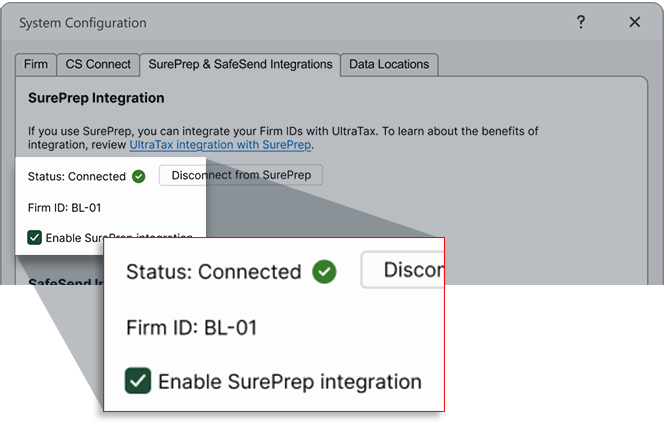
- SelectOKto save all settings.You're now set to create binders for tax year 2025!tipTo view your connection in SurePrep, navigate toFileRoom,Account Admin,Account Setup,Tax File Activation Web,UltraTax CS(tab). Your UltraTax account will appear in theUltraTax CS Firm Connection Detailssection.
Step 2: Additional Setup for TaxCaddy Customers (UltraTax CS Local Desktop Only)
note
Skip this step if you don't use both UltraTax CS
Local Desktop
AND TaxCaddy.Starting with tax year 2025, UltraTax CS Local Desktop users need to assign their UltraTax firm Account Number to clients:
- Go toTaxCaddy,Administrative,CLIENT MANAGEMENT.
- Select theEdit Multiple Clientsicon for bulk updates.
- In the Excel file, assign your firm's UltraTax Account Number to all clients.tipSelect the account number in the top cell, then drag down using the fill handle to apply to all clients
- Upload the updated Excel fileusing the Edit Multiple Clients feature.
- You can now create DRLs for tax year 2025!
Key benefits of the new integration
Simplified Setup Process
- Connect UltraTax to SurePrep from one application
- No more switching between multiple apps or managing API keys
- Unified process for both Local Desktop and Virtual Office/SaaS
Streamlined TaxCaddy Workflow
- For UltraTax local desktop customers, DRLs automatically go directly into the queue without launching a new window
- No more downloading PBFX files
- No more launching separate windows to create DRLs
Enhanced Template Selection
- Simplified binder template selection in the Create New Binder window
- One template for all UltraTax CS customers, regardless of Local/Virtual setup
Important Reminders
One-Time Setup Per Firm
- Only one user per firm needs to complete this integration
- The user must have permissions to accessSystem Configurationin UltraTax CS
- Changes apply to the entire firm account
- The user completing this integration in UltraTax must also have the same email address account inFileRoom,Admin,Users, thenUser Management
- Ensure SurePrep API is enabled for your firm
Account Limitations
- One SurePrep firm account can connect to one UltraTax account (and vice versa)
- If you have multiple FileRoom accounts (for example, a training account), you'll need to disconnect and select the appropriate FileRoom account in UltraTax. Use caution when disconnecting - this change applies to your entire firm and may disrupt existing binders. We recommend you carefully manage disconnection/reconnection to avoid disrupting production workflows.
note
Disconnect with caution
- all pending binders (in processing) will be discontinued for all clients and can't be restarted.Tax Year Coverage
- 2025 and future:New integration required
- 2024 and earlier:Continue using the existing integration method
- Both integrations can coexist for different tax years
Firms using SSO
- If your firm is using SurePrep's SSO (legacy), then you must switch over to Thomson Reuters SSO immediately. Your firm will not be able to create binders or TaxCaddy DRL until you migrate.
- SSO migration may take time to set up; we highly recommend initiating the process now.
- If you have any questions or need assistance, contact our Support team (sureprep.support@thomsonreuters.com).
Common questions
- Do I need to delete my existing UltraTax CS integration before setting up the new one?No, you don't need to delete your previous setup. The new integration works alongside the existing one for different tax years.
- Does this work for both Local Desktop and Virtual Office?Yes, the new integration supports both UltraTax CS Local Desktop and Virtual Office/SaaS in one unified process.
- What if I need to create binders for 2024 and earlier tax years?You must continue using the existing (legacy) UltraTax CS setup for 2024 and prior tax years.
- Does each user at my firm need to complete this integration?No, only one user per firm needs to complete the integration. The user must have UltraTax CS permissions to access Setup → System Configuration
- Can I create binders and DRLs for 2024 tax returns after completing the new integration?Yes, you can still process 2024 and earlier tax years, but you must maintain your existing (legacy) UltraTax CS integration setup for these years. The new integration is not retroactive.
- What SurePrep services require this new integration?The integration is required for 1040SCAN PRO, 1040SCANverify, 1040SCAN Organize, and SPbinder services. It does not apply to customers using only the SurePrep Outsource service.
- When is the deadline to complete this new integration setup?While there's no specific deadline, you must complete the integration before creating any binders or DRLs for tax year 2025. We recommend completing it before the 2025 tax season begins to avoid any service interruptions.
- Do I need to train all my staff on the new integration?Only users who create binders or DRLs need to be aware of the changes. The actual integration setup only needs to be done once by a user with System Configuration access.
- Will existing staff workflows change significantly?For most users, the workflow remains the same. The main changes are simplified binder template selection on theCreate New Binderwindow and automatic DRL processing for TaxCaddy Local Desktop users.
Related Content
-
Announcements
Format: Article
-
2025-11-24 Release (Activate new SurePrep UltraTax CS integration, Updated GoSystem tax file integration, FileRoom enhancements, API Service Expansion)
Format:
Article
-
2025-12-21 (Tax Year 2025 for Letters, Questionnaire, and Custom DRL, New API calls)
Format:
Article
-
2026-01-12 Release (Create binders for the 2025 tax year)
Format:
Article

