
2026-05-31 Review Wizard Desktop App Retirement
Starting September 1, 2026, SurePrep will no longer be supporting the 1040SCAN Review Wizard desktop application. Users can complete their Review Wizard workflows using the Review Wizard on Web.
The 1040SCAN Review Wizard desktop application will be retired on August 31, 2026
. Starting September 1, 2026, users will need to continue their work in Review Wizard exclusively using Review Wizard on Web. The Review Wizard on Web experience encompasses all features offered in the desktop application but bypasses the need to install additional software by hosting it on the web platform.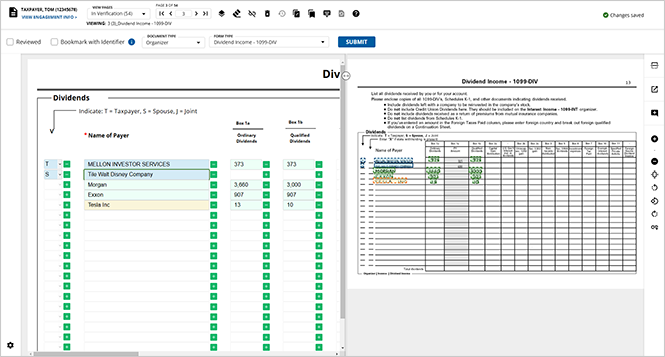
What does this mean for you?
The Review Wizard desktop application retirement does not mean that your work in Review Wizard will be coming to an end. You can complete the following
before August 31, 2026
to seamlessly transition your workflows to Review Wizard on Web:- Activate 1040SCAN Review Wizard on Web: Contact your firm administrator to activate the1040SCAN Review Wizard on Weboption inAdmin,ACCOUNT SETUP,Review Wizard Default Version.
- Familiarize yourself with Review Wizard on Web: While the workflow on web largely mirrors the experience of the application, we strongly recommend that users familiarize themselves with the Review Wizard on Web platform.
- Review Wizard on Web documentation:Users can refer to the1040SCAN Review Wizard on Websection of the SurePrep Help & Support page for comprehensive documentation on all steps of the Review Wizard process from activation to finalization.
Benefits of Review Wizard on Web
Review Wizard on Web offers users an improved experience unique to the Web platform, including:
- No Installation Required: Access the application directly through a web browser, eliminating the need for software installations and updates.
- Easy Integration: Seamlessly integrates with existing platforms, enhancing compatibility and workflow efficiency (e.g., UltraTax)
- Operating System Agnostic: Ability to verify on Microsoft Windows, Apple Mac, and Linux with the most current web browsers.
- Enhanced User Experience: Enjoy a modern interface with intuitive navigation and improved usability compared to the old desktop version.
- Auto-Save Functionality: Prevent data loss during unexpected closures with the auto-save feature, ensuring data integrity and security.
- Improved Performance: Experience faster navigation from one review step to another.
- Advanced Error Handling: Benefit from sophisticated backend error management that minimizes interruptions, providing a smoother user experience.
FAQ
- When will the Review Wizard desktop application officially be retired?The Review Wizard desktop application will officially be retired after August 31, 2026. Starting September 1, 2026, users must continue their Review Wizard work on the web platform.
- Will any of my verification work or review history be lost?No. Any work completed in the desktop application is synced to the web platform, so no data will be lost, and users will not need to duplicate any previously completed work after August 31, 2026.
- Do I need a new login or account to use the web version?No, you will not need to sign in again to open a binder for review. Once you sign into FileRoom and select the binder to review (as you would for the desktop app), Review Wizard on Web will open the binder in a new tab of your browser, automatically navigating you to the wizard that need your attention (Pre-Verification, Verification, Superseded, Child Form Association, etc.).
- Will our subscription or licensing costs change? Do we need a new license for the web version?No. Your access to Review Wizard on Web will not incur additional fees and you do not need to purchase any additional licenses to gain access.
- Will users need to be retrained to use Review Wizard on Web?While the workflow in Review Wizard on Web closely mirrors that of the desktop application, users are encouraged to familiarize themselves with the web platform prior to the retirement date.You can review the1040SCAN Review Wizard on Webarticles and watch the 1040SCAN Review Wizard training videos to familiarize yourself with the web experience.
- Which browsers are supported by Review Wizard on Web?We recommend either Google Chrome, Mozilla Firefox, or Microsoft Edge when using Review Wizard on Web.
- Is there documentation or a help center article we can share with our staff?Yes. Comprehensive documentation covering the full review process is available in the1040SCAN Review Wizard on Websection of the SurePrep Help & Support page.
Related Content
-
Announcements
Format: Article
-
2026-05-31 Register for the biweekly Review Wizard on Webinars
Format:
Article
-
2026-05-31 Release (Additive integration, API, SPbinder forms)
Format:
Article
-
2026-06-29 Release (FileRoom, Review Wizard, API)
Format:
Article
-
2026-07-27 Release (Flag a binder, Review Module Document checklist, SPbinder Notifications, Tax Return PDF Extraction, API)
Format:
Article

