
Smart Links returning to TaxCaddy
We're excited to announce that Smart Links will be making its return to TaxCaddy for your clients on
July 28th, 2025
! Following that release, firm users can tentatively expect to see Smart Links enabled on October 27th, 2025
. Once again, you and your clients will be able to create Smart Links between their TaxCaddy account and financial institutions, streamlining the document collection process. We're also excited to announce that we've added the ability to add a Smart Link with Payroll
institutions!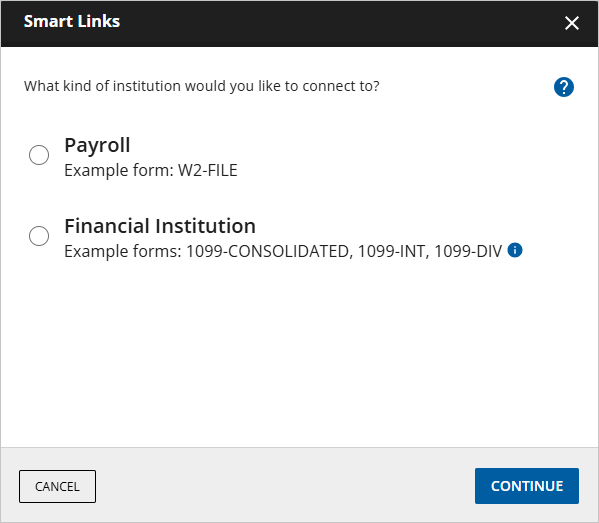
With this reintroduction, we've given Smart Links an updated look, enhanced features, and we've partnered with MeasureOne to ensure that your clients’ sensitive data is handled with the utmost care to remain as safe as ever. In addition to a revamped list of institutions you can create links with, Smart Links can now collect documents like W-2s directly from your client’s payroll institution!
note
Smart Links for taxpayers on the web platform will be released on
July 28th, 2025
. Smart Links for mobile devices will be released on August 25th, 2025
, so stay tuned! Now including payroll accounts
We've added the ability to add a Smart Link with
Payroll
institutions! Users will see the option to select Payroll
as the institution type that they'd like to add a Smart Link for. After they’ve selected Payroll
, users can search for the name of their employer from those available. From here, they will need to provide their Employee ID
and Password
, and Smart Links will take care of the rest! When available, your client’s applicable documents (for example, their W-2) will be uploaded to their TaxCaddy account!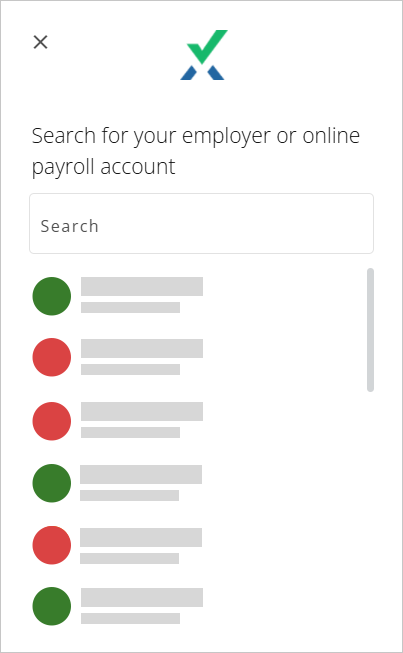
New institutions
Our list of supported financial institutions has been updated! Now, users who previously may not have had the ability to establish a Smart Link with their institution will be able to do so within just a few clicks.
Updated document fetching frequency
We've updated the frequency at which your client’s documents are fetched! Retrieval times will now fluctuate depending on the time of year, with more frequent retrievals happening during tax and extension seasons, and less frequent retrievals happening between these periods to account for lower traffic.
Now, rather than fetching documents from a client's financial institutions every 24 hours, document retrieval will be as follows:
- Once weekly on the Monday of each week between the following dates of the year:
- January 1st to April 30th
- September 1st to October 15th
- Once monthly on the 15th of each month between the following dates of the year:
- May 1st to August 31st
- October 16th to December 31st
FAQ
- Will users who previously had Smart Links added in their TaxCaddy account need to reestablish their Smart Links?Yes, users will need to reestablish their Smart Links. Once they've been re-added, users will begin seeing their documents appear in their TaxCaddy accounts and can even track activity from within their profile's Activity Feed.
- Will users need to reupload documents that were already fetched by their previous Smart Links?No, once a document was fetched in the past and uploaded to their TaxCaddy account via an old Smart Link, they will not need to reupload these documents again. However, if the user would like the Smart Link to continue fetching documents to upload to TaxCaddy, they must re-add the Smart Link.
- Will a user’s Smart Links remain functional if they've updated their password for their financial/payroll institution from within their institution's portal?No, after updating their account password from within their institution’s portal, the Smart Link will need to be reinstated. This is to deliver security of the user’s information and ensure that we are not gathering outdated data.
- Will taxpayers be alerted when a Smart Link is broken for any reason?Yes! Taxpayers will receive an SMS text alert, along with a toast notification that will appear at the bottom of their screen when a Smart Link requires their attention. When this happens, their documents will not be fetched, and they can either fix the link if they'd like to continue using it, or the user can remove it entirely if they no longer would like to fetch documents from the specified institution.
- A taxpayer is currently using two-factor authentication to log into their financial institution's portal. Will this present any issues when Smart Links try to fetch their documents?Those who utilize two-factor authentication to log into their financial institution's portal may run into difficulties when using Smart Links. We recommend remembering the device that is attempting to log in to fetch their documents via Smart Links and renewing the device's authorization when necessary to provide a smoother retrieval process.
Related Content
-
Announcements
Format: Article

