
Get started with Additive-SurePrep integration
Additive AI is an advanced document processing solution that uses generative AI to automate complex Schedule K-1 workflows. It is designed specifically for firms that deal with a number of Federal and State K-1, K-3, and supplemental forms. Additive transforms PDF tax documents into structured Excel data that can be sent to the binder with high accuracy. It will also give you extracted footnotes, foreign income, state allocations, and supplemental forms.
Key capabilities:
- High accuracy:Reliably extracts income details and footnotes, even those with complex formatting.
- Comprehensive extraction:Captures data from K-1s, K-3s, State K-1s, and supplemental forms that are supported by SurePrep document coverage.
- Time savings:Eliminates hours of manual data entry per return
- Structured output:Generates organized Excel workpapers and annotated PDFs for easy review and reconciliation
Step 1: Configure SurePrep API Credentials (Admin Only)
- Go to SurePrep FileRoom,Admin,API.
- Select theApp Managementtab, then select theNew Applicationbutton.
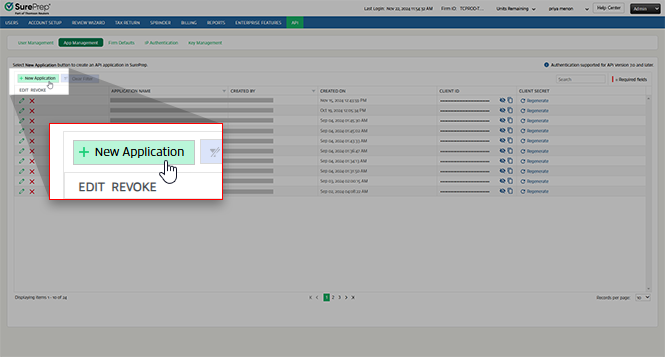
- Enter an application name (for example, "Additive Integration")
- Select theSaveicon (the green checkbox)
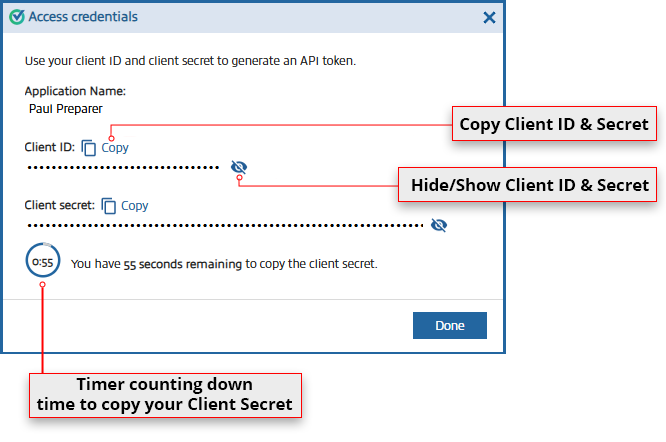
- A dialog box will display your Client ID and Client Secret. Copy both and securely store these credentials (they are shown only once).
Step 2: Connect Additive to SurePrep (Admin Only)
- This step must be completed by an Additive organization administrator.
- Sign in to Additive Settings. You can also select theSettingsicon in the upper corner of the screen.

- SelectConfigurenext to SurePrep underConnected Accounts.

- Enter the SurePrepClient IDandClient Secretyou copied earlier.

- SelectSave.
- (Optional) SelectAdd Another Domainto configure additional SurePrep domains.
Your Additive account is now connected with SurePrep
Step 3: Install the Additive Excel Add-In
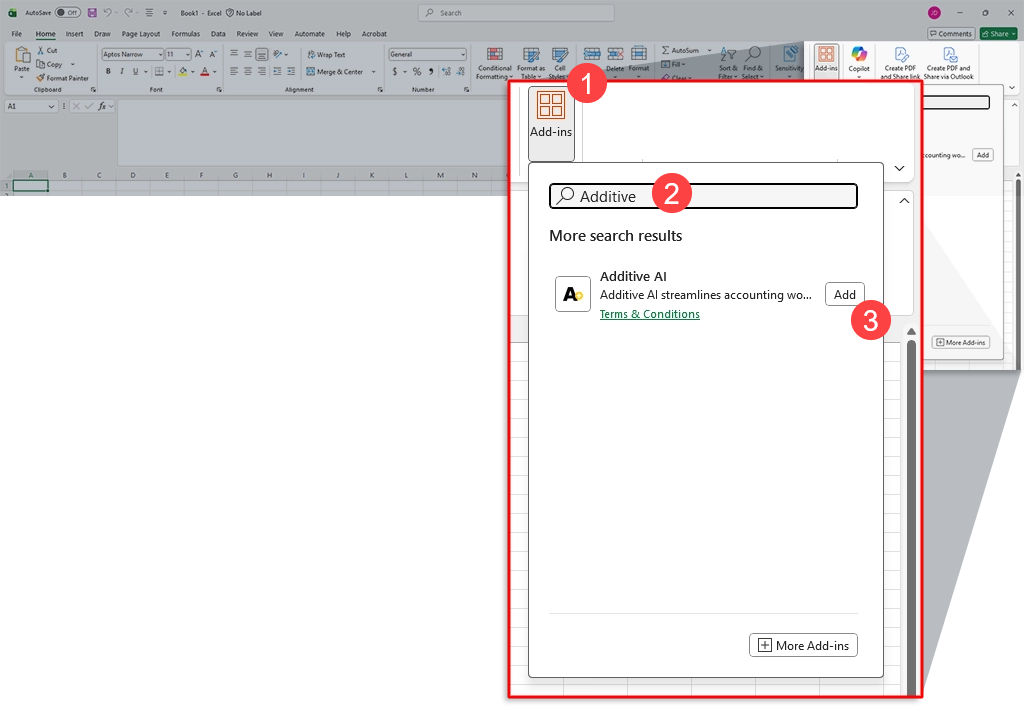
- Open Microsoft Excel, then selectAdd-inson theHometab.Internal only
 If you do not see theAdd-inbutton on the toolbar, right-click the toolbar, then selectCustomize the Ribbon, select theDevelopercheckbox to add it to your toolbar. Then you can selectAdd-insthrough the Developer toolbar
 - Search for "Additive" in the Microsoft Store, selectAddto install the Additive AI add-inInternal only
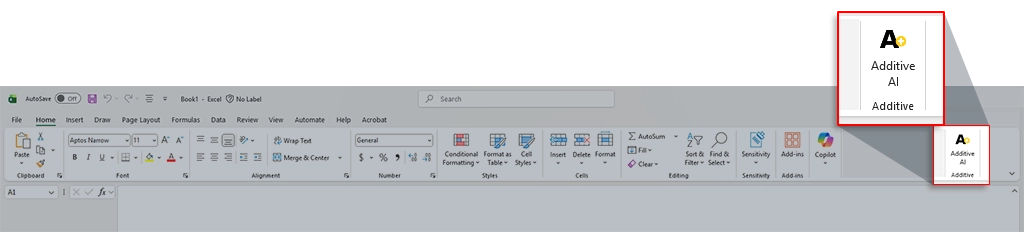
 A new Additive icon will appear in your Excel toolbar
 If you cannot install the Additive Excel Add-in, check whether your organization allows Office add-in installation.
You are now fully set up to transfer Schedule K-1 data from Additive to SurePrep binders.
Requirements
Specification | Details |
API | Must be enabled at Account Admin, Account Setup, and enable API. |
Tax Year | 2024 tax year onwards |
Services | Additive account and service purchased SurePrep: Any of the following SurePrep services
|
Leadsheet |
|
Binder Type |
|
Tax application |
|
Applications |
|
Related Content
-
2026-05-31 Release (Additive integration, API, SPbinder forms)
Format: Article

