
2025-06-22 (Firm Preparing option)
Hi everyone! Here's what's new in TaxCaddy this month:
- Firm Preparingoption
Firm Preparing option
You will now see the new
Firm Preparing
option available for any document Upload request sent to your client! The Firm Preparing
feature should be used when a client's document request is being uploaded by your firm, rather than by the taxpayer themself. In cases like these, the taxpayer will not be required to upload the requested document, allowing them to focus on their other tasks in TaxCaddy.After selecting a document request in the
Requested Items
section of a client's profile, users will now see the Firm Preparing
option listed in the document's menu.
Once the  in the
Firm Preparing
option is selected, the document request will now be denoted with the FIRM PREPARING
badge in the Status
column to indicate your selection.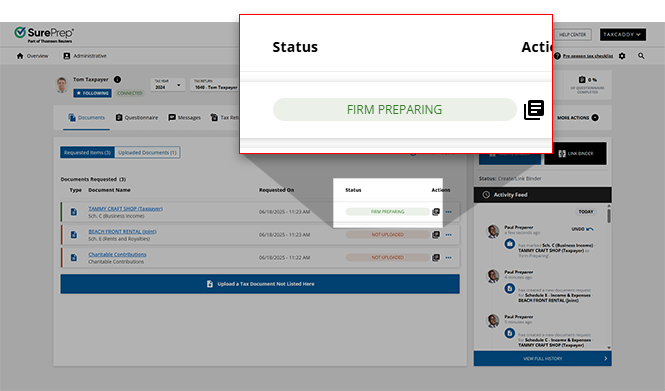
When you are ready to upload the requested document, select
Undo 'Firm Preparing'
from the document menu to undo the document's FIRM PREPARING
status. 
Taxpayer experience
After a document request has been marked as
Firm Preparing
(either by you or by the taxpayer themself), they will see the Firm Preparing
icon appear next to the selected request, indicating that this request will be handled by their tax professional.
Related Content
-
TaxCaddy release notes
Format: Article

