Target sheets
Target sheets are an optional tool that can be used to organize workpaper files, prior to scanning and creating a binder. The objective of a target sheet is to create a workpaper for a given category and automatically index the pages following the target sheet, to the
Index Tree
of SPbinder. Any page, standard, non-standard, or an organizer page, placed behind a target sheet bypasses 1040SCAN verification and therefore the data from those pages won’t export to the tax software. Target sheets are available for Schedules C, E, F, and A, as well as Taxpayer Information, State, and Unused.You can also download a specific target sheet here:
note
SurePrep Outsource services (Onshore/Offshore) don’t support Target Sheets. Outsource service binders submitted with Target Sheets will be sent back to the firm without being prepared.
When organizing source documents for scanning, place one or more Target Sheets and related pages, as the very last documents, behind any K-1s. You may use more than 1 target sheet for any given category; you may use more than 1 target sheet type.
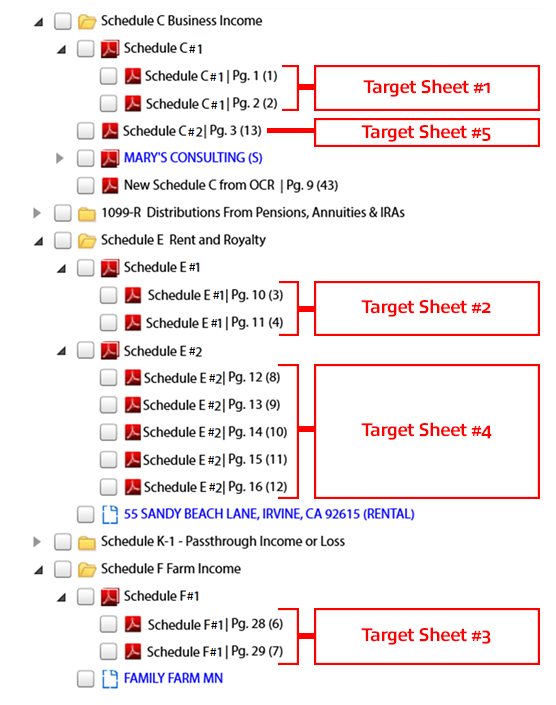
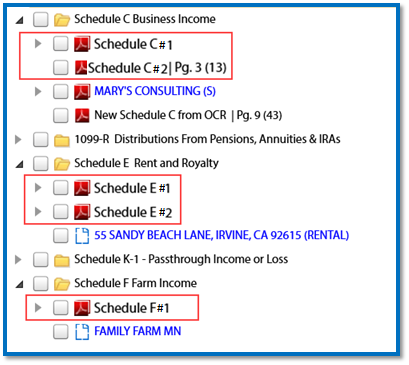
The pages scanned following a target sheet will be indexed under its respective category. The name of the workpaper will be the same as the target sheet. If multiple target sheets of the same type are included, the name of the workpaper will be incremented by 1.
note
Any standard documents scanned after the Target Sheet will be considered non-standard and the data from those pages won’t export to tax.
Scanning instructions
Follow these guidelines when scanning documents:
- Target Sheets should be scanned as the last documents in a PDF (after Schedule K-1).
- Target Sheets should be the 1st scanned page of the document set.
- Pages scanned after that Target Sheet will be indexed under that Target Sheet.
- Donotmodify the Target sheets.
- You can scan multiple target sheets of any type (Schedule C, E, F, A, Taxpayer Information, State or Unused)
Target Sheets for different types can be scanned in any order.
Scanned Target Sheet order | Income Type | Page order in scanned PDF |
|---|---|---|
1st Target Sheet | Schedule C | Pages 1-2 |
2nd Target Sheet | Schedule E | Pages 3-4 |
3rd Target Sheet | Schedule F | Pages 6-7 |
4th Target Sheet | Schedule E | Pages 8-12 |
5th Target Sheet | Schedule C | Page 13 |