
Inactivity period
By default, SurePrep applications timeout after 20 minutes of inactivity. You can customize (or remove) the inactivity period for
Account
Admin
and SPbinder
separately. After the inactivity period has elapsed without activity, an Inactivity alert appears. If the user doesn't select Stay Logged In
within 5 minutes, the user is automatically logged out of the application. The inactivity period doesn’t apply to FileRoom.Follow these steps to configure
Inactivity Period
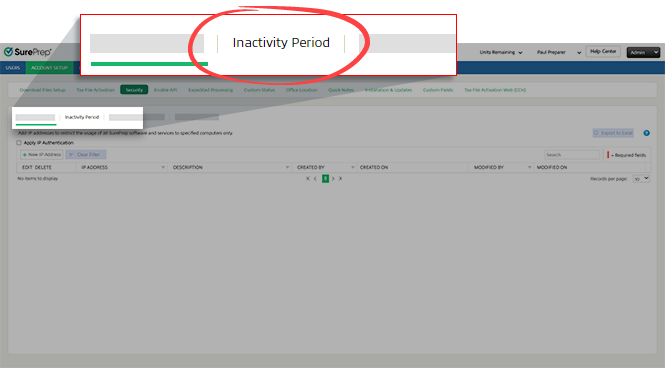
:- SelectFileRoom,Admin,Account Setup, thenSecurity.
 noteOnly users with permissions to access theSecuritytab will see theSecuritytab.
 - SelectInactivity Period.
- Enter the duration intoHours(s)andMin(s), or use the arrows to increase or decrease the time forAdmin and Reviewer DashboardandSPbinder. The default inactivity period is 20 minutes.
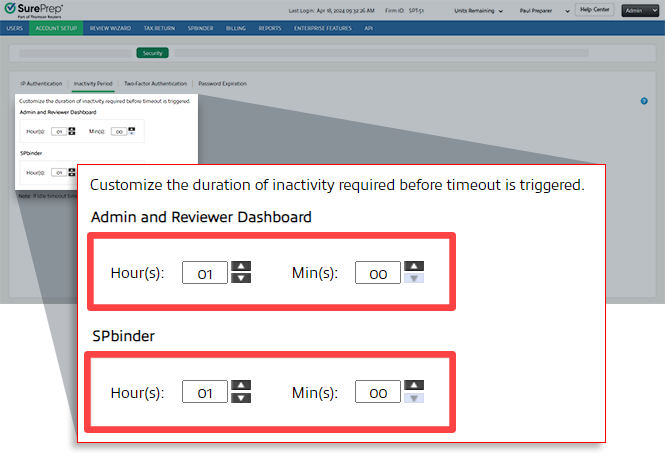 noteTo turn off the inactivity timeout, enter00in bothHour(s)andMin(s).
If the SurePrep application is inactive, an inactivity timer window will confirm if you want to stay logged in to a SurePrep application or else the system will automatically sign out in 5 minutes.
Maximum activity time
In addition to the inactivity period, firms can also set a maximum time limit for a single session regardless of activity. Before the time expires, users will receive a reminder notification letting them finalize any changes. Account Admin and Reviewer Dashboard session will expire based on the maximum time configured for your domain. Once the user reaches the maximum time limit, the user is signed out and will need to log back in to continue. To enable this feature, contact SurePrep support.


