
Grant access to SurePrep support
The
Grant SurePrep Support Access
feature enables you to grant the SurePrep Support team to access your binder/PBFX.note
SurePrep Support has default access to Binders submitted for
Outsource
, 1040SCANverify
and Pre-Verification services. The Grant access permissions are not available for these services.To make a binder accessible to SurePrep Support, select the  icon on the SPbinder toolbar.
Grant SurePrep Support Access
icon on the SPbinder toolbar.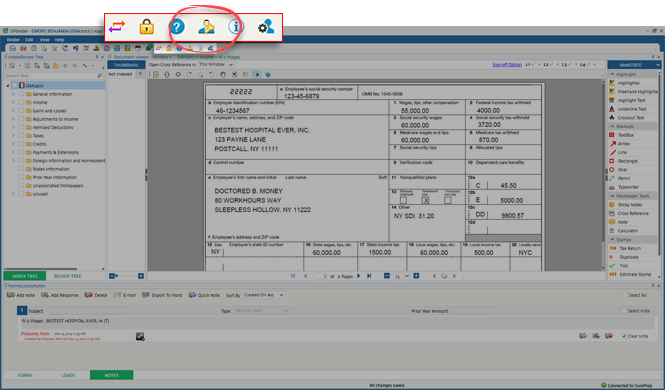
When the
Grant SP Support Access
window appears, select the number of days you want to grant access under Select Date For Granting Access to Support
then select Save
.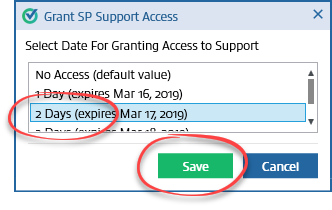
SurePrep support will be able to access the binder for the selected number of days.
note
The days counted will be as per the calender and not business days.
To check the expiry date for all the binders that have been provided SurePrep Support access, look on the
SurePrep Support Access
column in the FileRoom. You can filter the binders on the basis of their expiry date from here.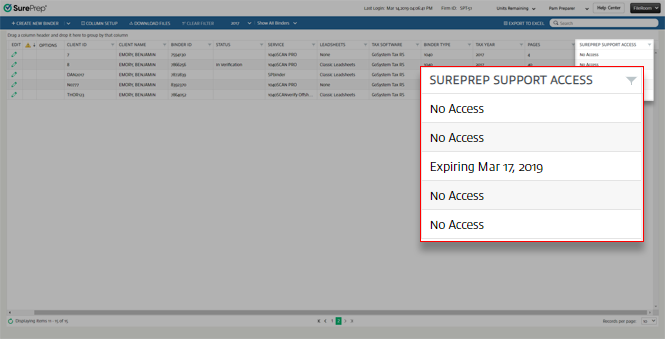
If the
SurePrep Support
column is not visible for you in the FileRoom, select Column Setup
, then select the SurePrep Support Access
check.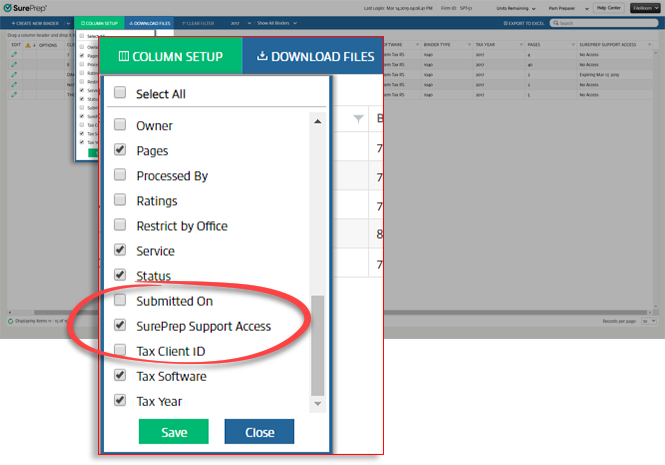
note
By default, the
Grant SPSupport Access
option is checked for all user groups in Admin
, Users
, User Group Management
, then Permissions
. If for a particular User Group, this option is unchecked then that user group won’t see this option in FileRoom and SPbinder.The Firm Administrator can check the sign in activity as well as the username of the SurePrep Support personnel who access the binder from
Admin
, Reports
, then Logging Events
.
